Joomla Aliexpress Importer
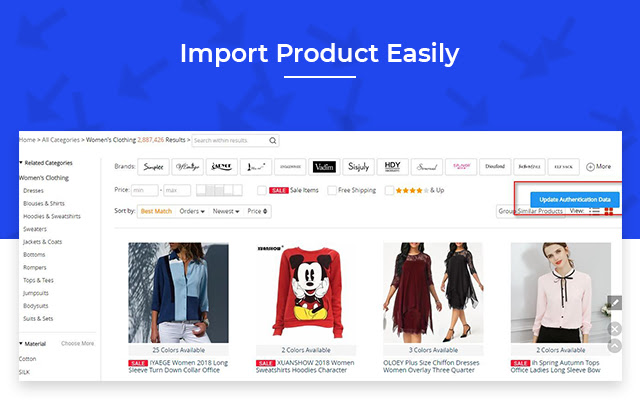
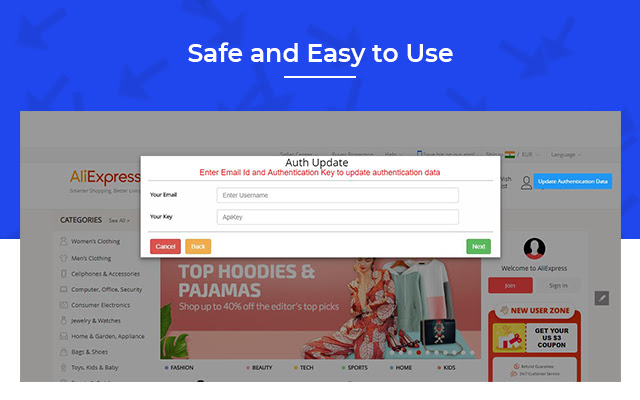
It is used to import product from aliexpress to Joomla store and it can be used with webkul Joomla Aliexpress Importer.
Joomla Aliexpress Importer क्या है?
Joomla Aliexpress Importer Webkul Software द्वारा विकसित एक क्रोम एक्सटेंशन है, और इसकी मुख्य विशेषता है "It is used to import product from aliexpress to Joomla store and it can be used with webkul Joomla Aliexpress Importer."।
एक्सटेंशन स्क्रीनशॉट्स

एक्सएक्स एक्सटेंशन CRX फ़ाइल डाउनलोड करें
crx प्रारूप में Joomla Aliexpress Importer एक्सटेंशन फ़ाइलें डाउनलोड करें, ब्राउज़र में क्रोम एक्सटेंशन को मैन्युअल रूप से स्थापित करें या दोस्तों के साथ crx फ़ाइलों को साझा करें ताकि क्रोम एक्सटेंशन को आसानी से स्थापित किया जा सके।
एक्सटेंशन उपयोग निर्देश
This is used to import the products from AliExpress directly to your Joomla VirtueMart store and start selling those products at your own store with the help of "Joomla VirtueMart AliExpress Dropshipping". एक्सटेंशन की मूल जानकारी
| नाम |  Joomla Aliexpress Importer Joomla Aliexpress Importer |
| ID | modgbjgnpmibebjdbkcmkegloikcaoka |
| आधिकारिक URL | https://chrome.google.com/webstore/detail/joomla-aliexpress-importe/modgbjgnpmibebjdbkcmkegloikcaoka |
| विवरण | It is used to import product from aliexpress to Joomla store and it can be used with webkul Joomla Aliexpress Importer. |
| फ़ाइल का आकार | 100 KB |
| स्थापना संख्या | 66 |
| वर्तमान संस्करण | 3.2 |
| अंतिम अपडेट | 2019-10-09 |
| प्रकाशन तिथि | 2019-10-09 |
| डेवलपर | Webkul Software |
| ईमेल | [email protected] |
| भुगतान के प्रकार | free |
| गोपनीयता नीति पृष्ठ URL | https://webkul.com/privacy-policy |
| समर्थित भाषाएँ | en-US |
| manifest.json | |
{
    "update_url": "https:\/\/clients2.google.com\/service\/update2\/crx",
    "name": "Joomla Aliexpress Importer",
    "description": "It is used to import product from aliexpress to Joomla store and it can be used with webkul Joomla Aliexpress Importer.",
    "version": "3.2",
    "content_scripts": [
        {
            "matches": [
                "*:\/\/*.aliexpress.com\/*"
            ],
            "js": [
                "resources\/js\/jquery.js",
                "resources\/js\/content.js"
            ],
            "css": [
                "resources\/style\/joomla_import.css"
            ]
        }
    ],
    "permissions": [
        "activeTab",
        "tabs"
    ],
    "icons": {
        "128": "resources\/image\/import-icon.png"
    },
    "browser_action": {
        "default_title": "Run only when aliexpress site open",
        "default_icon": "resources\/image\/import-icon.png",
        "default_popup": "popup.html"
    },
    "web_accessible_resources": [
        "resources\/image\/*.png",
        "resources\/js\/wk_joomlaimporter.js",
        "resources\/js\/jquery.js",
        "resources\/style\/joomla_import.css"
    ],
    "manifest_version": 2
} | |