WhatCetra - Wapp Web for HubSpot
Access & Manage HubSpot users inside Wapp Web for contacts. Add notes to HubSpot users directly from Wapp
WhatCetra - Wapp Web for HubSpot क्या है?
WhatCetra - Wapp Web for HubSpot http://www.whatcetra.com द्वारा विकसित एक क्रोम एक्सटेंशन है, और इसकी मुख्य विशेषता है "Access & Manage HubSpot users inside Wapp Web for contacts. Add notes to HubSpot users directly from Wapp"।
एक्सटेंशन स्क्रीनशॉट्स


एक्सएक्स एक्सटेंशन CRX फ़ाइल डाउनलोड करें
crx प्रारूप में WhatCetra - Wapp Web for HubSpot एक्सटेंशन फ़ाइलें डाउनलोड करें, ब्राउज़र में क्रोम एक्सटेंशन को मैन्युअल रूप से स्थापित करें या दोस्तों के साथ crx फ़ाइलों को साझा करें ताकि क्रोम एक्सटेंशन को आसानी से स्थापित किया जा सके।
एक्सटेंशन उपयोग निर्देश
                        Efficiently manage your HubSpot Contacts & Companies without leaving Wapp Web. Simplify communication with the help of the features listed below.

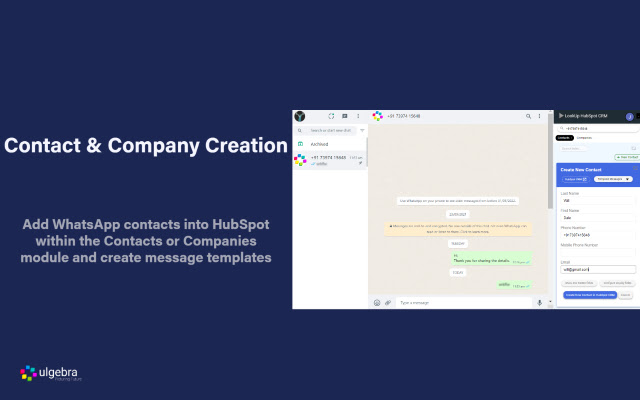
- Contact Creation
Add Contacts & Companies into HubSpot directly from Wapp Web and view the created contacts within HubSpot.

- Contact Search
Search for any Wapp number to view the contacts associated with the phone number.

- Contact Details
Access the details of any Wapp contact associated with HubSpot CRM.

- Field Search
Search for any HubSpot contact field and edit the fields from Wapp Web.

- Message Templates
Easily send predefined messages by creating message templates within Wapp Web. Edit or delete the template as and when required.

- Configure Displayed Fields
Customize the visible HubSpot fields through the 'Configure display fields' option.

- Access All Contact Fields
View and edit all the fields through the 'Show hidden fields' options.

- Notes
Add and view the list of notes associated with any contact.

For more information visit
https://apps.ulgebra.com/hubspot/hubspot-inside-whatsapp-web

Contact us at [email protected] in case of any assistance required.


Disclaimer:
This Chrome plugin is not endorsed or certified by WhatsApp Inc or HubSpot.
This is an unofficial enhancement tool for WhatsApp Web.

Our Extension Privacy policy:
https://ulgebra.com/privacy-policy/chrome-extensions/wa-web-zoho-crm.html
एक्सटेंशन की मूल जानकारी
| नाम |  WhatCetra - Wapp Web for HubSpot WhatCetra - Wapp Web for HubSpot |
| ID | oaioeafiobhcpckkockfndiekjkdklji |
| आधिकारिक URL | https://chrome.google.com/webstore/detail/whatcetra-wapp-web-for-hu/oaioeafiobhcpckkockfndiekjkdklji |
| विवरण | Access & Manage HubSpot users inside Wapp Web for contacts. Add notes to HubSpot users directly from Wapp |
| फ़ाइल का आकार | 140 KB |
| स्थापना संख्या | 576 |
| वर्तमान संस्करण | 5.0 |
| अंतिम अपडेट | 2022-09-02 |
| प्रकाशन तिथि | 2020-11-21 |
| डेवलपर | http://www.whatcetra.com |
| ईमेल | [email protected] |
| भुगतान के प्रकार | free |
| एक्सटेंशन वेबसाइट | https://apps.ulgebra.com/hubspot/hubspot-inside-whatsapp-web |
| सहायता पृष्ठ URL | https://apps.ulgebra.com/contact |
| गोपनीयता नीति पृष्ठ URL | https://apps.ulgebra.com/privacy-policy |
| समर्थित भाषाएँ | en |
| manifest.json | |
{
    "update_url": "https:\/\/clients2.google.com\/service\/update2\/crx",
    "name": "WhatCetra - Wapp Web for HubSpot",
    "version": "5.0",
    "description": "Access & Manage HubSpot users inside Wapp Web for contacts. Add notes to HubSpot users directly from Wapp",
    "permissions": [
        "storage",
        "tabs",
        "unlimitedStorage",
        "https:\/\/web.whatsapp.com\/*",
        "https:\/\/app.hubspot.com\/*",
        "https:\/\/app-eu1.hubspot.com\/*"
    ],
    "options_page": "popup.html",
    "background": {
        "scripts": [
            "background.js"
        ],
        "persistent": true
    },
    "content_scripts": [
        {
            "run_at": "document_end",
            "matches": [
                "https:\/\/web.whatsapp.com\/*"
            ],
            "js": [
                "jquery.min.js",
                "contentScript.js"
            ]
        },
        {
            "run_at": "document_end",
            "matches": [
                "https:\/\/app.hubspot.com\/*",
                "https:\/\/app-eu1.hubspot.com\/*"
            ],
            "js": [
                "jquery.min.js",
                "contentScriptHubspot.js"
            ]
        }
    ],
    "content_security_policy": "script-src 'self' https:\/\/apis.google.com\/ https:\/\/www.gstatic.com\/ https:\/\/*.firebaseio.com https:\/\/www.googleapis.com; object-src 'self'",
    "externally_connectable": {
        "matches": [
            "https:\/\/ulgebra-cdn-cicd-crm-msgbrd.gitlab.io\/*",
            "https:\/\/web.whatsapp.com\/*",
            "https:\/\/app.azurna.com\/*",
            "https:\/\/app.hubspot.com\/*",
            "https:\/\/app-eu1.hubspot.com\/*",
            "https:\/\/app.whatcetra.com\/*",
            "https:\/\/sms.ulgebra.com\/*",
            "https:\/\/events.ulgebra.com\/*"
        ]
    },
    "page_action": {
        "default_popup": "popup.html",
        "default_icon": {
            "16": "images\/whatcetra-16.png",
            "32": "images\/whatcetra-32.png",
            "48": "images\/whatcetra-48.png",
            "128": "images\/whatcetra-128.png"
        }
    },
    "icons": {
        "16": "images\/whatcetra-16.png",
        "32": "images\/whatcetra-32.png",
        "48": "images\/whatcetra-48.png",
        "128": "images\/whatcetra-128.png"
    },
    "web_accessible_resources": [
        "images\/*"
    ],
    "manifest_version": 2
} | |