Google Bookmarks Tree
google.com/bookmarks with tree view
Google Bookmarks Tree क्या है?
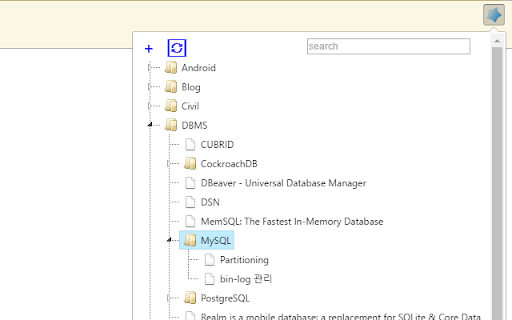
Google Bookmarks Tree Song Hyo Jin द्वारा विकसित एक क्रोम एक्सटेंशन है, और इसकी मुख्य विशेषता है "google.com/bookmarks with tree view"।
एक्सटेंशन स्क्रीनशॉट्स
एक्सएक्स एक्सटेंशन CRX फ़ाइल डाउनलोड करें
crx प्रारूप में Google Bookmarks Tree एक्सटेंशन फ़ाइलें डाउनलोड करें, ब्राउज़र में क्रोम एक्सटेंशन को मैन्युअल रूप से स्थापित करें या दोस्तों के साथ crx फ़ाइलों को साझा करें ताकि क्रोम एक्सटेंशन को आसानी से स्थापित किया जा सके।
एक्सटेंशन उपयोग निर्देश
                        Google has terminated the service.
Existing users can still see the bookmarks stored in Chrome, so please move the bookmarks.
This extension will be converted to private.
-------------------------------------------------------
tree view for https://www.google.com/bookmarks/

Labels naming with ">" mark is tree depth.
Folder>Folder>Folder

ctrl+Right-click on a folder to open all the links in the folder. Subfolders are ignored.

- not chrome's bookmarks. google site's bookmarks.
एक्सटेंशन की मूल जानकारी
| नाम |  Google Bookmarks Tree Google Bookmarks Tree |
| ID | ofppcpdgnpnmlmellfphhehmhkafbgmm |
| आधिकारिक URL | https://chromewebstore.google.com/detail/google-bookmarks-tree/ofppcpdgnpnmlmellfphhehmhkafbgmm |
| विवरण | google.com/bookmarks with tree view |
| फ़ाइल का आकार | 127 KB |
| स्थापना संख्या | 595 |
| वर्तमान संस्करण | 1.10 |
| अंतिम अपडेट | 2022-09-26 |
| प्रकाशन तिथि | 2019-06-13 |
| रेटिंग | 4.65/5 कुल 23 रेटिंग्स |
| डेवलपर | Song Hyo Jin |
| ईमेल | [email protected] |
| भुगतान के प्रकार | free |
| गोपनीयता नीति पृष्ठ URL | https://xenosi.de/privacyext.html |
| समर्थित भाषाएँ | en,ko |
| manifest.json | |
{
    "update_url": "https:\/\/clients2.google.com\/service\/update2\/crx",
    "manifest_version": 2,
    "default_locale": "ko",
    "name": "__MSG_extName__",
    "short_name": "XenoBookmarks",
    "description": "__MSG_extDescription__",
    "version": "1.10",
    "icons": {
        "16": "image\/16x16.png",
        "48": "image\/48x48.png",
        "128": "image\/128x128.png"
    },
    "browser_action": {
        "default_icon": {
            "19": "image\/19x19.png",
            "38": "image\/38x38.png"
        },
        "default_popup": "bookmarks.html"
    },
    "permissions": [
        "tabs",
        "storage",
        "unlimitedStorage",
        "https:\/\/www.google.com\/bookmarks\/*"
    ]
} | |