Simple Word Highlighter
This extension highlights words on a webpage as specified by the user
Simple Word Highlighter क्या है?
Simple Word Highlighter berdinemail द्वारा विकसित एक क्रोम एक्सटेंशन है, और इसकी मुख्य विशेषता है "This extension highlights words on a webpage as specified by the user"।
एक्सटेंशन स्क्रीनशॉट्स
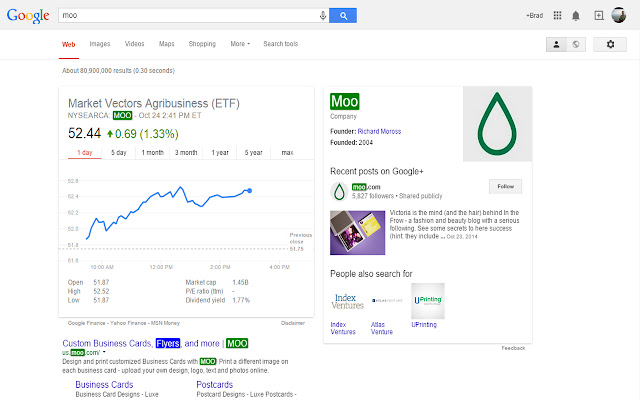
एक्सएक्स एक्सटेंशन CRX फ़ाइल डाउनलोड करें
crx प्रारूप में Simple Word Highlighter एक्सटेंशन फ़ाइलें डाउनलोड करें, ब्राउज़र में क्रोम एक्सटेंशन को मैन्युअल रूप से स्थापित करें या दोस्तों के साथ crx फ़ाइलों को साझा करें ताकि क्रोम एक्सटेंशन को आसानी से स्थापित किया जा सके।
एक्सटेंशन उपयोग निर्देश
                        This extension allows you highlight words on any website.

You can specify which websites to run on

You can specify which words to highlight per page

You can specify which color you would like to highlight with
एक्सटेंशन की मूल जानकारी
| नाम |  Simple Word Highlighter Simple Word Highlighter |
| ID | ojmcbcojgmdcdmnidlgjjajoniomibdj |
| आधिकारिक URL | https://chrome.google.com/webstore/detail/simple-word-highlighter/ojmcbcojgmdcdmnidlgjjajoniomibdj |
| विवरण | This extension highlights words on a webpage as specified by the user |
| फ़ाइल का आकार | 103 KB |
| स्थापना संख्या | 926 |
| वर्तमान संस्करण | 1.0 |
| अंतिम अपडेट | 2014-10-24 |
| प्रकाशन तिथि | 2014-10-24 |
| रेटिंग | 3.89/5 कुल 9 रेटिंग्स |
| डेवलपर | berdinemail |
| भुगतान के प्रकार | free |
| समर्थित भाषाएँ | en |
| manifest.json | |
{
    "update_url": "https:\/\/clients2.google.com\/service\/update2\/crx",
    "manifest_version": 2,
    "name": "Simple Word Highlighter",
    "description": "This extension highlights words on a webpage as specified by the user",
    "version": "1.0",
    "background": {
        "scripts": [
            "Configure.js"
        ],
        "persistent": false
    },
    "content_scripts": [
        {
            "matches": [
                "http:\/\/*\/*",
                "https:\/\/*\/*"
            ],
            "js": [
                "jquery.min.js",
                "ModifyPage.js"
            ],
            "css": [
                "Highlight.css"
            ],
            "all_frames": true
        }
    ],
    "icons": {
        "16": "icon_16.png",
        "48": "icon_48.png",
        "128": "icon.png"
    },
    "browser_action": {
        "default_icon": "icon.png",
        "default_popup": "popup.html"
    },
    "permissions": [
        "tabs",
        "http:\/\/*\/*",
        "https:\/\/*\/*",
        "storage"
    ]
} | |