Media Control
Control Amazon music player, Spotify web player, and YouTube (HTML player only) without switching tabs.
Media Control क्या है?
Media Control m.ryanmurphy द्वारा विकसित एक क्रोम एक्सटेंशन है, और इसकी मुख्य विशेषता है "Control Amazon music player, Spotify web player, and YouTube (HTML player only) without switching tabs."।
एक्सटेंशन स्क्रीनशॉट्स

एक्सएक्स एक्सटेंशन CRX फ़ाइल डाउनलोड करें
crx प्रारूप में Media Control एक्सटेंशन फ़ाइलें डाउनलोड करें, ब्राउज़र में क्रोम एक्सटेंशन को मैन्युअल रूप से स्थापित करें या दोस्तों के साथ crx फ़ाइलों को साझा करें ताकि क्रोम एक्सटेंशन को आसानी से स्थापित किया जा सके।
एक्सटेंशन उपयोग निर्देश
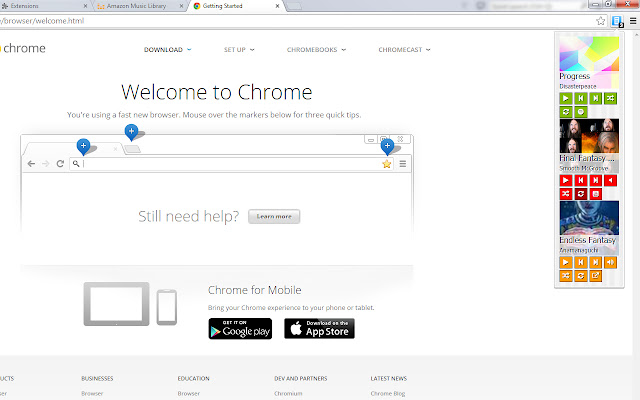
                        Media Control appears as a toolbar button, and is a simple dropdown to control media players from Amazon, Spotify, and YouTube (HTML player only).

For each you can play and pause, and if listening from a playlist, go forward and back within the list. Spotify allows additional control of repeat and shuffle. YouTube allows additional control of playlist autoplay and mute functionality. Amazon allows for all of the above. You can also click the external link button to go directly to the tab.

For each tab with a player you have open, a control will appear. If for some reason it is unable to control directly there appears a large button to go to the tab directly.
एक्सटेंशन की मूल जानकारी
| नाम |  Media Control Media Control |
| ID | pncnfpeioeljgmelkbboabkefmccechp |
| आधिकारिक URL | https://chrome.google.com/webstore/detail/media-control/pncnfpeioeljgmelkbboabkefmccechp |
| विवरण | Control Amazon music player, Spotify web player, and YouTube (HTML player only) without switching tabs. |
| फ़ाइल का आकार | 371 KB |
| स्थापना संख्या | 96 |
| वर्तमान संस्करण | 1.5 |
| अंतिम अपडेट | 2015-02-13 |
| प्रकाशन तिथि | 2015-02-13 |
| रेटिंग | 1.00/5 कुल 2 रेटिंग्स |
| डेवलपर | m.ryanmurphy |
| ईमेल | [email protected] |
| भुगतान के प्रकार | free |
| समर्थित भाषाएँ | en |
| manifest.json | |
{
    "update_url": "https:\/\/clients2.google.com\/service\/update2\/crx",
    "name": "Media Control",
    "version": "1.5",
    "manifest_version": 2,
    "description": "Control Amazon music player, Spotify web player, and YouTube (HTML player only) without switching tabs.",
    "homepage_url": "https:\/\/bitbucket.org\/whote\/media-control",
    "permissions": [
        "tabs"
    ],
    "background": {
        "scripts": [
            "background.js"
        ],
        "persistent": false
    },
    "content_scripts": [
        {
            "matches": [
                "*:\/\/play.spotify.com\/*",
                "*:\/\/*.youtube.com\/*",
                "*:\/\/*.amazon.com\/*\/cloudplayer\/*"
            ],
            "js": [
                "page-inject.js"
            ]
        }
    ],
    "icons": {
        "16": "images\/16.png",
        "48": "images\/48.png",
        "64": "images\/64.png",
        "128": "images\/128.png"
    },
    "browser_action": {
        "default_icon": "images\/38.png",
        "default_title": "Media Control",
        "default_popup": "popup\/control.html"
    }
} | |