Berkeley Schedule Exporter
Export your Berkeley class schedule!
Apa itu Berkeley Schedule Exporter?
Berkeley Schedule Exporter adalah ekstensi Chrome yang dikembangkan oleh berkeleyschedexport, dan fitur utamanya adalah "Export your Berkeley class schedule!".
Screenshot Ekstensi
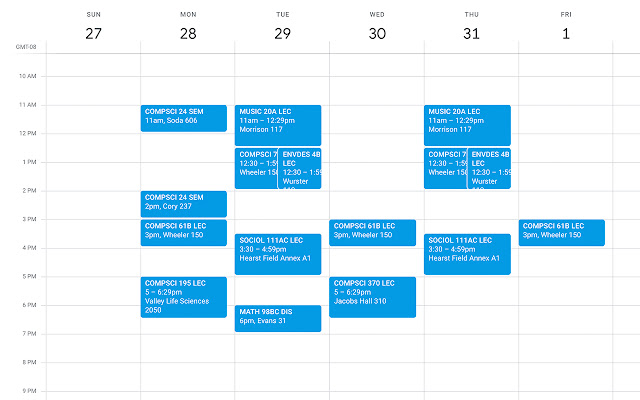
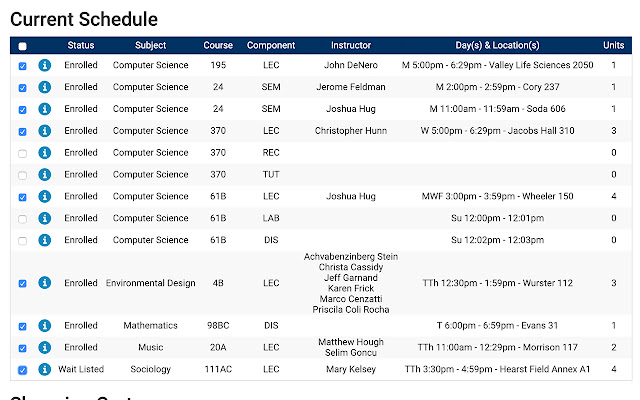
Unduh Berkas CRX Ekstensi Berkeley Schedule Exporter
Unduh file ekstensi Berkeley Schedule Exporter dalam format crx, pasang ekstensi Chrome secara manual di peramban, atau bagikan file crx dengan teman untuk menginstal ekstensi Chrome dengan mudah.
Petunjuk Penggunaan Ekstensi
                        Export your Berkeley class schedule to .ics! (which can be imported to Google Calendar). Should also work with other schools that use collegescheduler.com.

https://github.com/ziyaointl/Schedule-Exporter

Usage

1. Go to CalCentral, My Academics. Select Schedule Planner.

2. Check the courses you want to export. You can select from both Current Schedule and Shopping Cart.

3. Click on the extension icon in the upper right Chrome menu. (You might have to wait a few seconds for the page to fully load before clicking on the icon). You should get a file named calendar.ics. Then, you can import this ics file to whatever calendar platform you desire. Classes automatically repeat weekly starting from the first day of the current semester!
Informasi Dasar Ekstensi
| Nama |  Berkeley Schedule Exporter Berkeley Schedule Exporter |
| ID | adnjnncenfmhbfaggmchmfelhbafbkmn |
| URL Resmi | https://chrome.google.com/webstore/detail/berkeley-schedule-exporte/adnjnncenfmhbfaggmchmfelhbafbkmn |
| Deskripsi | Export your Berkeley class schedule! |
| Ukuran File | 1.1 MB |
| Jumlah Instalasi | 929 |
| Versi Saat Ini | 1.2.4 |
| Terakhir Diperbarui | 2023-02-26 |
| Tanggal Publikasi | 2020-01-15 |
| Penilaian | 4.28/5 Total 18 Penilaian |
| Pengembang | berkeleyschedexport |
| [email protected] | |
| Tipe Pembayaran | free |
| Situs Ekstensi | https://github.com/ziyaointl/Schedule-Exporter |
| URL Halaman Bantuan | https://github.com/ziyaointl/Schedule-Exporter/issues |
| Bahasa yang Didukung | en |
| manifest.json | |
{
    "update_url": "https:\/\/clients2.google.com\/service\/update2\/crx",
    "name": "Berkeley Schedule Exporter",
    "version": "1.2.4",
    "description": "Export your Berkeley class schedule!",
    "manifest_version": 3,
    "action": {
        "default_icon": {
            "16": "icons\/icon-16.png",
            "32": "icons\/icon-32.png",
            "48": "icons\/icon-48.png",
            "128": "icons\/icon-128.png"
        }
    },
    "icons": {
        "16": "icons\/icon-16.png",
        "32": "icons\/icon-32.png",
        "48": "icons\/icon-48.png",
        "128": "icons\/icon-128.png"
    },
    "permissions": [
        "declarativeContent",
        "activeTab",
        "scripting"
    ],
    "background": {
        "service_worker": "src\/background.js"
    },
    "web_accessible_resources": [
        {
            "resources": [
                "src\/export.js",
                "src\/icsjs\/ics.deps.min.js"
            ],
            "matches": [
                "https:\/\/berkeley.collegescheduler.com\/*"
            ]
        }
    ]
} | |