Download Button
Opens Downloads tab from Toolbar and Context Menu. Options available to change icon, remove from context menu etc.
Apa itu Download Button?
Download Button adalah ekstensi Chrome yang dikembangkan oleh https://tejji.com, dan fitur utamanya adalah "Opens Downloads tab from Toolbar and Context Menu. Options available to change icon, remove from context menu etc.".
Screenshot Ekstensi


Unduh Berkas CRX Ekstensi Download Button
Unduh file ekstensi Download Button dalam format crx, pasang ekstensi Chrome secara manual di peramban, atau bagikan file crx dengan teman untuk menginstal ekstensi Chrome dengan mudah.
Petunjuk Penggunaan Ekstensi
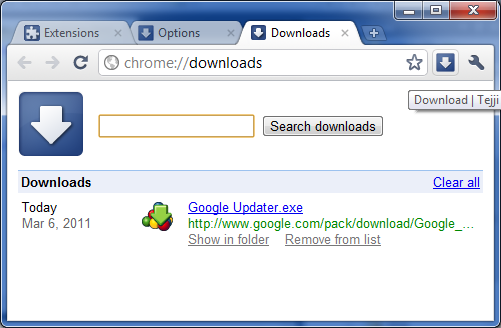
                        Opens Downloads tab in single click. Simple

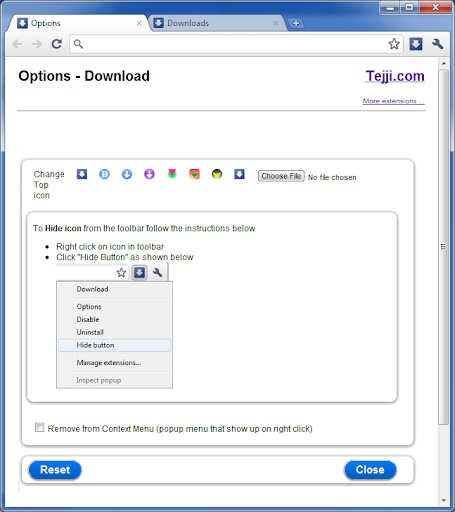
Other options....
1. Open from Context Menu
2. Change Icon
3. Add / Remove from context menu

The above options are available via...
Tools --> Extensions --> Download --> Click Options
OR
Right click icon in toolbar --> Click Options

Opens in new tab

More extensions at http://tejji.com/browser/chrome/extensions/

Thanks,
http://tejji.com

v1.4
- updated to comply to changes in Chrome web store policies

v1.3
- updated for latest manifest

v1.2
- Added ability to change the icon to fit to individual needs and themes
- Added context menu shortcut to access Downloads folder from context menu

v1.1
- Icon updated to show transparent arrow to fit most of the themes
Informasi Dasar Ekstensi
| Nama |  Download Button Download Button |
| ID | alakoggmijiicdlcjjeakffojoinhlpg |
| URL Resmi | https://chromewebstore.google.com/detail/download-button/alakoggmijiicdlcjjeakffojoinhlpg |
| Deskripsi | Opens Downloads tab from Toolbar and Context Menu. Options available to change icon, remove from context menu etc. |
| Ukuran File | 81.41 KB |
| Jumlah Instalasi | 26,420 |
| Versi Saat Ini | 1.4 |
| Terakhir Diperbarui | 2018-09-11 |
| Tanggal Publikasi | 2018-09-08 |
| Penilaian | 4.63/5 Total 513 Penilaian |
| Pengembang | https://tejji.com |
| [email protected] | |
| Tipe Pembayaran | free |
| Situs Ekstensi | http://tejji.com/ |
| URL Halaman Bantuan | http://tejji.com/contactus.aspx |
| URL Halaman Kebijakan Privasi | https://tejji.com/privacy.aspx |
| Bahasa yang Didukung | en |
| manifest.json | |
{
    "update_url": "https:\/\/clients2.google.com\/service\/update2\/crx",
    "name": "Download Button",
    "version": "1.4",
    "description": "Opens Downloads tab from Toolbar and Context Menu. Options available to change icon, remove from context menu etc.                 ",
    "icons": {
        "16": "img\/icon16.png",
        "19": "img\/icon19.png",
        "32": "img\/icon32.png",
        "48": "img\/icon48.png",
        "128": "img\/icon128.png"
    },
    "background": {
        "page": "background.htm"
    },
    "options_page": "options.htm",
    "permissions": [
        "contextMenus",
        "unlimitedStorage"
    ],
    "browser_action": {
        "default_icon": "img\/icon19.png",
        "default_title": "Download Button | Tejji"
    },
    "manifest_version": 2,
    "homepage_url": "http:\/\/tejji.com\/"
} | |