Jalangi2
Jalangi2 Chrome Extension for Javascript code analysis
Apa itu Jalangi2?
Jalangi2 adalah ekstensi Chrome yang dikembangkan oleh gembigfan, dan fitur utamanya adalah "Jalangi2 Chrome Extension for Javascript code analysis".
Screenshot Ekstensi
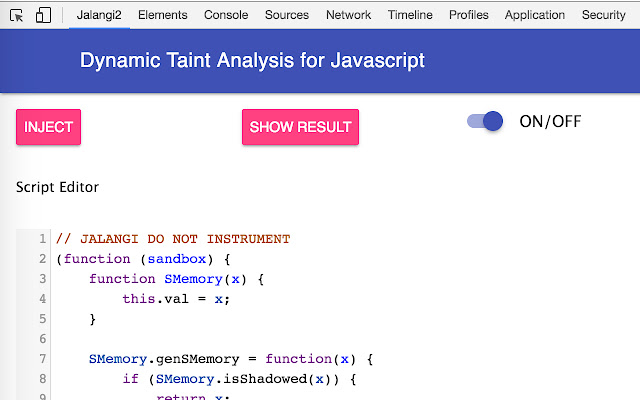
Unduh Berkas CRX Ekstensi Jalangi2
Unduh file ekstensi Jalangi2 dalam format crx, pasang ekstensi Chrome secara manual di peramban, atau bagikan file crx dengan teman untuk menginstal ekstensi Chrome dengan mudah.
Petunjuk Penggunaan Ekstensi
                        This is Chrome extension (Devtool) for Jalangi2 to perform dynamic javascript analysis. A user can easily implement their own user-script to perform customized javascript analysis such as finding bugs, performance problems and taint analysis.
Prerequisites:
1. python
2. node
3. mitmproxy

Steps for installation:
1. git clone https://[email protected]/jedihy/jalangi2-chrome.git
2. cd jalangi2
3. npm install
4. mitmdump -p 9999 --anticache -s "jalangi2/scripts/proxy.py --inlineIID --inlineSource"

In this version, you have to use port 9999 for mitmdump because the port number is hardcoded in the extension.
Informasi Dasar Ekstensi
| Nama |  Jalangi2 Jalangi2 |
| ID | bjchnamfmkkcejgiacanfhnokbchijoj |
| URL Resmi | https://chrome.google.com/webstore/detail/jalangi2/bjchnamfmkkcejgiacanfhnokbchijoj |
| Deskripsi | Jalangi2 Chrome Extension for Javascript code analysis |
| Ukuran File | 1.45 MB |
| Jumlah Instalasi | 42 |
| Versi Saat Ini | 0.1 |
| Terakhir Diperbarui | 2016-11-30 |
| Tanggal Publikasi | 2016-11-30 |
| Penilaian | 5.00/5 Total 1 Penilaian |
| Pengembang | gembigfan |
| Tipe Pembayaran | free |
| Bahasa yang Didukung | en-US |
| manifest.json | |
{
    "update_url": "https:\/\/clients2.google.com\/service\/update2\/crx",
    "name": "Jalangi2",
    "version": "0.1",
    "description": "Jalangi2 Chrome Extension for Javascript code analysis",
    "devtools_page": "proxy.html",
    "manifest_version": 2,
    "web_accessible_resources": [
        "*"
    ],
    "icons": {
        "16": "logo.png",
        "32": "logo.png",
        "128": "logo.png"
    },
    "content_scripts": [
        {
            "matches": [
                "http:\/\/*\/*",
                "https:\/\/*\/*"
            ],
            "js": [
                "injector.js"
            ],
            "run_at": "document_start"
        }
    ],
    "background": {
        "scripts": [
            "background.js"
        ]
    },
    "permissions": [
        "storage",
        "proxy",
        "activeTab",
        "http:\/\/*\/",
        "https:\/\/*\/",
        "*:\/\/*\/*",
        "tabs"
    ]
} | |