Flip Lichess Knights
Flip the direction of the knights on lichess.org
Apa itu Flip Lichess Knights?
Flip Lichess Knights adalah ekstensi Chrome yang dikembangkan oleh Sam Sweeney, dan fitur utamanya adalah "Flip the direction of the knights on lichess.org".
Screenshot Ekstensi
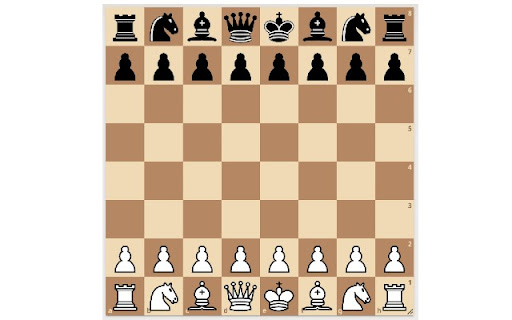
Unduh Berkas CRX Ekstensi Flip Lichess Knights
Unduh file ekstensi Flip Lichess Knights dalam format crx, pasang ekstensi Chrome secara manual di peramban, atau bagikan file crx dengan teman untuk menginstal ekstensi Chrome dengan mudah.
Petunjuk Penggunaan Ekstensi
Flip Lichess Knights allows you to customize your board UI when playing chess on lichess.org. By default knights on Lichess face to the right. Flip Lichess Knights allows you to toggle their direction, so they can face either to the right or to the left. Informasi Dasar Ekstensi
| Nama |  Flip Lichess Knights Flip Lichess Knights |
| ID | cdkfpbdifpndnncjmfciiphhfjjfbpad |
| URL Resmi | https://chromewebstore.google.com/detail/flip-lichess-knights/cdkfpbdifpndnncjmfciiphhfjjfbpad |
| Deskripsi | Flip the direction of the knights on lichess.org |
| Ukuran File | 30.63 KB |
| Jumlah Instalasi | 38 |
| Versi Saat Ini | 0.0.0.1 |
| Terakhir Diperbarui | 2021-03-18 |
| Tanggal Publikasi | 2021-03-18 |
| Pengembang | Sam Sweeney |
| [email protected] | |
| Tipe Pembayaran | free |
| Bahasa yang Didukung | en |
| manifest.json | |
{
    "update_url": "https:\/\/clients2.google.com\/service\/update2\/crx",
    "name": "Flip Lichess Knights",
    "description": "Flip the direction of the knights on lichess.org",
    "version": "0.0.0.1",
    "manifest_version": 3,
    "background": {
        "service_worker": "background.js"
    },
    "content_scripts": [
        {
            "matches": [
                "https:\/\/*.lichess.org\/*"
            ],
            "js": [
                "flip-knights.js"
            ]
        }
    ],
    "action": {
        "default_popup": "popup.html",
        "default_icon": {
            "16": "icon16.png",
            "48": "icon48.png",
            "128": "icon128.png"
        }
    },
    "icons": {
        "16": "icon16.png",
        "48": "icon48.png",
        "128": "icon128.png"
    },
    "permissions": [
        "storage"
    ]
} | |