Print Google Doc with Comments
Print Google Doc with Comments
Apa itu Print Google Doc with Comments?
Print Google Doc with Comments adalah ekstensi Chrome yang dikembangkan oleh theclassisflat, dan fitur utamanya adalah "Print Google Doc with Comments".
Screenshot Ekstensi
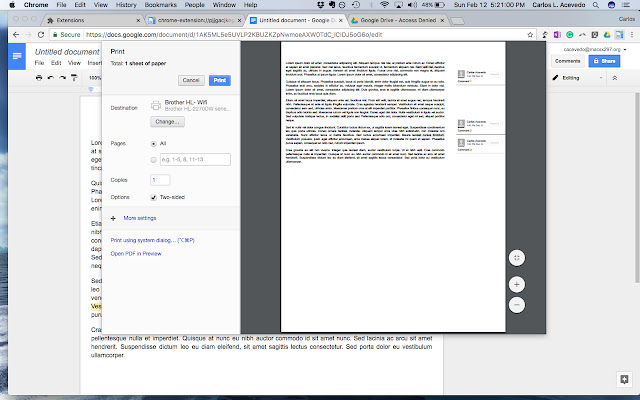
Unduh Berkas CRX Ekstensi Print Google Doc with Comments
Unduh file ekstensi Print Google Doc with Comments dalam format crx, pasang ekstensi Chrome secara manual di peramban, atau bagikan file crx dengan teman untuk menginstal ekstensi Chrome dengan mudah.
Petunjuk Penggunaan Ekstensi
This extension was developed by a teacher for teachers. Showing a student's progress is important when reflecting on a multi-draft assignment. This extension does just what it is titled to do. Teachers -- or anyone -- who would like to print a Google Doc with comments directly from the browser can now do so easily. No longer will you need to download a Google Doc as either an HTML file or a .docx to print. Informasi Dasar Ekstensi
| Nama |  Print Google Doc with Comments Print Google Doc with Comments |
| ID | cohkclffagpcbnkiobagmipplkpoagbg |
| URL Resmi | https://chrome.google.com/webstore/detail/print-google-doc-with-com/cohkclffagpcbnkiobagmipplkpoagbg |
| Deskripsi | Print Google Doc with Comments |
| Ukuran File | 754 KB |
| Jumlah Instalasi | 10,000 |
| Versi Saat Ini | 1.2.0 |
| Terakhir Diperbarui | 2017-02-12 |
| Tanggal Publikasi | 2017-02-12 |
| Penilaian | 1.85/5 Total 41 Penilaian |
| Pengembang | theclassisflat |
| [email protected] | |
| Tipe Pembayaran | free |
| Bahasa yang Didukung | en-US |
| manifest.json | |
{
    "update_url": "https:\/\/clients2.google.com\/service\/update2\/crx",
    "author": "Muthukumaran Navaneethakrishnan(https:\/\/github.com\/muthuishere)",
    "background": {
        "scripts": [
            "scripts\/global.js"
        ]
    },
    "description": "Print Google Doc with Comments",
    "icons": {
        "128": "images\/google-doc-print-128.png",
        "48": "images\/google-doc-print-48.png",
        "64": "images\/google-doc-print-64.png"
    },
    "page_action": {
        "default_icon": "images\/google-doc-print-19.png",
        "default_title": "Print Google Doc with Comments"
    },
    "manifest_version": 2,
    "name": "Print Google Doc with Comments",
    "options_page": "faq\/index.html",
    "permissions": [
        "tabs",
        "declarativeContent",
        "notifications",
        "https:\/\/*\/*"
    ],
    "short_name": "google-doc-print",
    "version": "1.2.0",
    "web_accessible_resources": [
        "images\/*.png",
        "images\/*.svg",
        "faq\/images\/*.png",
        "donate.html"
    ]
} | |