TabMan
Manage Tabs : Stash it, reopen it, organize into folders
Apa itu TabMan?
TabMan adalah ekstensi Chrome yang dikembangkan oleh Nayan Intwala, dan fitur utamanya adalah "Manage Tabs : Stash it, reopen it, organize into folders".
Screenshot Ekstensi
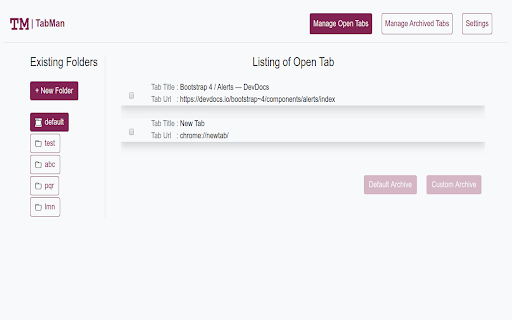
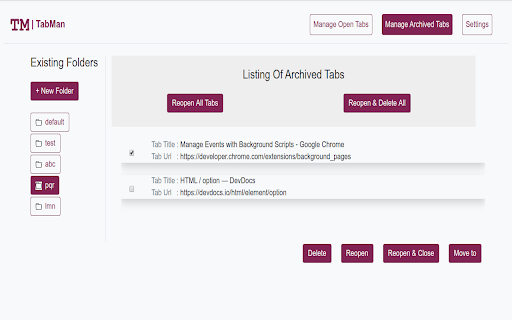
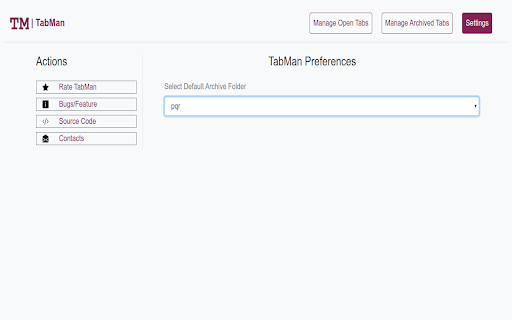
Unduh Berkas CRX Ekstensi TabMan
Unduh file ekstensi TabMan dalam format crx, pasang ekstensi Chrome secara manual di peramban, atau bagikan file crx dengan teman untuk menginstal ekstensi Chrome dengan mudah.
Petunjuk Penggunaan Ekstensi
                        Quick Tabs Navigation Shortcuts
1. Ctrl + Left Arrow    : (Cycle through open tabs in left direction)
2. Ctrl + Right Arrow  : (Cycle through open tabs in right direction)
3. Ctrl + Down Arrow : (Go browser back for active tab)
4. Ctrl + Up Arrow      : (Go browser forward for active tab)

Bookmarks are so old school. Organize your browser tabs and access them quickly anywhere.
“I had to open saved bookmarks one by one from folder, with TabMan I can open all folders tab” – from a new user

Don't Bookmarks because TabMan is at your service. Organize your browser tabs into folders via TabMan so you can access key resources in two-click per folder.

TabMan enhances your Chrome browser. Add open tabs into folder in just one-click. Access all of your folder on any desktop with automatic sync. With custom folder names tabs can be organized nicely for each of the associated topic.

TabMan is changing the way you save and access tabs by making it easy and fun to use.


WHY YOU SHOULD MANAGE TABS?

TabMan provides easy to use tab archival facility so that open tabs can be organized and accessed as and when needed removing the need to email all interested tab and there by saving precious user time.


★ Like it but don't have time Stash it.
★ Recalled something important archived article, access it with few clicks.
★ Forget opening different window for different works. Just Stash it in custom folders and access all tabs with bulk open feature.
★ Synced inside your google account to provide you seamless experience across multiple devices.
★ Stop emailing yourself links

Now never loose your favourite articles, just use TabMan to quickly archive it.

GIVE ME A 5-STAR REVIEW
★★★★★
Genuinely enjoy the TabMan? Helped you save time at work? Support the me by giving us a great review!


SUPPORT & BUG REPORTING
https://github.com/intwalanayan/tabman/issues
Informasi Dasar Ekstensi
| Nama |  TabMan TabMan |
| ID | dhfjhapabfcbnekdcdcbobepdafdbecd |
| URL Resmi | https://chromewebstore.google.com/detail/tabman/dhfjhapabfcbnekdcdcbobepdafdbecd |
| Deskripsi | Manage Tabs : Stash it, reopen it, organize into folders |
| Ukuran File | 386 KB |
| Jumlah Instalasi | 78 |
| Versi Saat Ini | 1.0 |
| Terakhir Diperbarui | 2020-05-19 |
| Tanggal Publikasi | 2020-05-19 |
| Penilaian | 3.50/5 Total 2 Penilaian |
| Pengembang | Nayan Intwala |
| Tipe Pembayaran | free |
| Situs Ekstensi | https://github.com/intwalanayan/tabman |
| URL Halaman Bantuan | https://github.com/intwalanayan/tabman/issues |
| Bahasa yang Didukung | en |
| manifest.json | |
{
    "update_url": "https:\/\/clients2.google.com\/service\/update2\/crx",
    "manifest_version": 2,
    "name": "TabMan",
    "version": "1.0",
    "description": "Manage Tabs : Stash it, reopen it, organize into folders",
    "icons": {
        "128": "icons\/icon_128.png",
        "48": "icons\/icon_48.png",
        "32": "icons\/icon_32.png",
        "16": "icons\/white_favicon.png"
    },
    "options_page": "\/views\/options.html",
    "browser_action": {
        "default_icon": "icons\/white_icon_128.png",
        "default_title": "TabMan"
    },
    "background": {
        "persistent": true,
        "scripts": [
            "\/scripts\/jquery.min.js",
            "\/scripts\/view_helper.js",
            "\/scripts\/tab_helper.js",
            "\/scripts\/folder_helper.js",
            "\/scripts\/tab_manager.js",
            "\/scripts\/background.js"
        ]
    },
    "commands": {
        "right-tab": {
            "suggested_key": {
                "default": "Ctrl+Right",
                "mac": "Ctrl+Right"
            },
            "description": "Move to tab on the right."
        },
        "left-tab": {
            "suggested_key": {
                "default": "Ctrl+Left",
                "mac": "Ctrl+Left"
            },
            "description": "Move to tab on the left."
        },
        "go-back": {
            "suggested_key": {
                "default": "Ctrl+Down",
                "mac": "Ctrl+Down"
            },
            "description": "Browser back for current tab."
        },
        "go-next": {
            "suggested_key": {
                "default": "Ctrl+Up",
                "mac": "Ctrl+Up"
            },
            "description": "Browser forward for current tab."
        }
    },
    "permissions": [
        "tabs",
        "storage",
        "unlimitedStorage"
    ]
} | |





![Stashio [URL Saver]](https://lh3.googleusercontent.com/k1u7CukXmJqE4QUBug53zwSdV8KqEDrSeNWdzNhbRrId8YhUsuoavD0rs9nYyoebzdciUqfzBltU6o1DrZm4UQAK)


