Steam Activity Filter
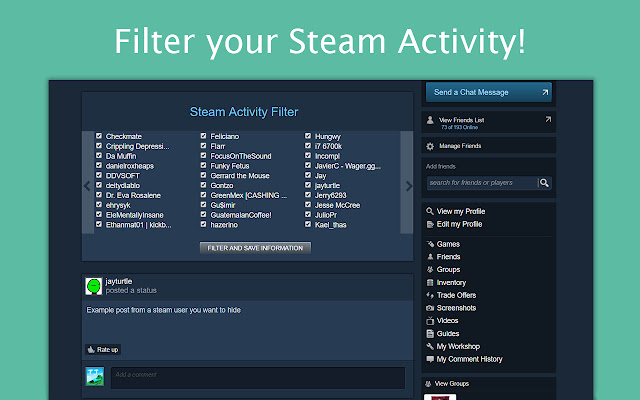
Steam Activity Filter lets you filter out unwanted screenshots and status updates from your Steam Friend Activity Feed.
Apa itu Steam Activity Filter?
Steam Activity Filter adalah ekstensi Chrome yang dikembangkan oleh jayleenli, dan fitur utamanya adalah "Steam Activity Filter lets you filter out unwanted screenshots and status updates from your Steam Friend Activity Feed.".
Screenshot Ekstensi

Unduh Berkas CRX Ekstensi Steam Activity Filter
Unduh file ekstensi Steam Activity Filter dalam format crx, pasang ekstensi Chrome secara manual di peramban, atau bagikan file crx dengan teman untuk menginstal ekstensi Chrome dengan mudah.
Petunjuk Penggunaan Ekstensi
                        Steam Activity Filter(SAF) hides unwanted posts on your Steam Activity Feed. (e.g. https://steamcommunity.com/my/home)

SAF automatically places a filtering interface on at the top your Steam Friend Activity Home page. SAF retrieves your current Steam Friends list (https://steamcommunity.com/my/friends) and places the usernames in the interface.

This Chrome Extension can hide the following types of posts:
-Screenshots
-New Games
-Status Posts
-Favorites on Steam Community items

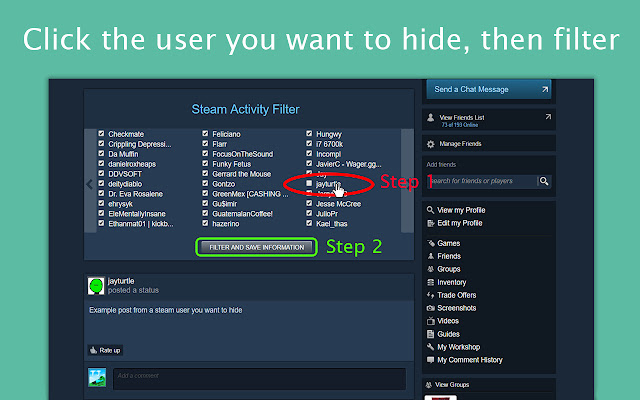
How to use Steam Activity Filter:
1. Uncheck the usernames of whom you do not want to see in your feed. Checked users will appear in your feed.
2. Click the filter button, and your Steam Activity Feed will change instantly.

Changelog:
https://github.com/jayleenli/Steam-Activity-Filter

Author:
Jayleen Li
Informasi Dasar Ekstensi
| Nama |  Steam Activity Filter Steam Activity Filter |
| ID | dnhaemngbanccjamofoeokgpadfegjcf |
| URL Resmi | https://chrome.google.com/webstore/detail/steam-activity-filter/dnhaemngbanccjamofoeokgpadfegjcf |
| Deskripsi | Steam Activity Filter lets you filter out unwanted screenshots and status updates from your Steam Friend Activity Feed. |
| Ukuran File | 40.39 KB |
| Jumlah Instalasi | 71 |
| Versi Saat Ini | 1.1 |
| Terakhir Diperbarui | 2017-04-03 |
| Tanggal Publikasi | 2017-04-03 |
| Penilaian | 3.00/5 Total 6 Penilaian |
| Pengembang | jayleenli |
| Tipe Pembayaran | free |
| URL Halaman Kebijakan Privasi | https://docs.google.com/document/d/1Qs86rceXys_oTsdKI79pKmd7tKlf6bVusTb4PYokVIo/edit?usp=sharing |
| Bahasa yang Didukung | en |
| manifest.json | |
{
    "update_url": "https:\/\/clients2.google.com\/service\/update2\/crx",
    "manifest_version": 2,
    "name": "Steam Activity Filter",
    "description": "Steam Activity Filter lets you filter out unwanted screenshots and status updates from your Steam Friend Activity Feed.",
    "version": "1.1",
    "icons": {
        "16": "saflogo.png",
        "48": "saflogo.png",
        "128": "saflogo.png"
    },
    "browser_action": {
        "default_icon": "saflogo.png"
    },
    "permissions": [
        "http:\/\/steamcommunity.com\/*"
    ],
    "content_scripts": [
        {
            "matches": [
                "http:\/\/steamcommunity.com\/id\/*",
                "http:\/\/steamcommunity.com\/profiles\/*"
            ],
            "exclude_matches": [
                "*:\/\/store.steampowered.com\/dynamicstore\/*",
                "*:\/\/store.steampowered.com\/checkout\/*",
                "*:\/\/store.steampowered.com\/widget\/*",
                "*:\/\/store.steampowered.com\/login\/*",
                "*:\/\/store.steampowered.com\/join\/*",
                "*:\/\/store.steampowered.com\/api\/*",
                "*:\/\/steamcommunity.com\/login\/*"
            ],
            "js": [
                "jQuery.min.js",
                "steamfilter.js"
            ]
        }
    ]
} | |