My Groups for YouTube™
Allows you to create your own groups for subscriptions and playlists on YouTube™.
Apa itu My Groups for YouTube™?
My Groups for YouTube™ adalah ekstensi Chrome yang dikembangkan oleh Vladimir Volkov, dan fitur utamanya adalah "Allows you to create your own groups for subscriptions and playlists on YouTube™.".
Screenshot Ekstensi

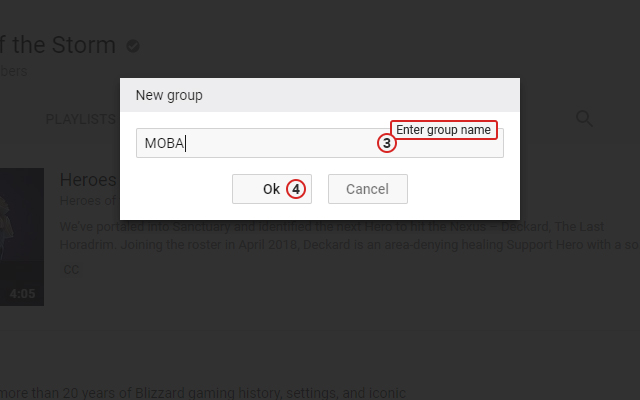
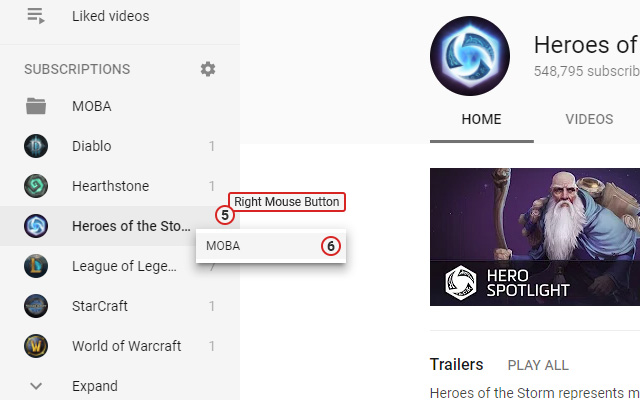
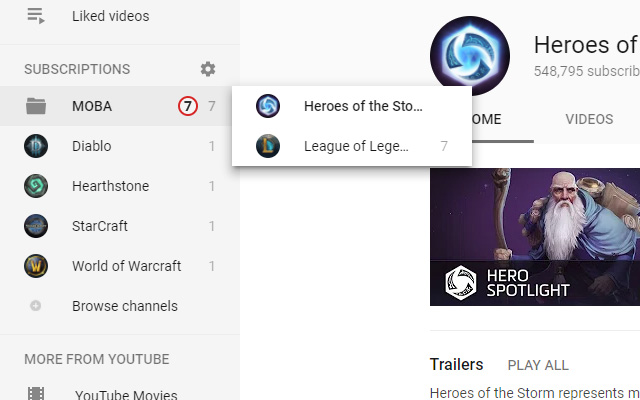
Unduh Berkas CRX Ekstensi My Groups for YouTube™
Unduh file ekstensi My Groups for YouTube™ dalam format crx, pasang ekstensi Chrome secara manual di peramban, atau bagikan file crx dengan teman untuk menginstal ekstensi Chrome dengan mudah.
Petunjuk Penggunaan Ekstensi
YouTube is a trademark of Google Inc. Use of this trademark is subject to Google Permissions. Informasi Dasar Ekstensi
| Nama |  My Groups for YouTube™ My Groups for YouTube™ |
| ID | elfckedljnccjpiclpimfgekmiaoaamf |
| URL Resmi | https://chrome.google.com/webstore/detail/my-groups-for-youtube/elfckedljnccjpiclpimfgekmiaoaamf |
| Deskripsi | Allows you to create your own groups for subscriptions and playlists on YouTube™. |
| Ukuran File | 335 KB |
| Jumlah Instalasi | 15 |
| Versi Saat Ini | 0.6.4 |
| Terakhir Diperbarui | 2019-09-28 |
| Tanggal Publikasi | 2019-09-28 |
| Penilaian | 5.00/5 Total 2 Penilaian |
| Pengembang | Vladimir Volkov |
| Tipe Pembayaran | free |
| Bahasa yang Didukung | en |
| manifest.json | |
{
    "manifest_version": 2,
    "name": "__MSG_ext_name__",
    "description": "__MSG_ext_description__",
    "version": "0.6.4",
    "default_locale": "en",
    "author": "__MSG_ext_author__",
    "content_scripts": [
        {
            "matches": [
                "https:\/\/www.youtube.com\/*"
            ],
            "css": [
                "\/css\/content.css"
            ],
            "js": [
                "\/lib\/jquery-3.3.1.min.js",
                "\/lib\/vue.min.js",
                "\/lib\/vuex.min.js",
                "\/lib\/lodash.min.js",
                "\/js\/content.js"
            ]
        }
    ],
    "background": {
        "scripts": [
            "\/js\/background.js"
        ]
    },
    "browser_action": {
        "default_icon": {
            "16": "\/icons\/16.png",
            "24": "\/icons\/24.png",
            "32": "\/icons\/32.png"
        },
        "default_title": "__MSG_ext_name__",
        "default_popup": "popup.html"
    },
    "icons": {
        "16": "\/icons\/16.png",
        "48": "\/icons\/48.png",
        "128": "\/icons\/128.png"
    },
    "permissions": [
        "tabs",
        "storage",
        "downloads"
    ],
    "content_security_policy": "script-src 'self' 'unsafe-eval'; object-src 'self'",
    "update_url": "https:\/\/clients2.google.com\/service\/update2\/crx",
    "web_accessible_resources": [
        "\/img\/how-to-use-1.jpg",
        "\/img\/how-to-use-2.jpg",
        "\/img\/how-to-use-3.jpg",
        "\/img\/how-to-use-4.jpg"
    ]
} | |