Cloud Carbon
Calculate and show the energy you've spent browsing Facebook, Netflix, and YouTube.
Apa itu Cloud Carbon?
Cloud Carbon adalah ekstensi Chrome yang dikembangkan oleh chrisallick, dan fitur utamanya adalah "Calculate and show the energy you've spent browsing Facebook, Netflix, and YouTube.".
Screenshot Ekstensi
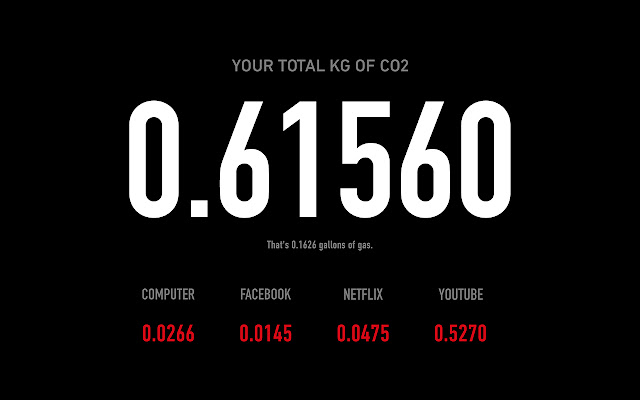
Unduh Berkas CRX Ekstensi Cloud Carbon
Unduh file ekstensi Cloud Carbon dalam format crx, pasang ekstensi Chrome secara manual di peramban, atau bagikan file crx dengan teman untuk menginstal ekstensi Chrome dengan mudah.
Petunjuk Penggunaan Ekstensi
                        Cloud Carbon is a Chrome Extension that calculates the carbon footprint created by your use of Facebook, YouTube, and Netflix. Each time you open a new tab in Chrome you'll see your stats as well as reference to how many gallons of gas you could have used.

Cloud computing allows us to have virtual selves, digital doppelgängers, but, because of the fossil fuels burnt in order to power the data centers which store our personal data, our digital selves have a very real-world impact.

Cloud Carbon was created over a 24 hour period for Art Hack Day 2015

http://www.arthackday.net/events/deluge

by Chris Allick and Dan Savage

Thanks,
Chris Allick

ps - Hack The Planet
Informasi Dasar Ekstensi
| Nama |  Cloud Carbon Cloud Carbon |
| ID | engfdahohpcdnnhmpgmedgehbbgeheho |
| URL Resmi | https://chrome.google.com/webstore/detail/cloud-carbon/engfdahohpcdnnhmpgmedgehbbgeheho |
| Deskripsi | Calculate and show the energy you've spent browsing Facebook, Netflix, and YouTube. |
| Ukuran File | 448 KB |
| Jumlah Instalasi | 95 |
| Versi Saat Ini | 0.1.2 |
| Terakhir Diperbarui | 2016-01-30 |
| Tanggal Publikasi | 2016-01-30 |
| Penilaian | 4.50/5 Total 4 Penilaian |
| Pengembang | chrisallick |
| Tipe Pembayaran | free |
| Bahasa yang Didukung | en-US |
| manifest.json | |
{
    "update_url": "https:\/\/clients2.google.com\/service\/update2\/crx",
    "name": "Cloud Carbon",
    "description": "Calculate and show the energy you've spent browsing Facebook, Netflix, and YouTube.",
    "version": "0.1.2",
    "manifest_version": 2,
    "incognito": "split",
    "chrome_url_overrides": {
        "newtab": "blank.html"
    },
    "background": {
        "scripts": [
            "background.js"
        ],
        "persistent": true
    },
    "permissions": [
        "tabs",
        "http:\/\/*\/*",
        "https:\/\/*\/*",
        "storage",
        "management"
    ],
    "browser_action": {
        "default_icon": "icon128.png"
    },
    "icons": {
        "16": "icon16.png",
        "48": "icon48.png",
        "64": "icon64.png",
        "128": "icon128.png"
    }
} | |