4 Smart Shortcuts
Define custom keyboard shortcuts for four favorite sites. Goes to a matching tab first. Creates a new tab if none exist.
Apa itu 4 Smart Shortcuts?
4 Smart Shortcuts adalah ekstensi Chrome yang dikembangkan oleh rawbytz, dan fitur utamanya adalah "Define custom keyboard shortcuts for four favorite sites. Goes to a matching tab first. Creates a new tab if none exist.".
Screenshot Ekstensi
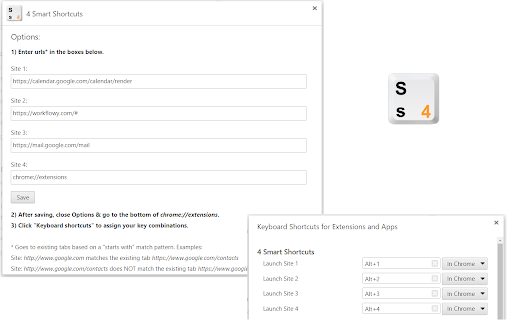
Unduh Berkas CRX Ekstensi 4 Smart Shortcuts
Unduh file ekstensi 4 Smart Shortcuts dalam format crx, pasang ekstensi Chrome secara manual di peramban, atau bagikan file crx dengan teman untuk menginstal ekstensi Chrome dengan mudah.
Petunjuk Penggunaan Ekstensi
                        • 'Smart' keyboard shortcuts won't duplicate existing tabs.
• Great for fullscreen.
• Support for "chrome://" system shortcuts like, chrome://extensions & chrome://apps
• Goes to existing tabs based on a "starts with" matching pattern.
EXAMPLES:
• Shortcut: https://www.google.com goes to the existing tab https://www.google.com/contacts
• Shortcut: https://www.google.com/contacts does NOT go to the existing tab https://www.google.com
Informasi Dasar Ekstensi
| Nama |  4 Smart Shortcuts 4 Smart Shortcuts |
| ID | fmmofgdcmllajpdnnpllmlffogijffan |
| URL Resmi | https://chromewebstore.google.com/detail/4-smart-shortcuts/fmmofgdcmllajpdnnpllmlffogijffan |
| Deskripsi | Define custom keyboard shortcuts for four favorite sites. Goes to a matching tab first. Creates a new tab if none exist. |
| Ukuran File | 12.06 KB |
| Jumlah Instalasi | 124 |
| Versi Saat Ini | 1.4 |
| Terakhir Diperbarui | 2018-03-08 |
| Tanggal Publikasi | 2018-03-07 |
| Penilaian | 5.00/5 Total 5 Penilaian |
| Pengembang | rawbytz |
| [email protected] | |
| Tipe Pembayaran | free |
| Bahasa yang Didukung | en |
| manifest.json | |
{
    "update_url": "https:\/\/clients2.google.com\/service\/update2\/crx",
    "name": "4 Smart Shortcuts",
    "version": "1.4",
    "description": "Define custom keyboard shortcuts for four favorite sites. Goes to a matching tab first. Creates a new tab if none exist.",
    "manifest_version": 2,
    "permissions": [
        "tabs",
        "storage"
    ],
    "icons": {
        "128": "4SS_128.png"
    },
    "background": {
        "persistent": true,
        "scripts": [
            "background.js"
        ]
    },
    "options_ui": {
        "page": "options.html",
        "chrome_style": true
    },
    "commands": {
        "site1": {
            "description": "Launch Site 1"
        },
        "site2": {
            "description": "Launch Site 2"
        },
        "site3": {
            "description": "Launch Site 3"
        },
        "site4": {
            "description": "Launch Site 4"
        }
    }
} | |