Debug-GPT
Your AI-Powered Debugging Assistant.
Apa itu Debug-GPT?
Debug-GPT adalah ekstensi Chrome yang dikembangkan oleh CircleCI, dan fitur utamanya adalah "Your AI-Powered Debugging Assistant.".
Screenshot Ekstensi
Unduh Berkas CRX Ekstensi Debug-GPT
Unduh file ekstensi Debug-GPT dalam format crx, pasang ekstensi Chrome secara manual di peramban, atau bagikan file crx dengan teman untuk menginstal ekstensi Chrome dengan mudah.
Petunjuk Penggunaan Ekstensi
                        Welcome to Debug-GPT – your indispensable debugging companion that transforms the way you tackle complex errors within Chrome DevTools. Powered by advanced artificial intelligence, Debug-GPT reads and deciphers intricate error logs, offering a user-friendly understanding of the root causes and suggesting actionable steps to swiftly resolve issues. You will need an OpenAI token to activate Debug GPT features. Fetch your token on https://platform.openai.com/account/api-keys

Key features:
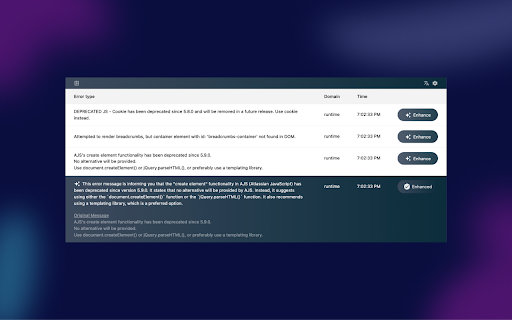
• AI-Powered Decoding: Debug-GPT leverages OpenAI technology to translate cryptic error messages into plain language explanations. Say goodbye to the frustration of deciphering complex logs.
• Actionable Insights: Debug-GPT provides actionable insights, guiding you through the next steps to effectively troubleshoot and resolve issues.
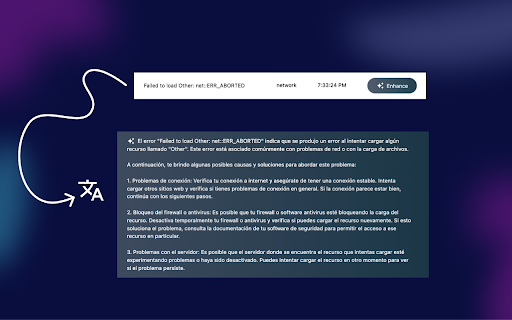
• Language Translations: Break down language barriers with Debug-GPT’s language translation feature. Get error explanations in your preferred language, enhancing accessibility and usability.

Debug-GPT seamlessly integrates into Chrome DevTools, enhancing your debugging workflow without disrupting your development environment. By expediting issue resolution, Debug-GPT helps you maintain high code quality and productivity, freeing you to focus on building exceptional websites.

How to get started
• Install the Debug-GPT Chrome extension from the Chrome Web Store.
• Pin the Debug-GPT extension in the taskbar
• Open Chrome Developer Tools in your browser window (View>Developer>Developer Tools)
• Open the Debug-GPT panel in the Drawer section of the Developer Tools window.
• Click on the Debug-GPT icon in the taskbar. You should get confirmation that an extension is debugging the browser.
• Encounter an error message you’d like to understand better.
• Click the “Enhance” button in the error message panel.

Say hello to a smoother debugging experience and a more productive coding journey.

Note: Debug-GPT is an open-source project developed by CircleCI. Join our community, https://github.com/CircleCI-Public/debug-gpt, and contribute to the evolution of smarter debugging for developers worldwide.
Informasi Dasar Ekstensi
| Nama |  Debug-GPT Debug-GPT |
| ID | gdejebcifoelpfihochmbaoghanjjdbc |
| URL Resmi | https://chromewebstore.google.com/detail/debug-gpt/gdejebcifoelpfihochmbaoghanjjdbc |
| Deskripsi | Your AI-Powered Debugging Assistant. |
| Ukuran File | 90.38 KB |
| Jumlah Instalasi | 141 |
| Versi Saat Ini | 1.0.2 |
| Terakhir Diperbarui | 2024-01-09 |
| Tanggal Publikasi | 2023-09-27 |
| Penilaian | 5.00/5 Total 8 Penilaian |
| Pengembang | CircleCI |
| [email protected] | |
| Tipe Pembayaran | free |
| Situs Ekstensi | https://continuouslabs.circleci.com/ |
| URL Halaman Bantuan | https://github.com/CircleCI-Public/debug-gpt |
| URL Halaman Kebijakan Privasi | https://privacy.circleci.com |
| Bahasa yang Didukung | en-US |
| manifest.json | |
{
    "update_url": "https:\/\/clients2.google.com\/service\/update2\/crx",
    "manifest_version": 3,
    "name": "Debug-GPT",
    "description": "Your AI-Powered Debugging Assistant.",
    "version": "1.0.2",
    "permissions": [
        "debugger",
        "activeTab",
        "storage"
    ],
    "background": {
        "service_worker": "service-worker.js",
        "type": "module"
    },
    "devtools_page": "devtools.html",
    "action": [],
    "icons": {
        "16": "icons\/16.png",
        "48": "icons\/48.png",
        "128": "icons\/128.png"
    }
} | |