Wanscam IP Camera
Monitor your camera without opening new tab.
Apa itu Wanscam IP Camera?
Wanscam IP Camera adalah ekstensi Chrome yang dikembangkan oleh Leon Tuček, dan fitur utamanya adalah "Monitor your camera without opening new tab.".
Screenshot Ekstensi
Unduh Berkas CRX Ekstensi Wanscam IP Camera
Unduh file ekstensi Wanscam IP Camera dalam format crx, pasang ekstensi Chrome secara manual di peramban, atau bagikan file crx dengan teman untuk menginstal ekstensi Chrome dengan mudah.
Petunjuk Penggunaan Ekstensi
                        Unofficial Wanscam Google Chrome extension. Monitor your camera without opening new tab or window.

---------------------------------------------------------------
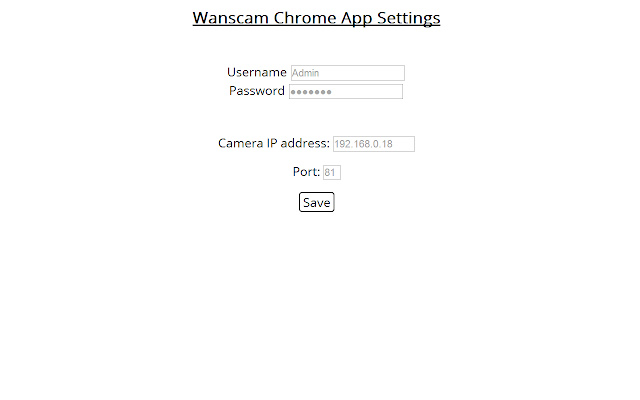
Configuration: Right click on extension icon and go to settings. Enter your camera IP address, port, username and password, click save.

For PTZ go to configuration and choose between 4 and 8 directions, after choosing click save.
---------------------------------------------------------------

Please keep in mind currently this extension works only with local cameras, and doesn't support sound.

v1.0 - Tested on Wanscam JW0009
v1.1 - Minor updates and bug fixes
v1.2 - Added PTZ support, performance improvements
Informasi Dasar Ekstensi
| Nama |  Wanscam IP Camera Wanscam IP Camera |
| ID | heibmgpgjohfbkkhbonnmimpnmjaopcp |
| URL Resmi | https://chrome.google.com/webstore/detail/wanscam-ip-camera/heibmgpgjohfbkkhbonnmimpnmjaopcp |
| Deskripsi | Monitor your camera without opening new tab. |
| Ukuran File | 147 KB |
| Jumlah Instalasi | 5,377 |
| Versi Saat Ini | 1.2 |
| Terakhir Diperbarui | 2015-01-10 |
| Tanggal Publikasi | 2015-01-10 |
| Penilaian | 2.83/5 Total 75 Penilaian |
| Pengembang | Leon Tuček |
| Tipe Pembayaran | free |
| Bahasa yang Didukung | en-US |
| manifest.json | |
{
    "update_url": "https:\/\/clients2.google.com\/service\/update2\/crx",
    "manifest_version": 2,
    "name": "Wanscam IP Camera",
    "options_page": "options.html",
    "description": "Monitor your camera without opening new tab.",
    "icons": {
        "128": "images\/cam-128x128.png",
        "16": "images\/cam-48x48.png",
        "48": "images\/cam-48x48.png"
    },
    "version": "1.2",
    "permissions": [
        "storage"
    ],
    "browser_action": {
        "default_icon": "images\/icon.png",
        "default_popup": "popup.html"
    },
    "content_security_policy": "script-src 'self' https:\/\/ssl.google-analytics.com; object-src 'self'"
} | |