HTML Style Quick Viewer
HTML DOM element style quick viewer
Apa itu HTML Style Quick Viewer?
HTML Style Quick Viewer adalah ekstensi Chrome yang dikembangkan oleh _(:з」∠)_, dan fitur utamanya adalah "HTML DOM element style quick viewer".
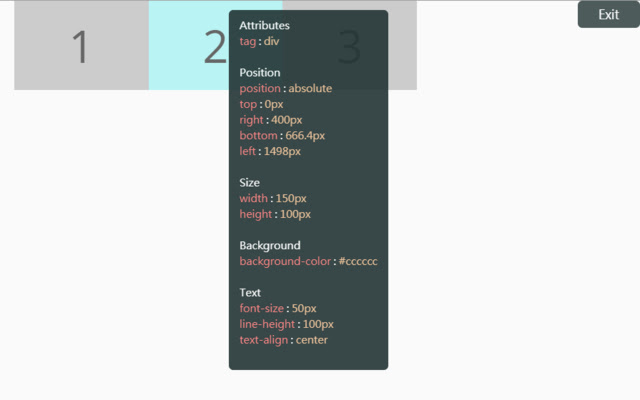
Screenshot Ekstensi
Unduh Berkas CRX Ekstensi HTML Style Quick Viewer
Unduh file ekstensi HTML Style Quick Viewer dalam format crx, pasang ekstensi Chrome secara manual di peramban, atau bagikan file crx dengan teman untuk menginstal ekstensi Chrome dengan mudah.
Petunjuk Penggunaan Ekstensi
                        How about viewing the HTML DOM styles in a different way?
Just move your mouse and it shows the target's styles.

After installation, you may have to reload tabs to for the extension to take effect.

Instructions:
1. Click HTML Style Quick Viewer in the toolbar, then click 'run' button to start.
2. Move mouse to see the element's styles.
3. Mouse left click to close the popup panel.
4. Mouse middle click to pin the popup panel.
5. Click the 'Exit' button at the top-right or click 'Stop' button through the toolbar to stop.
Informasi Dasar Ekstensi
| Nama |  HTML Style Quick Viewer HTML Style Quick Viewer |
| ID | inafmkpmbkldliccdbeieeafnbkcmmap |
| URL Resmi | https://chrome.google.com/webstore/detail/html-style-quick-viewer/inafmkpmbkldliccdbeieeafnbkcmmap |
| Deskripsi | HTML DOM element style quick viewer |
| Ukuran File | 15.88 KB |
| Jumlah Instalasi | 271 |
| Versi Saat Ini | 1.0.2 |
| Terakhir Diperbarui | 2018-08-26 |
| Tanggal Publikasi | 2018-08-26 |
| Penilaian | 5.00/5 Total 3 Penilaian |
| Pengembang | _(:з」∠)_ |
| [email protected] | |
| Tipe Pembayaran | free |
| Bahasa yang Didukung | en |
| manifest.json | |
{
    "update_url": "https:\/\/clients2.google.com\/service\/update2\/crx",
    "name": "HTML Style Quick Viewer",
    "description": "HTML DOM element style quick viewer",
    "version": "1.0.2",
    "permissions": [
        "activeTab"
    ],
    "content_scripts": [
        {
            "matches": [
                "http:\/\/*\/*",
                "https:\/\/*\/*"
            ],
            "js": [
                "content\/content.js"
            ],
            "css": [
                "content\/content.css"
            ],
            "run_at": "document_start"
        }
    ],
    "browser_action": {
        "default_title": "HTML Style Quick Viewer\nRight click (Close)\nMiddle click (Pin)",
        "default_icon": {
            "16": "icons\/icon_16.png",
            "32": "icons\/icon_32.png",
            "48": "icons\/icon_48.png",
            "128": "icons\/icon_128.png"
        },
        "default_popup": "popup\/popup.html"
    },
    "manifest_version": 2
} | |