Alienware New Tab Page HD Brands Themes
Alienware's different HD wallpapers are available each time you open a new tab. This new theme includes clock and more.
Apa itu Alienware New Tab Page HD Brands Themes?
Alienware New Tab Page HD Brands Themes adalah ekstensi Chrome yang dikembangkan oleh http://mytab.me, dan fitur utamanya adalah "Alienware's different HD wallpapers are available each time you open a new tab. This new theme includes clock and more.".
Screenshot Ekstensi
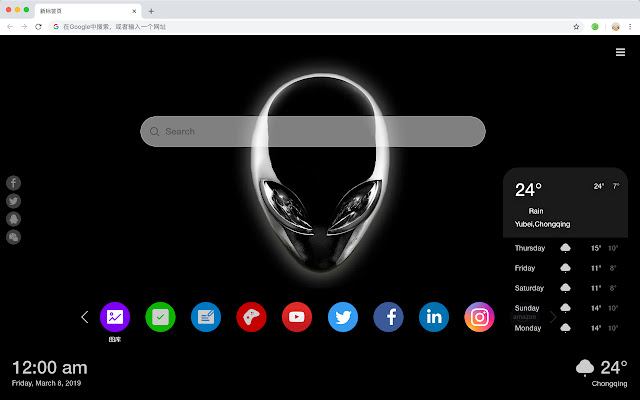


Unduh Berkas CRX Ekstensi Alienware New Tab Page HD Brands Themes
Unduh file ekstensi Alienware New Tab Page HD Brands Themes dalam format crx, pasang ekstensi Chrome secara manual di peramban, atau bagikan file crx dengan teman untuk menginstal ekstensi Chrome dengan mudah.
Petunjuk Penggunaan Ekstensi
                        Dell Alien notebook, also known as Dell Alienware notebook, has M11x, M13X, M14x, M15X, M17X and M18x six series, the price is generally more than 10,000 yuan.

Here's a list of other features you'll get:
 - To-do list
 - Set your favorite wallpapers
 - Discover new hot spots
 - Bookmarks
 - Social network notifications
 - High quality wallpaper for each new label
 - Clock showing date and time
 - Weather widget
 - Open to search
Informasi Dasar Ekstensi
| Nama |  Alienware New Tab Page HD Brands Themes Alienware New Tab Page HD Brands Themes |
| ID | kbgjnmbhakcjlonoaoifiiiaipnamhjl |
| URL Resmi | https://chrome.google.com/webstore/detail/alienware-new-tab-page-hd/kbgjnmbhakcjlonoaoifiiiaipnamhjl |
| Deskripsi | Alienware's different HD wallpapers are available each time you open a new tab. This new theme includes clock and more. |
| Ukuran File | 25.18 KB |
| Jumlah Instalasi | 52 |
| Versi Saat Ini | 1.1.1.0 |
| Terakhir Diperbarui | 2019-06-27 |
| Tanggal Publikasi | 2019-06-27 |
| Pengembang | http://mytab.me |
| Tipe Pembayaran | free |
| Bahasa yang Didukung | en,zh-CN,zh-TW |
| manifest.json | |
{
    "name": "__MSG_ext_name__",
    "manifest_version": 2,
    "description": "__MSG_ext_desc__",
    "browser_action": {
        "default_icon": {
            "48": "icons\/48.png"
        },
        "default_title": "__MSG_ext_name__"
    },
    "chrome_url_overrides": {
        "newtab": "pages\/newtab\/index.html"
    },
    "background": {
        "scripts": [
            "app.js",
            "pages\/background\/index.js"
        ],
        "persistent": false
    },
    "default_locale": "en",
    "icons": {
        "48": "icons\/48.png",
        "128": "icons\/128.png"
    },
    "minimum_chrome_version": "57",
    "offline_enabled": true,
    "update_url": "https:\/\/clients2.google.com\/service\/update2\/crx",
    "version": "1.1.1.0"
} | |