QWiki
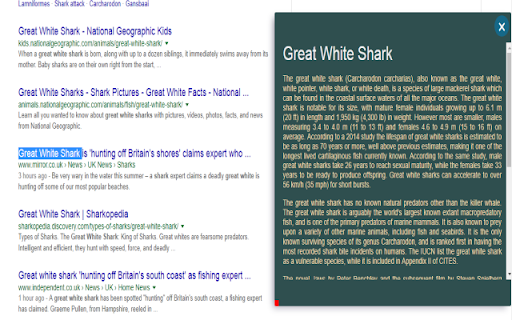
Search for any word or a string of words on your current page from Wikipedia without leaving the page
Apa itu QWiki?
QWiki adalah ekstensi Chrome yang dikembangkan oleh checkmate_bitch, dan fitur utamanya adalah "Search for any word or a string of words on your current page from Wikipedia without leaving the page".
Screenshot Ekstensi



Unduh Berkas CRX Ekstensi QWiki
Unduh file ekstensi QWiki dalam format crx, pasang ekstensi Chrome secara manual di peramban, atau bagikan file crx dengan teman untuk menginstal ekstensi Chrome dengan mudah.
Petunjuk Penggunaan Ekstensi
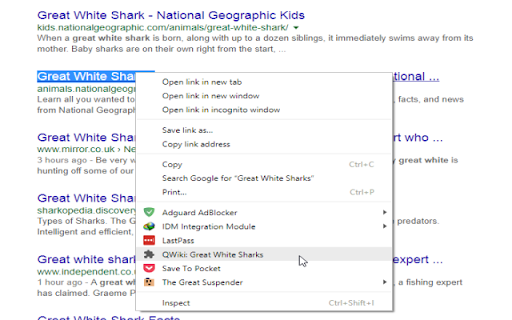
                        Whatever you're browsing there's at least one word that intrigues you. You can just select this word and let the extension serve up the Wikipedia result for the word(s)

It's easy to get started:

1) Select the word or string of words.
2) Right click and select QWiki
3) OR You can hit the keyboard hotkey combination Alt+Shift+y after selecting the word
4) If it is a single word a double click would also produce desired results

****** Update on Features ******
1) Added an Options Menu which can be accessed by clicking Extension Icon next to address bar and then clicking on hamburger or 3 stripe button.
2) Double Click is optional and disabled by default
3) Customization in terms of color. User can create his/her own color scheme.

https://github.com/checkmate-bitch/QWiki
Informasi Dasar Ekstensi
| Nama |  QWiki QWiki |
| ID | lcedjopbmngfbhipnhelglpblmombagc |
| URL Resmi | https://chromewebstore.google.com/detail/qwiki/lcedjopbmngfbhipnhelglpblmombagc |
| Deskripsi | Search for any word or a string of words on your current page from Wikipedia without leaving the page |
| Ukuran File | 645 KB |
| Jumlah Instalasi | 14 |
| Versi Saat Ini | 1.1.0 |
| Terakhir Diperbarui | 2017-07-21 |
| Tanggal Publikasi | 2017-07-21 |
| Penilaian | 4.80/5 Total 5 Penilaian |
| Pengembang | checkmate_bitch |
| [email protected] | |
| Tipe Pembayaran | free |
| Situs Ekstensi | https://github.com/checkmate-bitch/QWiki |
| Bahasa yang Didukung | en |
| manifest.json | |
{
    "update_url": "https:\/\/clients2.google.com\/service\/update2\/crx",
    "manifest_version": 2,
    "name": "QWiki",
    "description": "Search for any word or a string of words on your current page from Wikipedia without leaving the page",
    "version": "1.1.0",
    "background": {
        "scripts": [
            "background.js"
        ]
    },
    "browser_action": {
        "default_popup": "Wiki_Viewer.html",
        "default_title": "QWiki",
        "default_icon": {
            "16": "images\/icon16.png",
            "48": "images\/icon48.png",
            "128": "images\/icon128.png"
        }
    },
    "content_scripts": [
        {
            "css": [
                "inject.css"
            ],
            "matches": [
                "http:\/\/*\/*",
                "https:\/\/*\/*"
            ],
            "js": [
                "jquery.min.js",
                "inject.js"
            ]
        }
    ],
    "commands": {
        "_execute_browser_action": {
            "suggested_key": {
                "default": "Alt+Q"
            },
            "description": "open popup"
        },
        "side_panel": {
            "suggested_key": {
                "default": "Alt+Shift+Y"
            },
            "description": "open side panel"
        }
    },
    "options_page": "options.html",
    "permissions": [
        "activeTab",
        "tabs",
        "contextMenus",
        "https:\/\/en.wikipedia.org\/*",
        "storage"
    ]
} | |