PDF Bookmarker
Bookmark PDF pages for easy access
Apa itu PDF Bookmarker?
PDF Bookmarker adalah ekstensi Chrome yang dikembangkan oleh Michael Truong, dan fitur utamanya adalah "Bookmark PDF pages for easy access".
Screenshot Ekstensi
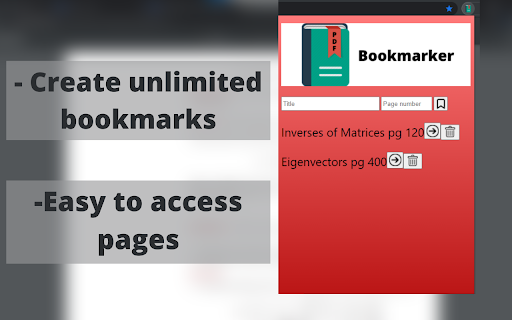
Unduh Berkas CRX Ekstensi PDF Bookmarker
Unduh file ekstensi PDF Bookmarker dalam format crx, pasang ekstensi Chrome secara manual di peramban, atau bagikan file crx dengan teman untuk menginstal ekstensi Chrome dengan mudah.
Petunjuk Penggunaan Ekstensi
                        Read PDFs efficiently with PDF Bookmarker.

Have you ever used a PDF version of a textbook and hated manually switching back and forth between pages? PDF Bookmarker solves this problem by allowing users to title and bookmark specific pages in the PDF.

Using PDF Bookmarker:
- simply enter in the page number and title of what you want to call the bookmark
(title optional) and it will save onto the extension for easy access
-click the bookmark button to bookmark your desired page
- click the arrow button to access the page, and the delete button to delete the bookmark

Created by Michael Truong
Informasi Dasar Ekstensi
| Nama |  PDF Bookmarker PDF Bookmarker |
| ID | lcjfmnolgglggffdhkpfgiobobfmbhbd |
| URL Resmi | https://chromewebstore.google.com/detail/pdf-bookmarker/lcjfmnolgglggffdhkpfgiobobfmbhbd |
| Deskripsi | Bookmark PDF pages for easy access |
| Ukuran File | 141 KB |
| Jumlah Instalasi | 666 |
| Versi Saat Ini | 2.0.1 |
| Terakhir Diperbarui | 2022-01-23 |
| Tanggal Publikasi | 2021-06-24 |
| Penilaian | 3.50/5 Total 4 Penilaian |
| Pengembang | Michael Truong |
| [email protected] | |
| Tipe Pembayaran | free |
| Bahasa yang Didukung | en-US |
| manifest.json | |
{
    "update_url": "https:\/\/clients2.google.com\/service\/update2\/crx",
    "name": "PDF Bookmarker",
    "description": "Bookmark PDF pages for easy access",
    "version": "2.0.1",
    "manifest_version": 3,
    "background": {
        "service_worker": "background.js"
    },
    "permissions": [
        "storage",
        "tabs"
    ],
    "action": {
        "default_popup": "popup.html",
        "default_icon": {
            "16": "\/images\/PDF16.png",
            "32": "\/images\/PDF32.png",
            "48": "\/images\/PDF48.png",
            "128": "\/images\/PDF128.png"
        }
    },
    "icons": {
        "16": "\/images\/PDF16.png",
        "32": "\/images\/PDF32.png",
        "48": "\/images\/PDF48.png",
        "128": "\/images\/PDF128.png"
    }
} | |