HKUL Search Assistant
Search the HKU Libraries Catalogue without leaving your current page
Apa itu HKUL Search Assistant?
HKUL Search Assistant adalah ekstensi Chrome yang dikembangkan oleh HKU Libraries, dan fitur utamanya adalah "Search the HKU Libraries Catalogue without leaving your current page".
Screenshot Ekstensi

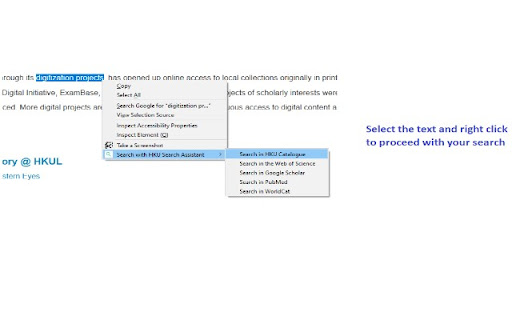
Unduh Berkas CRX Ekstensi HKUL Search Assistant
Unduh file ekstensi HKUL Search Assistant dalam format crx, pasang ekstensi Chrome secara manual di peramban, atau bagikan file crx dengan teman untuk menginstal ekstensi Chrome dengan mudah.
Petunjuk Penggunaan Ekstensi
                        HKUL Search Assistant helps you to search HKU Libraries Catalogue and other popular search engines within your current page.

Access from a non-HKUL website, such as a Publisher’s website, would not trigger the HKUL login page, and you will be asked to pay for access. HKUL Search Assistant identifies your affiliation with HKUL, you will need to route via the EZProxy server.
Informasi Dasar Ekstensi
| Nama |  HKUL Search Assistant HKUL Search Assistant |
| ID | lfjmkaiddobaebgokockcncpchpbnoad |
| URL Resmi | https://chromewebstore.google.com/detail/hkul-search-assistant/lfjmkaiddobaebgokockcncpchpbnoad |
| Deskripsi | Search the HKU Libraries Catalogue without leaving your current page |
| Ukuran File | 2.01 MB |
| Jumlah Instalasi | 4,000 |
| Versi Saat Ini | 3.0.16 |
| Terakhir Diperbarui | 2024-02-15 |
| Tanggal Publikasi | 2020-08-03 |
| Penilaian | 5.00/5 Total 2 Penilaian |
| Pengembang | HKU Libraries |
| [email protected] | |
| Tipe Pembayaran | free |
| Situs Ekstensi | https://lib.hku.hk/ |
| Bahasa yang Didukung | en |
| manifest.json | |
{
    "update_url": "https:\/\/clients2.google.com\/service\/update2\/crx",
    "manifest_version": 3,
    "name": "HKUL Search Assistant",
    "description": "Search the HKU Libraries Catalogue without leaving your current page",
    "version": "3.0.16",
    "author": "HKU Libraries",
    "content_security_policy": {
        "extension_pages": "script-src 'self'; object-src 'self';"
    },
    "action": {
        "default_icon": "images\/icons\/icon128.png",
        "default_popup": "popup.html",
        "default_title": "HKUL Search Assistant"
    },
    "icons": {
        "16": "images\/icons\/icon16.png",
        "48": "images\/icons\/icon48.png",
        "128": "images\/icons\/icon128.png"
    },
    "background": {
        "service_worker": "background.js"
    },
    "permissions": [
        "contextMenus",
        "activeTab",
        "tabs",
        "storage"
    ]
} | |