MUSE login
Automatically log in to shef.ac.uk without typing your details!
Apa itu MUSE login?
MUSE login adalah ekstensi Chrome yang dikembangkan oleh georgepowell10, dan fitur utamanya adalah "Automatically log in to shef.ac.uk without typing your details!".
Screenshot Ekstensi
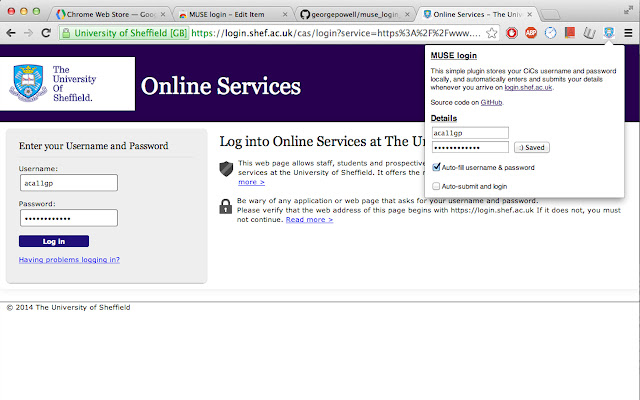
Unduh Berkas CRX Ekstensi MUSE login
Unduh file ekstensi MUSE login dalam format crx, pasang ekstensi Chrome secara manual di peramban, atau bagikan file crx dengan teman untuk menginstal ekstensi Chrome dengan mudah.
Petunjuk Penggunaan Ekstensi
                        Fed up of typing your MUSE login every single freaking time? Why can't chrome remember your password or keep you signed in like every other website? Now it can! Introducing the MUSE login chrome extension. The extension automatically fills in and submits the login form whenever you arrive on the university login page, so you don't have to!

Fully open source and free forever at https://github.com/georgepowell/muse_login_chrome

Extension does not access the internet and stores your details safely on the local machine. Feel free to check out the source code if you have any doubts.
Informasi Dasar Ekstensi
| Nama |  MUSE login MUSE login |
| ID | lgemcjddblhggnfeigkgoefcedkhmdnl |
| URL Resmi | https://chrome.google.com/webstore/detail/muse-login/lgemcjddblhggnfeigkgoefcedkhmdnl |
| Deskripsi | Automatically log in to shef.ac.uk without typing your details! |
| Ukuran File | 211 KB |
| Jumlah Instalasi | 31 |
| Versi Saat Ini | 0.1 |
| Terakhir Diperbarui | 2014-03-03 |
| Tanggal Publikasi | 2014-03-03 |
| Penilaian | 5.00/5 Total 1 Penilaian |
| Pengembang | georgepowell10 |
| Tipe Pembayaran | free |
| Bahasa yang Didukung | en-GB |
| manifest.json | |
{
    "update_url": "https:\/\/clients2.google.com\/service\/update2\/crx",
    "name": "MUSE login",
    "version": "0.1",
    "description": "Automatically log in to shef.ac.uk without typing your details!",
    "content_scripts": [
        {
            "js": [
                "jquery.js",
                "content_script.js"
            ],
            "matches": [
                "http:\/\/login.shef.ac.uk\/*",
                "https:\/\/login.shef.ac.uk\/*"
            ]
        }
    ],
    "permissions": [
        "declarativeContent",
        "storage"
    ],
    "icons": {
        "19": "icon-19.png",
        "48": "icon-48.png",
        "128": "icon-128.png"
    },
    "browser_action": {
        "default_icon": "icon-19.png",
        "default_title": "Muse Login!",
        "default_popup": "default_page.html"
    },
    "manifest_version": 2
} | |