Letterboxd Shortcuts
Keyboard shortcuts for Letterboxd.
Apa itu Letterboxd Shortcuts?
Letterboxd Shortcuts adalah ekstensi Chrome yang dikembangkan oleh Alan Dours, dan fitur utamanya adalah "Keyboard shortcuts for Letterboxd.".
Screenshot Ekstensi

Unduh Berkas CRX Ekstensi Letterboxd Shortcuts
Unduh file ekstensi Letterboxd Shortcuts dalam format crx, pasang ekstensi Chrome secara manual di peramban, atau bagikan file crx dengan teman untuk menginstal ekstensi Chrome dengan mudah.
Petunjuk Penggunaan Ekstensi
                        Log/review

Shortcuts for logging/reviewing films.

N — Log new film
L — Like/unlike film
Enter — Submit review/diary entry
Esc — Close modal window


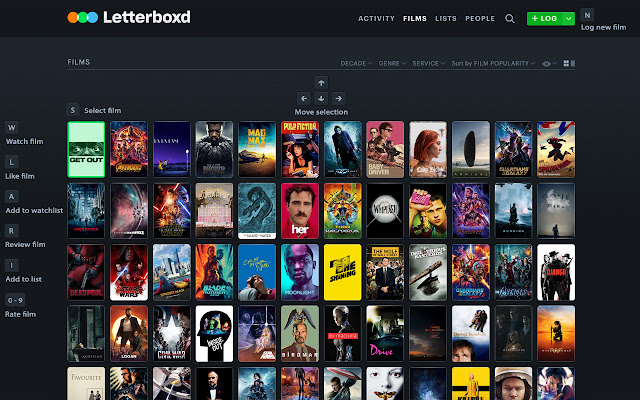
Selecting films

Shortcuts that work on any page that has films.

S — Select/deselect films
↑ ↓ → ← — Move selection
Home — Move selection to the first film of the page
End — Move selection to the last film of the page
Enter — Go to the selected film page


Films

Shortcuts that only work on film pages or when a film is selected.

W — Watch/unwatch film
L — Like/unlike film
A — Add/remove from the watchlist
X — Remove the selected film from the watchlist (only when a film is selected)
R — Review/log film
I — Add film to a list
0-9 — Rate film: Numbers 1 to 9 equals ½ ★ each / 0 equals ★★★★★
Z — Remove rating


Diary

Shortcuts that only work when viewing your own diary page.

E — Edit the selected review/diary entry
D or Delete — Delete the selected review/diary entry / Confirm deleting review/diary entry
Informasi Dasar Ekstensi
| Nama |  Letterboxd Shortcuts Letterboxd Shortcuts |
| ID | lpopedcebfdkhelkoiakllmilggjcope |
| URL Resmi | https://chrome.google.com/webstore/detail/letterboxd-shortcuts/lpopedcebfdkhelkoiakllmilggjcope |
| Deskripsi | Keyboard shortcuts for Letterboxd. |
| Ukuran File | 14.6 KB |
| Jumlah Instalasi | 89 |
| Versi Saat Ini | 1.1.2 |
| Terakhir Diperbarui | 2020-07-28 |
| Tanggal Publikasi | 2019-08-04 |
| Penilaian | 5.00/5 Total 2 Penilaian |
| Pengembang | Alan Dours |
| [email protected] | |
| Tipe Pembayaran | free |
| Situs Ekstensi | https://github.com/alandours/letterboxd-shortcuts |
| Bahasa yang Didukung | en-US |
| manifest.json | |
{
    "update_url": "https:\/\/clients2.google.com\/service\/update2\/crx",
    "manifest_version": 2,
    "name": "Letterboxd Shortcuts",
    "description": "Keyboard shortcuts for Letterboxd.",
    "version": "1.1.2",
    "permissions": [
        "activeTab"
    ],
    "icons": {
        "16": "icons\/icon-16.png",
        "32": "icons\/icon-32.png",
        "48": "icons\/icon-48.png"
    },
    "background": {
        "scripts": [
            "background.js"
        ]
    },
    "content_scripts": [
        {
            "matches": [
                "*:\/\/*.letterboxd.com\/*"
            ],
            "include_globs": [
                "*letterboxd.com\/*\/films\/diary*",
                "*letterboxd.com\/*\/tag\/*\/diary*"
            ],
            "js": [
                "js\/shortcutsMain.js",
                "js\/shortcutsDiary.js"
            ],
            "css": [
                "css\/shortcuts.css"
            ]
        },
        {
            "matches": [
                "*:\/\/*.letterboxd.com\/*"
            ],
            "include_globs": [
                "*letterboxd.com\/film\/*",
                "*letterboxd.com\/*\/film\/*"
            ],
            "js": [
                "js\/shortcutsMain.js",
                "js\/shortcutsFilm.js"
            ]
        },
        {
            "matches": [
                "*:\/\/*.letterboxd.com\/*"
            ],
            "exclude_globs": [
                "*letterboxd.com\/film\/*",
                "*letterboxd.com\/*\/film\/*",
                "*letterboxd.com\/*\/films\/diary*",
                "*letterboxd.com\/*\/tag\/*\/diary*"
            ],
            "js": [
                "js\/shortcutsMain.js",
                "js\/shortcutsFilmGrid.js"
            ],
            "css": [
                "css\/shortcuts.css"
            ]
        }
    ]
} | |