YouTube Timed Comments
Show comments with timestamps
Apa itu YouTube Timed Comments?
YouTube Timed Comments adalah ekstensi Chrome yang dikembangkan oleh lerxst, dan fitur utamanya adalah "Show comments with timestamps".
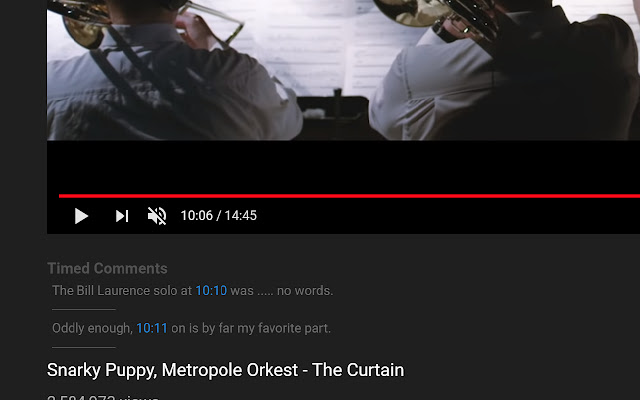
Screenshot Ekstensi
Unduh Berkas CRX Ekstensi YouTube Timed Comments
Unduh file ekstensi YouTube Timed Comments dalam format crx, pasang ekstensi Chrome secara manual di peramban, atau bagikan file crx dengan teman untuk menginstal ekstensi Chrome dengan mudah.
Petunjuk Penggunaan Ekstensi
                        See comments that have timestamps, show up at the appropriate time.

Note: Only comments that have loaded on the page will show up.
Informasi Dasar Ekstensi
| Nama |  YouTube Timed Comments YouTube Timed Comments |
| ID | mfmjnhncafdcdegeiamnjpnjgmmkkaal |
| URL Resmi | https://chrome.google.com/webstore/detail/youtube-timed-comments/mfmjnhncafdcdegeiamnjpnjgmmkkaal |
| Deskripsi | Show comments with timestamps |
| Ukuran File | 96.02 KB |
| Jumlah Instalasi | 159 |
| Versi Saat Ini | 0.0.0.1 |
| Terakhir Diperbarui | 2019-09-03 |
| Tanggal Publikasi | 2019-09-03 |
| Penilaian | 3.33/5 Total 3 Penilaian |
| Pengembang | lerxst |
| [email protected] | |
| Tipe Pembayaran | free |
| Bahasa yang Didukung | en-US |
| manifest.json | |
{
    "update_url": "https:\/\/clients2.google.com\/service\/update2\/crx",
    "manifest_version": 2,
    "name": "YouTube Timed Comments",
    "description": "Show comments with timestamps",
    "version": "0.0.0.1",
    "content_scripts": [
        {
            "matches": [
                "https:\/\/www.youtube.com\/*"
            ],
            "js": [
                "third-party-scripts\/jquery-3.3.1.js",
                "third-party-scripts\/arrive.min.js",
                "third-party-scripts\/clamp.min.js",
                "content-script.js"
            ]
        }
    ],
    "permissions": [
        "contextMenus",
        "webNavigation",
        "tabs"
    ],
    "background": {
        "scripts": [
            "event-page.js"
        ],
        "persistent": false
    },
    "web_accessible_resources": [
        "third-party-scripts\/jquery-3.3.1.js",
        "third-party-scripts\/mustache.min.js",
        "third-party-scripts\/arrive.min.js",
        "third-party-scripts\/clamp.min.js",
        "page-script.js"
    ],
    "icons": {
        "16": "icons\/icon-16.png",
        "32": "icons\/icon-32.png",
        "192": "icons\/icon-192.png"
    }
} | |