Keyboard Control for Chrome™
Keyboard shortcuts for navigation and control. Vim like bindings.
Apa itu Keyboard Control for Chrome™?
Keyboard Control for Chrome™ adalah ekstensi Chrome yang dikembangkan oleh 安東邦泰, dan fitur utamanya adalah "Keyboard shortcuts for navigation and control. Vim like bindings.".
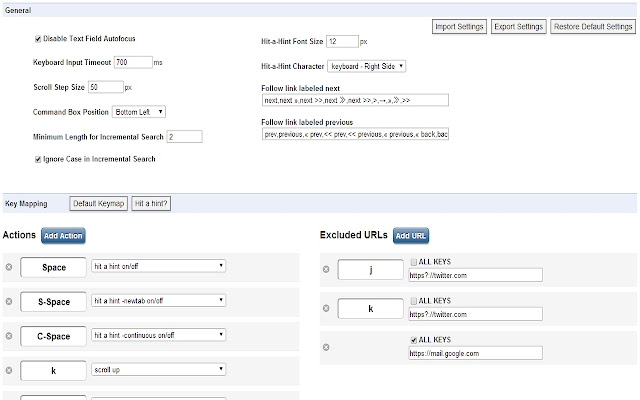
Screenshot Ekstensi


Unduh Berkas CRX Ekstensi Keyboard Control for Chrome™
Unduh file ekstensi Keyboard Control for Chrome™ dalam format crx, pasang ekstensi Chrome secara manual di peramban, atau bagikan file crx dengan teman untuk menginstal ekstensi Chrome dengan mudah.
Petunjuk Penggunaan Ekstensi
                        keyboard shortcuts for navigation and control.
Vim keybindings extension.


No ads, no spyware.

v9.3
    Deprecate and Remove KeyboardEvent.keyIdenfitier (Chrome 54)

v9.2
    execute scripts
    alias mode (localstorage -> bookmarks)

v8.8 bugfix (scrolling)
v8.3 multi link opener
v8.0 added some commands
v7.0
    smooth scroll
    screen capture

v6.1 added show clock
v5.0 added get text
v4.3 added extension manager


**********NOTE**********
Google does not allow extensions to run on built-in Chrome pages.
(Setting page and New Tab page)


---hit a hint---
Hit-a-Hint
Hit-a-Hint -newtab
Hit-a-Hint -continuous


---scroll---
scroll up
scroll down
scroll left
scroll right
scroll to top
scroll to bottom
scroll down full page
scroll up full page
scroll up half page
scroll up half page


---select tab---
select first tab
select last tab
select left tab
select right tab
select next window


---history---
forward in history
back in history


---search web---
search web
search web in new tab


---tab list---
show tabList


---open---
open bookmark
open bookmark in new tab
open history entry
open history entry in new tab
open URL
open URL in new tab
open URL in new tab background


---focus---
focus first text input
blur focus
focus next editable element
focus previous editable element


---close/restore---
close current tab
close left tabs
close right tabs
close other tabs
close current window
restore closed tab


---pin/unpin---
pin/unpin tab


---create---
create new tab
create new tab background
create new window


---to clipboard---
copy current URL
copy url and title
copy url and title as a tag
URL Shortener


---link label---
follow link labeled next
follow link labeled previous


---go to---
go to parent dir
go to root


---mark---
set mark
jump to mark


---split window---
split window vertically
split window horizontally


---reload---
reload
cacheless reload
reload all tabs


---search text---
search mode forward
search mode backward


---URL Alias---
URL alias mode


---sort tab---
sort tab (title)
sort tab (URL)
sort tab (id)


---screenshot---
full page screen
visible part of the page


---etc----
duplicate tab
store/load tabs
save as MHTML
options page
Informasi Dasar Ekstensi
| Nama |  Keyboard Control for Chrome™ Keyboard Control for Chrome™ |
| ID | mhofehfbkjmeldlgkbleegeffhaocceg |
| URL Resmi | https://chrome.google.com/webstore/detail/keyboard-control-for-chro/mhofehfbkjmeldlgkbleegeffhaocceg |
| Deskripsi | Keyboard shortcuts for navigation and control. Vim like bindings. |
| Ukuran File | 830 KB |
| Jumlah Instalasi | 4,000 |
| Versi Saat Ini | 9.4 |
| Terakhir Diperbarui | 2018-02-13 |
| Tanggal Publikasi | 2018-02-13 |
| Penilaian | 3.94/5 Total 35 Penilaian |
| Pengembang | 安東邦泰 |
| Tipe Pembayaran | free |
| Bahasa yang Didukung | en |
| manifest.json | |
{
"update_url": "https:\/\/clients2.google.com\/service\/update2\/crx",
"manifest_version": 2,
"minimum_chrome_version": "43",
"name": "Keyboard Control for Chrome\u2122",
"description": "Keyboard shortcuts for navigation and control. Vim like bindings.",
"background": {
"scripts": [
"js\/background.js"
],
"persistent": false
},
"content_scripts": [
{
"all_frames": true,
"run_at": "document_start",
"js": [
"js\/contentscript.js"
],
"matches": [
" | |