QuizCards: World Capitals
Use these interactive browser-based flash cards to easily learn the world capitals.
Apa itu QuizCards: World Capitals?
QuizCards: World Capitals adalah ekstensi Chrome yang dikembangkan oleh https://www.quizcards.info, dan fitur utamanya adalah "Use these interactive browser-based flash cards to easily learn the world capitals.".
Screenshot Ekstensi
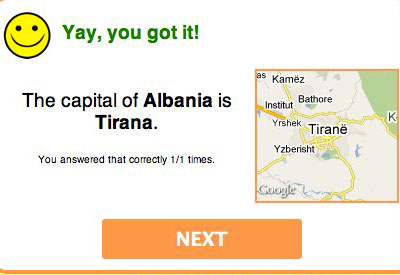
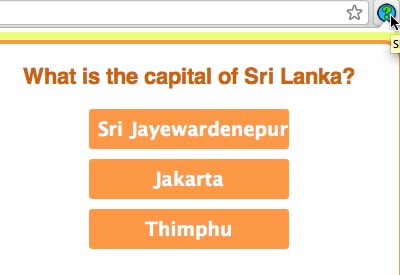

Unduh Berkas CRX Ekstensi QuizCards: World Capitals
Unduh file ekstensi QuizCards: World Capitals dalam format crx, pasang ekstensi Chrome secara manual di peramban, atau bagikan file crx dengan teman untuk menginstal ekstensi Chrome dengan mudah.
Petunjuk Penggunaan Ekstensi
                        This extension puts a icon on your browser bar and whenever you click that icon, you're presented with a question about the capitals of the world. It remembers what you answer correctly and incorrectly, and uses those statistics to figure out what cards to show you more often.

A fun and educational way to learn geography while waiting for websites to load. :)
Informasi Dasar Ekstensi
| Nama |  QuizCards: World Capitals QuizCards: World Capitals |
| ID | nikenaeclebghemphbkfedjndafkfjan |
| URL Resmi | https://chromewebstore.google.com/detail/quizcards-world-capitals/nikenaeclebghemphbkfedjndafkfjan |
| Deskripsi | Use these interactive browser-based flash cards to easily learn the world capitals. |
| Ukuran File | 2.25 MB |
| Jumlah Instalasi | 276 |
| Versi Saat Ini | 3.0.0 |
| Terakhir Diperbarui | 2022-07-13 |
| Tanggal Publikasi | 2013-06-15 |
| Penilaian | 4.11/5 Total 9 Penilaian |
| Pengembang | https://www.quizcards.info |
| [email protected] | |
| Tipe Pembayaran | free |
| Situs Ekstensi | https://github.com/pamelafox/chrome-cards |
| URL Halaman Bantuan | https://github.com/pamelafox/chrome-cards/issues |
| Bahasa yang Didukung | en |
| manifest.json | |
{
    "update_url": "https:\/\/clients2.google.com\/service\/update2\/crx",
    "name": "QuizCards: World Capitals",
    "version": "3.0.0",
    "manifest_version": 3,
    "description": "Use these interactive browser-based flash cards to easily learn the world capitals.",
    "permissions": [
        "storage",
        "alarms"
    ],
    "background": {
        "service_worker": "background.js"
    },
    "icons": {
        "128": "icon_128.png"
    },
    "action": {
        "default_title": "Show the next flash card!",
        "default_icon": "browser_icon.png",
        "default_popup": "popup.html"
    }
} | |