Zoho CRM inside WApp Web
Access & Manage Zoho CRM users inside WApp Web for contacts. Add notes to Zoho CRM users directly from WApp
Apa itu Zoho CRM inside WApp Web?
Zoho CRM inside WApp Web adalah ekstensi Chrome yang dikembangkan oleh https://www.ulgebra.com, dan fitur utamanya adalah "Access & Manage Zoho CRM users inside WApp Web for contacts. Add notes to Zoho CRM users directly from WApp".
Screenshot Ekstensi


Unduh Berkas CRX Ekstensi Zoho CRM inside WApp Web
Unduh file ekstensi Zoho CRM inside WApp Web dalam format crx, pasang ekstensi Chrome secara manual di peramban, atau bagikan file crx dengan teman untuk menginstal ekstensi Chrome dengan mudah.
Petunjuk Penggunaan Ekstensi
                        Associate and manage Zoho CRM contacts from WA Web to simplify communication. Access the abundant features listed below.

- Contact Addition into Zoho CRM
Create Leads, Contacts & Deals within Zoho CRM for contacts available on WA Web and view the respective contacts within Zoho CRM.

- Contact Details
Go through the contact details within WA Web.

- Contact Search
Search for a number on WA Web to view the Contacts, Leads or Accounts associated with the contact.

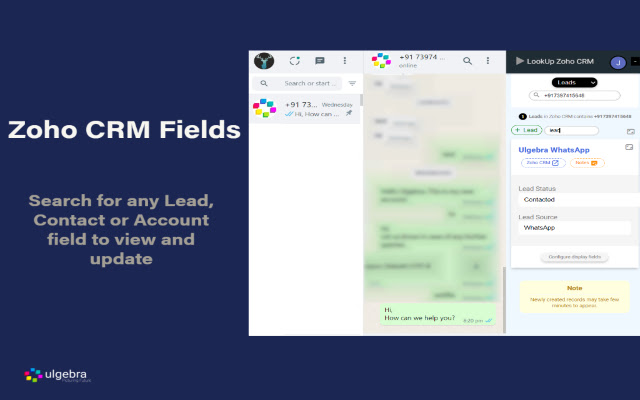
- Field Search
Search for any Zoho CRM field inside WA Web. You can also edit any field as and when required.

- Configure Displayed Fields
Using the ‘Configure display fields’ option customize the Zoho CRM fields to be visible on WA Web.

- View Zoho CRM Fields
Access all the Zoho CRM fields using the 'Show hidden fields' options.

- Notes
Stay up to date with the happenings any contact by adding notes WA Web

View the complete details through the link below:
https://apps.ulgebra.com/zoho/crm/zoho-crm-inside-whatsapp-web_1

Contact us at [email protected] in case of any assistance required.


Disclaimer:
This Chrome plugin is not endorsed or certified by WhatsApp Inc or Zoho CRM.

This is an unofficial enhancement tool for WhatsApp Web.

Our Extension Privacy policy:
https://ulgebra.com/privacy-policy/chrome-extensions/wa-web-zoho-crm.html
Informasi Dasar Ekstensi
| Nama |  Zoho CRM inside WApp Web Zoho CRM inside WApp Web |
| ID | njeihbodihkkobpnmekmkplikbkmehed |
| URL Resmi | https://chrome.google.com/webstore/detail/zoho-crm-inside-wapp-web/njeihbodihkkobpnmekmkplikbkmehed |
| Deskripsi | Access & Manage Zoho CRM users inside WApp Web for contacts. Add notes to Zoho CRM users directly from WApp |
| Ukuran File | 120 KB |
| Jumlah Instalasi | 962 |
| Versi Saat Ini | 5.0 |
| Terakhir Diperbarui | 2022-09-02 |
| Tanggal Publikasi | 2020-09-15 |
| Pengembang | https://www.ulgebra.com |
| [email protected] | |
| Tipe Pembayaran | free |
| Situs Ekstensi | https://apps.ulgebra.com/zoho/crm/zoho-crm-inside-whatsapp-web_1 |
| URL Halaman Bantuan | https://desk.zoho.com/portal/ulgebra/en/newticket |
| URL Halaman Kebijakan Privasi | https://apps.ulgebra.com/privacy-policy |
| Bahasa yang Didukung | en |
| manifest.json | |
{
    "update_url": "https:\/\/clients2.google.com\/service\/update2\/crx",
    "name": "Zoho CRM inside WApp Web",
    "version": "5.0",
    "description": "Access & Manage Zoho CRM users inside WApp Web for contacts. Add notes to Zoho CRM users directly from WApp",
    "permissions": [
        "storage",
        "tabs",
        "https:\/\/*.zappsusercontent.com\/*",
        "https:\/\/platform.zoho.com\/*",
        "https:\/\/platform.zoho.in\/*",
        "https:\/\/platform.zoho.eu\/*",
        "https:\/\/platform.zoho.com.au\/*",
        "https:\/\/platform.zoho.com.cn\/*"
    ],
    "options_page": "popup.html",
    "background": {
        "scripts": [
            "background.js"
        ],
        "persistent": true
    },
    "content_scripts": [
        {
            "run_at": "document_end",
            "matches": [
                "https:\/\/web.whatsapp.com\/*"
            ],
            "js": [
                "jquery.min.js",
                "contentScript.js"
            ]
        }
    ],
    "externally_connectable": {
        "matches": [
            "https:\/\/*.zappsusercontent.com\/*",
            "https:\/\/ulgebra-cdn-cicd-crm-msgbrd.gitlab.io\/*",
            "https:\/\/web.whatsapp.com\/*",
            "https:\/\/app.azurna.com\/*"
        ]
    },
    "page_action": {
        "default_popup": "popup.html",
        "default_icon": {
            "16": "images\/whatsapp-business-logo-16.png",
            "32": "images\/whatsapp-business-logo-32.png",
            "48": "images\/whatsapp-business-logo-48.png",
            "128": "images\/whatsapp-business-logo-128.png"
        }
    },
    "icons": {
        "16": "images\/whatsapp-business-logo-16.png",
        "32": "images\/whatsapp-business-logo-32.png",
        "48": "images\/whatsapp-business-logo-48.png",
        "128": "images\/whatsapp-business-logo-128.png"
    },
    "web_accessible_resources": [
        "images\/*"
    ],
    "manifest_version": 2
} | |