Cite Trove
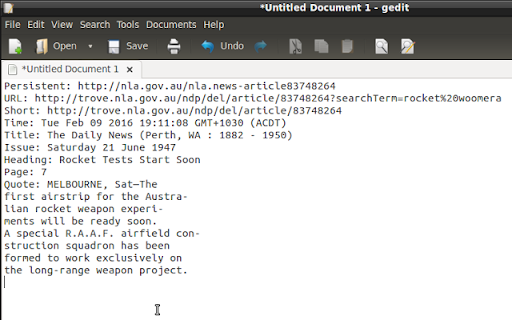
Copies selected information from the NLA Trove Newspaper website to the clipboard.
Apa itu Cite Trove?
Cite Trove adalah ekstensi Chrome yang dikembangkan oleh Chris Willoughby, dan fitur utamanya adalah "Copies selected information from the NLA Trove Newspaper website to the clipboard.".
Screenshot Ekstensi

Unduh Berkas CRX Ekstensi Cite Trove
Unduh file ekstensi Cite Trove dalam format crx, pasang ekstensi Chrome secara manual di peramban, atau bagikan file crx dengan teman untuk menginstal ekstensi Chrome dengan mudah.
Petunjuk Penggunaan Ekstensi
                        A Chrome extension to quote National Library of Australia Trove Newspaper text. Updated for https version of Trove.

The Trove Newspaper site (http://trove.nla.gov.au/newspaper?q=) allows users
to read and correct newspaper OCR text for historical Australian Newspapers.

When quoting newspaper text for research purposes it is useful to quote the
newspaper title, date and page. This extension enables a 'Cite Trove' context
menu item that adds your selected text and configurable newspaper information
to the clipboard. This text is then available for pasting into other
applications.

To Use:

Simply select the OCR text you want copied, right-click the mouse to bring up the context menu, and select "Cite Trove". The selected text, and details about the newspaper, are now available for pasting into another application.
Informasi Dasar Ekstensi
| Nama |  Cite Trove Cite Trove |
| ID | obppnlfjpphcaklepoggjopigjoemfbj |
| URL Resmi | https://chromewebstore.google.com/detail/cite-trove/obppnlfjpphcaklepoggjopigjoemfbj |
| Deskripsi | Copies selected information from the NLA Trove Newspaper website to the clipboard. |
| Ukuran File | 25.88 KB |
| Jumlah Instalasi | 10 |
| Versi Saat Ini | 0.3.0 |
| Terakhir Diperbarui | 2017-12-08 |
| Tanggal Publikasi | 2017-12-08 |
| Pengembang | Chris Willoughby |
| Tipe Pembayaran | free |
| Situs Ekstensi | https://chrrrisw.github.io/cite-trove-chrome/ |
| URL Halaman Bantuan | https://chrrrisw.github.io/cite-trove-chrome/ |
| Bahasa yang Didukung | en |
| manifest.json | |
{
    "update_url": "https:\/\/clients2.google.com\/service\/update2\/crx",
    "manifest_version": 2,
    "name": "Cite Trove",
    "version": "0.3.0",
    "description": "Copies selected information from the NLA Trove Newspaper website to the clipboard.",
    "icons": {
        "16": "cite-trove-logo16.png",
        "19": "cite-trove-logo19.png",
        "32": "cite-trove-logo32.png",
        "48": "cite-trove-logo48.png",
        "64": "cite-trove-logo64.png",
        "96": "cite-trove-logo96.png",
        "128": "cite-trove-logo128.png"
    },
    "page_action": {
        "default_icon": {
            "16": "cite-trove-logo16.png",
            "19": "cite-trove-logo19.png",
            "32": "cite-trove-logo32.png",
            "48": "cite-trove-logo48.png",
            "64": "cite-trove-logo64.png",
            "96": "cite-trove-logo96.png",
            "128": "cite-trove-logo128.png"
        },
        "default_title": "Cite Trove"
    },
    "author": "Chris Willoughby",
    "background": {
        "scripts": [
            "formatter.js",
            "background.js"
        ],
        "persistent": false
    },
    "content_scripts": [
        {
            "matches": [
                "http:\/\/trove.nla.gov.au\/newspaper\/*",
                "https:\/\/trove.nla.gov.au\/newspaper\/*"
            ],
            "js": [
                "scraper.js",
                "content.js"
            ]
        }
    ],
    "homepage_url": "https:\/\/chrrrisw.github.io\/cite-trove-chrome\/",
    "minimum_chrome_version": "33",
    "options_page": "options.html",
    "options_ui": {
        "page": "options.html",
        "chrome_style": true
    },
    "permissions": [
        "clipboardWrite",
        "contextMenus",
        "declarativeContent",
        "storage"
    ]
} | |