Page capture screenshot tool-ThisShot
The page snipping tool for screenshot/capture webpage in full or part.
Apa itu Page capture screenshot tool-ThisShot?
Page capture screenshot tool-ThisShot adalah ekstensi Chrome yang dikembangkan oleh https://addonx.net, dan fitur utamanya adalah "The page snipping tool for screenshot/capture webpage in full or part.".
Screenshot Ekstensi



Unduh Berkas CRX Ekstensi Page capture screenshot tool-ThisShot
Unduh file ekstensi Page capture screenshot tool-ThisShot dalam format crx, pasang ekstensi Chrome secara manual di peramban, atau bagikan file crx dengan teman untuk menginstal ekstensi Chrome dengan mudah.
Petunjuk Penggunaan Ekstensi
                        An easy-to-use, completely free web screenshot extension.
Function:
Support full page screenshots;
Supports screenshots of the current viewable area;
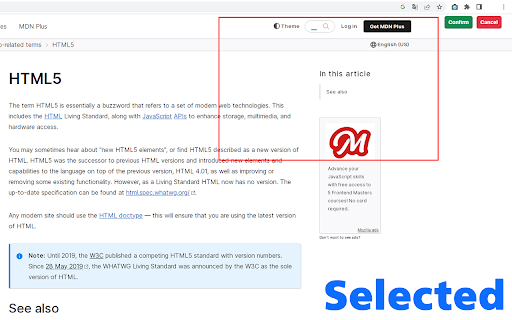
Support selected area screenshot;
Supports screenshots of interfaces other than the current web page, such as computer desktops, documents, other application interfaces, other tab interfaces, etc.;

Feature:
Your screenshots can be saved in three formats: PNG, JPG, and PDF;
You can mark up your screenshots (draw lines in the screenshot, add arrows, etc.);
You can select local images and mark them.
You can copy the screenshot to the clipboard and paste it when blogging;
Informasi Dasar Ekstensi
| Nama |  Page capture screenshot tool-ThisShot Page capture screenshot tool-ThisShot |
| ID | ojobnnfifncmgnjnbdlmkmhecaccjapp |
| URL Resmi | https://chromewebstore.google.com/detail/page-capture-screenshot-t/ojobnnfifncmgnjnbdlmkmhecaccjapp |
| Deskripsi | The page snipping tool for screenshot/capture webpage in full or part. |
| Ukuran File | 1.32 MB |
| Jumlah Instalasi | 4,000 |
| Versi Saat Ini | 1.0 |
| Terakhir Diperbarui | 2023-04-29 |
| Tanggal Publikasi | 2023-04-28 |
| Penilaian | 4.83/5 Total 23 Penilaian |
| Pengembang | https://addonx.net |
| [email protected] | |
| Tipe Pembayaran | free |
| Situs Ekstensi | https://addonx.net/thisshot |
| Bahasa yang Didukung | id,ms,de,en,en-GB,en-US,fil,fr,sw,nl,no,vi,tr,ca,da,et,es,es-419,hr,it,lv,lt,hu,pl,pt-BR,pt-PT,ro,sk,sl,fi,sv,cs,el,sr,bg,ru,uk,mr,hi,bn,gu,ta,te,kn-IN,th,am-ET,zh-CN,zh-TW,ja,ko |
| manifest.json | |
{
    "update_url": "https:\/\/clients2.google.com\/service\/update2\/crx",
    "manifest_version": 3,
    "name": "__MSG_manifest_name__",
    "short_name": "ThisShot",
    "version": "1.0",
    "description": "__MSG_manifest_description__",
    "icons": {
        "16": "img\/icon-16.png",
        "48": "img\/icon-48.png",
        "128": "img\/icon-128.png"
    },
    "background": {
        "service_worker": "worker.js"
    },
    "action": {
        "default_icon": {
            "16": "img\/icon-16.png",
            "48": "img\/icon-48.png",
            "128": "img\/icon-128.png"
        },
        "default_title": "__MSG_manifest_browser_action__",
        "default_popup": "popup.html"
    },
    "content_scripts": [
        {
            "matches": [
                "*:\/\/addonx.net\/thisshot"
            ],
            "js": [
                "libs\/jquery-3.5.1.min.js",
                "libs\/jspdf.min.js",
                "libs\/markerjs2.js",
                "js\/loader.js"
            ],
            "run_at": "document_end"
        },
        {
            "all_frames": false,
            "matches": [
                "*:\/\/*\/*"
            ],
            "exclude_globs": [
                "*\/\/addonx.net\/*"
            ],
            "js": [
                "libs\/jquery-3.5.1.min.js",
                "js\/content-script.js"
            ],
            "run_at": "document_start"
        }
    ],
    "web_accessible_resources": [
        {
            "resources": [
                "bootstrap-5.2.3-dist\/css\/bootstrap.min.css",
                "bootstrap-5.2.3-dist\/icons\/bootstrap-icons.css",
                "bootstrap-5.2.3-dist\/icons\/fonts\/bootstrap-icons.woff2",
                "bootstrap-5.2.3-dist\/icons\/fonts\/bootstrap-icons.woff"
            ],
            "matches": [
                "https:\/\/addonx.net\/*"
            ]
        }
    ],
    "permissions": [
        "tabs",
        "storage",
        "unlimitedStorage",
        "activeTab",
        "scripting"
    ],
    "host_permissions": [
        "http:\/\/addonx.net\/*",
        "https:\/\/addonx.net\/*"
    ],
    "homepage_url": "https:\/\/addonx.net\/thisshot",
    "default_locale": "en"
} | |