Snappy Tab
Snappy Tab is a Chrome Extension for the New Tab
Apa itu Snappy Tab?
Snappy Tab adalah ekstensi Chrome yang dikembangkan oleh Engler LLC, dan fitur utamanya adalah "Snappy Tab is a Chrome Extension for the New Tab".
Screenshot Ekstensi
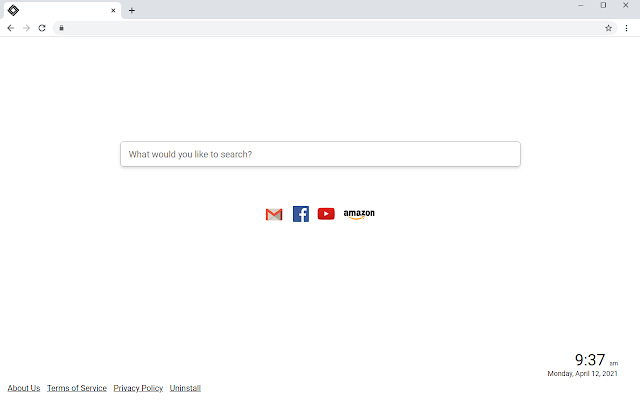

Unduh Berkas CRX Ekstensi Snappy Tab
Unduh file ekstensi Snappy Tab dalam format crx, pasang ekstensi Chrome secara manual di peramban, atau bagikan file crx dengan teman untuk menginstal ekstensi Chrome dengan mudah.
Petunjuk Penggunaan Ekstensi
                        Snappy Tab is a Chrome Extension for the New Tab

This extension changes your existing new tab page and provides the features below:
- Clean Tab Look
- Popular useful links
- New tab search box providing Bing.com search results.
  Use the new tab search box to search your desired information, images, videos, and more through Bing search directly from your browser’s new tab.

This extension is free to download from the Chrome Web store

By installing and using Snappy Tab Tab agree to the Terms of Use and Privacy Policy.
Please review our Privacy Policy for details regarding the information we collect when you install and use the extension. You can uninstall the program any time.


About:
https://snappytab.com/about

Terms of Service:
https://snappytab.com/terms

Privacy Policy:
https://snappytab.com/privacy
Informasi Dasar Ekstensi
| Nama |  Snappy Tab Snappy Tab |
| ID | pkdlcnapnadkpfdplhnhblbjiphjcdci |
| URL Resmi | https://chrome.google.com/webstore/detail/snappy-tab/pkdlcnapnadkpfdplhnhblbjiphjcdci |
| Deskripsi | Snappy Tab is a Chrome Extension for the New Tab |
| Ukuran File | 30.38 KB |
| Jumlah Instalasi | 10,000 |
| Versi Saat Ini | 1.6 |
| Terakhir Diperbarui | 2021-04-22 |
| Tanggal Publikasi | 2021-04-12 |
| Pengembang | Engler LLC |
| [email protected] | |
| Tipe Pembayaran | free |
| Situs Ekstensi | http://snappytab.com/ |
| URL Halaman Bantuan | http://snappytab.com/faq |
| URL Halaman Kebijakan Privasi | https://snappytab.com/privacy |
| Bahasa yang Didukung | en |
| manifest.json | |
{
    "update_url": "https:\/\/clients2.google.com\/service\/update2\/crx",
    "background": {
        "scripts": [
            "scripts\/background.js"
        ]
    },
    "browser_action": {
        "default_icon": {
            "16": "images\/icon-16.png",
            "32": "images\/icon-32.png"
        },
        "default_title": "__MSG_appName__"
    },
    "chrome_url_overrides": {
        "newtab": "newTab.html"
    },
    "default_locale": "en",
    "description": "__MSG_appDescription__",
    "icons": {
        "128": "images\/icon-128.png",
        "16": "images\/icon-16.png",
        "48": "images\/icon-48.png"
    },
    "manifest_version": 2,
    "name": "__MSG_appName__",
    "permissions": [
        "background",
        "storage"
    ],
    "version": "1.6"
} | |