Eye Guardian
Blue light filter 🛡️ and break timer for eye protection. Reduces eye strain, encourages regular breaks, improves health & sleep.
Cos'è Eye Guardian?
Eye Guardian è un'estensione di Chrome sviluppata da joce.contact.pro, e la sua funzione principale è "Blue light filter 🛡️ and break timer for eye protection. Reduces eye strain, encourages regular breaks, improves health & sleep.".
Screenshot dell'Estensione

Scarica il file CRX dell'estensione Eye Guardian
Scarica i file di estensione Eye Guardian in formato crx, installa manualmente le estensioni di Chrome nel browser o condividi i file crx con gli amici per installare facilmente le estensioni di Chrome.
Istruzioni per l'Uso dell'Estensione
                        Eye Guardian - Blue Light Filter, Screen Dimmer & Break Timer for Eye Protection

🔎Description:

Eye Guardian is a Chrome extension designed to protect your eyes from the harmful effects of prolonged exposure to blue light emitted by digital screens. It adds a customizable filter to your screen, reducing the intensity of blue light and making the screen more comfortable to look at. It also includes a break timer to remind you to rest your eyes regularly, following the 20-20-20 rule.

🪶Features:

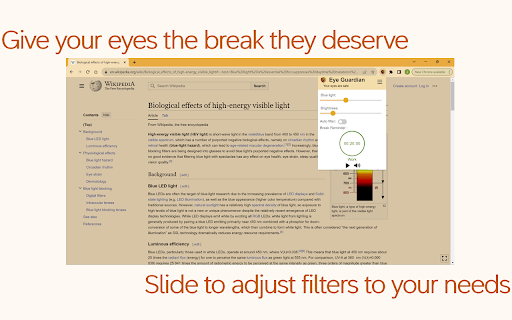
Blue Light Filter: Eye Guardian reduces the amount of blue light emitted by your screen, which can cause eye strain and disrupt your sleep cycle.

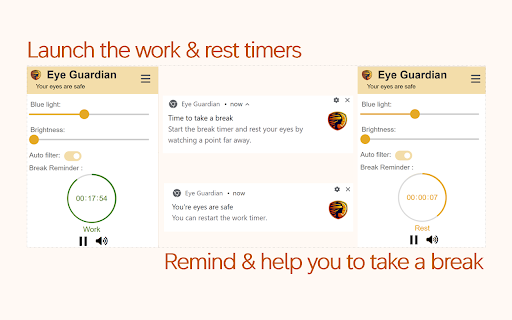
Break Timer: The extension includes a break timer that follows the 20-20-20 rule (every 20 minutes, take a 20-second break and look at something 20 feet away) to help prevent digital eye strain.

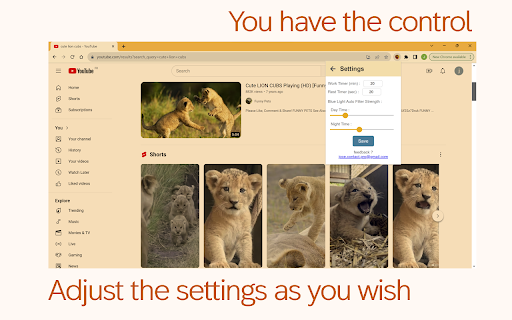
Customizable Settings: You can adjust the intensity of the filter and the frequency of the break reminders to suit your personal preferences and the lighting conditions in your environment.

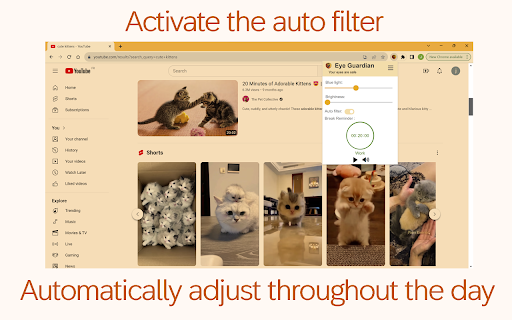
Easy On/Off Auto Filter Toggle: The extension offers an Auto Filter mode that can be easily enabled or disabled with a single click.

🏅Benefits

- Reduces eye strain and fatigue caused by prolonged screen time
- Encourages regular breaks to rest your eyes and prevent digital eye strain
- Can help improve sleep by reducing exposure to blue light in the evening
- Allows for comfortable screen viewing in any lighting conditions
- Easy to use and adjust as needed
- Saves your computer's battery

🧐How to Use

- Add the Eye Guardian extension to your Chrome browser.
- Click on the Eye Guardian icon in your browser toolbar to open the control panel.
- Use the slider to adjust the intensity of the blue light/ brightness filter.
- Set the frequency for the break timer.
- Start the work timer that'll notify you when you need to rest your eyes.
- When the work timer is finished, start the break timer and rest your eyes.
- Click the toggle switch to enable or disable the Auto Filter.

😊To summarize:

Eye Guardian is a simple and effective tool for anyone who spends a lot of time in front of a screen. By reducing the amount of blue light your screen emits and reminding you to take regular breaks, it can help protect your eyes, improve your sleep, and enhance your overall well-being.


V2: Blue light filter, brightness filter & break timer
V1: Blue light filter only
Informazioni di Base sull'Estensione
| Nome |  Eye Guardian Eye Guardian |
| ID | alnaklamobemdmneodhdgcpcimolihfc |
| URL Ufficiale | https://chromewebstore.google.com/detail/eye-guardian/alnaklamobemdmneodhdgcpcimolihfc |
| Descrizione | Blue light filter 🛡️ and break timer for eye protection. Reduces eye strain, encourages regular breaks, improves health & sleep. |
| Dimensione del File | 1.08 MB |
| Conteggio Installazioni | 335 |
| Versione Corrente | 2.1.0 |
| Ultimo Aggiornamento | 2024-03-05 |
| Data di Pubblicazione | 2023-11-13 |
| Valutazione | 5.00/5 Totale 5 Valutazioni |
| Sviluppatore | joce.contact.pro |
| [email protected] | |
| Tipo di Pagamento | free |
| Lingue Supportate | de,en,fr,nl,es,it,pt-BR,pt-PT,ru,hi,ar,zh-CN,zh-TW,ja |
| manifest.json | |
{
"update_url": "https:\/\/clients2.google.com\/service\/update2\/crx",
"manifest_version": 3,
"name": "Eye Guardian",
"description": "__MSG_appDescription__",
"version": "2.1.0",
"action": {
"default_popup": "popup.html",
"default_icon": {
"64": "images\/eye-guardian-64.png",
"128": "images\/eye-guardian-128.png",
"256": "images\/eye-guardian-256.png"
}
},
"icons": {
"64": "images\/eye-guardian-64.png",
"128": "images\/eye-guardian-128.png",
"256": "images\/eye-guardian-256.png"
},
"permissions": [
"activeTab",
"scripting",
"storage",
"notifications",
"offscreen"
],
"host_permissions": [
" | |