Tab Titler 2.0
Tab Titler 2.0
Cos'è Tab Titler 2.0?
Tab Titler 2.0 è un'estensione di Chrome sviluppata da Tim, e la sua funzione principale è "Tab Titler 2.0".
Screenshot dell'Estensione
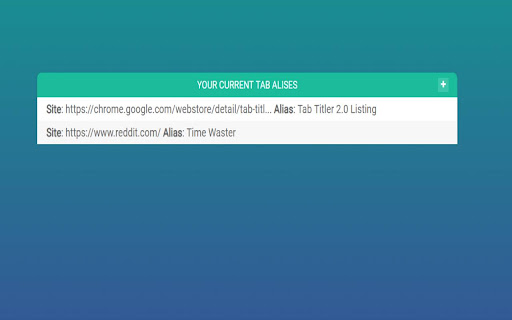
Scarica il file CRX dell'estensione Tab Titler 2.0
Scarica i file di estensione Tab Titler 2.0 in formato crx, installa manualmente le estensioni di Chrome nel browser o condividi i file crx con gli amici per installare facilmente le estensioni di Chrome.
Istruzioni per l'Uso dell'Estensione
                        This extension lets you change the title of a tab on the go and manage them over time.

Press ALT + SHIFT + S to automatically begin renaming a tab.
Renames will persist and last for as long as you want!
View the options page to manage all your saved tab aliases.

Browser to Browser Renaming - if you're logged into Chrome your saved names come with you!

Its dead simple. No extra fluff and no unnecessary banter - it does the job and the way you want it done!
Informazioni di Base sull'Estensione
| Nome |  Tab Titler 2.0 Tab Titler 2.0 |
| ID | aolhnnheicpbohggibkibdmfdkmkaocc |
| URL Ufficiale | https://chromewebstore.google.com/detail/tab-titler-20/aolhnnheicpbohggibkibdmfdkmkaocc |
| Descrizione | Tab Titler 2.0 |
| Dimensione del File | 42.11 KB |
| Conteggio Installazioni | 234 |
| Versione Corrente | 1.0 |
| Ultimo Aggiornamento | 2019-02-02 |
| Data di Pubblicazione | 2019-01-29 |
| Valutazione | 4.33/5 Totale 3 Valutazioni |
| Sviluppatore | Tim |
| [email protected] | |
| Tipo di Pagamento | free |
| Lingue Supportate | en |
| manifest.json | |
{
    "update_url": "https:\/\/clients2.google.com\/service\/update2\/crx",
    "manifest_version": 2,
    "name": "Tab Titler 2.0",
    "version": "1.0",
    "description": "Tab Titler 2.0",
    "icons": {
        "16": "tab16.png",
        "48": "tab48.png",
        "128": "tab128.png"
    },
    "permissions": [
        "tabs",
        "activeTab",
        "storage"
    ],
    "background": {
        "scripts": [
            "background.js"
        ],
        "persistent": false
    },
    "content_scripts": [
        {
            "matches": [
                "*:\/\/*\/*"
            ],
            "js": [
                "main.js"
            ]
        }
    ],
    "commands": {
        "rename_tab": {
            "suggested_key": {
                "default": "Alt+Shift+S"
            },
            "description": "Save a Tab Name"
        }
    },
    "options_ui": {
        "page": "options.html",
        "open_in_tab": true
    }
} | |