Daymap Graphics
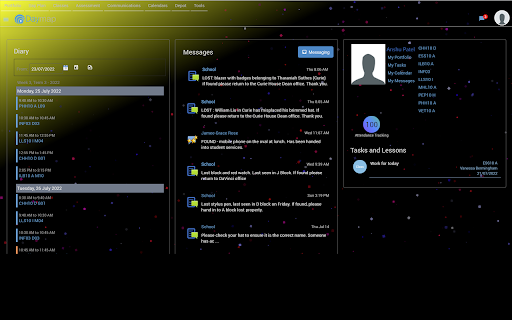
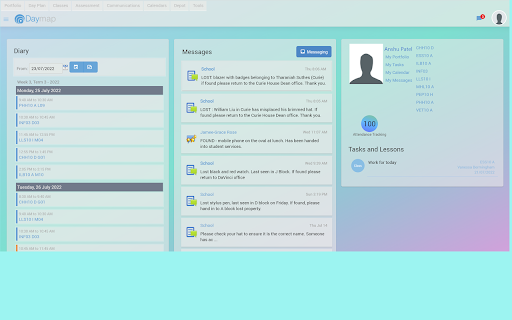
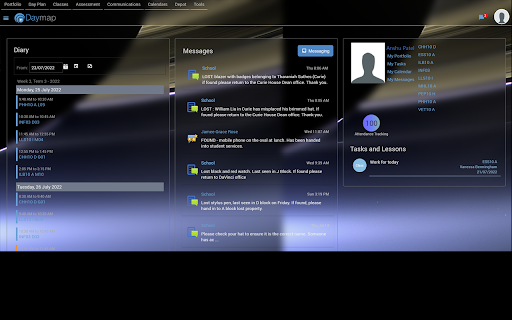
Daymap is currently plain and boring. With Daymap Graphics, customise colour, transparency, blurred background, and more!
Cos'è Daymap Graphics?
Daymap Graphics è un'estensione di Chrome sviluppata da apate98, e la sua funzione principale è "Daymap is currently plain and boring. With Daymap Graphics, customise colour, transparency, blurred background, and more!".
Screenshot dell'Estensione
Scarica il file CRX dell'estensione Daymap Graphics
Scarica i file di estensione Daymap Graphics in formato crx, installa manualmente le estensioni di Chrome nel browser o condividi i file crx con gli amici per installare facilmente le estensioni di Chrome.
Istruzioni per l'Uso dell'Estensione
                        Have you ever wondered how Daymap would look if you could customise it? Instead of a white foreground on a white background, why not a glassy transparent foreground on a stellar background? Daymap Graphics lets you customise Daymap. You can change the background colour, foreground transparency, revert Daymap to the original layout, and more!


Changelog
6.0.0: Added changelog and introduced compatibility for Daymap's timetable view.
6.0.1: Fixed a problem where opacity is reversed in timetable view.
6.0.2: Changed the manual background change to apply to underlay rather than body. Increased speed of underlay rainbow.
6.0.3: Allowed manual changing of the attendance indicator colour to anything, replacing the old background-color with background.
6.1.0: Allows blurring behind the foreground cards, giving a glassy effect.
6.1.1: Made header also change opacity and made logo transparent.
7.0.0: Removed all jQuery usage to enable compatibility with new Daymap. Also basically rewrote a bunch of code to work with new Daymap.
7.0.1: Fixed an issue to do with timetable view transparency. Also made transparent cards match with dark mode or light mode.
7.0.2: Fixed transparency... again. This time for feed view. Also changed the namespace.
7.1.0: Made the header less obtrusive and made dark mode work properly.
7.2.0: Added option to revert to original layout.
7.2.1: Fixed a major bug which would cause Daymap to not load properly.
7.2.2: Removed auto background option as it confused many new users. Background will now load regardless of checking the box. Also accounted for school removing messages.
7.2.3: Fixed a major bug that would cause the menus to not work properly some of the time. Also fixed the dark mode cookie expiring after the session.
7.3.0: Storing settings in synced storage rather than local storage, and added help on where to find instructions, added comments in code and fixed a minor issue in timetable view. Also fixed evil mode and changed the icon!
Informazioni di Base sull'Estensione
| Nome |  Daymap Graphics Daymap Graphics |
| ID | bekonlbokpdhkldcccibklmhnhcaglie |
| URL Ufficiale | https://chromewebstore.google.com/detail/daymap-graphics/bekonlbokpdhkldcccibklmhnhcaglie |
| Descrizione | Daymap is currently plain and boring. With Daymap Graphics, customise colour, transparency, blurred background, and more! |
| Dimensione del File | 42.8 KB |
| Conteggio Installazioni | 92 |
| Versione Corrente | 7.3.0 |
| Ultimo Aggiornamento | 2022-09-06 |
| Data di Pubblicazione | 2022-07-23 |
| Valutazione | 4.47/5 Totale 15 Valutazioni |
| Sviluppatore | apate98 |
| [email protected] | |
| Tipo di Pagamento | free |
| Sito Web dell'Estensione | https://github.com/apate98/DaymapGraphics |
| Lingue Supportate | en |
| manifest.json | |
{
    "manifest_version": 3,
    "name": "Daymap Graphics",
    "version": "7.3.0",
    "description": "Daymap is currently plain and boring. With Daymap Graphics, customise colour, transparency, blurred background, and more!",
    "permissions": [
        "storage"
    ],
    "content_scripts": [
        {
            "matches": [
                "*:\/\/*.daymap.net\/*",
                "*:\/\/*.sa.edu.au\/daymap"
            ],
            "js": [
                "daymapGraphics.js"
            ]
        }
    ],
    "web_accessible_resources": [
        {
            "resources": [
                "headerMenus.js"
            ],
            "matches": [
                "*:\/\/*.daymap.net\/*"
            ]
        }
    ],
    "icons": {
        "128": "icons\/128.png"
    },
    "action": {
        "default_popup": "popup.html",
        "default_icon": "icons\/128.png"
    },
    "update_url": "https:\/\/clients2.google.com\/service\/update2\/crx"
} | |