Color Picker
Allows you to define the color of an element on the page
Cos'è Color Picker?
Color Picker è un'estensione di Chrome sviluppata da makrkovdmitrij, e la sua funzione principale è "Allows you to define the color of an element on the page".
Screenshot dell'Estensione


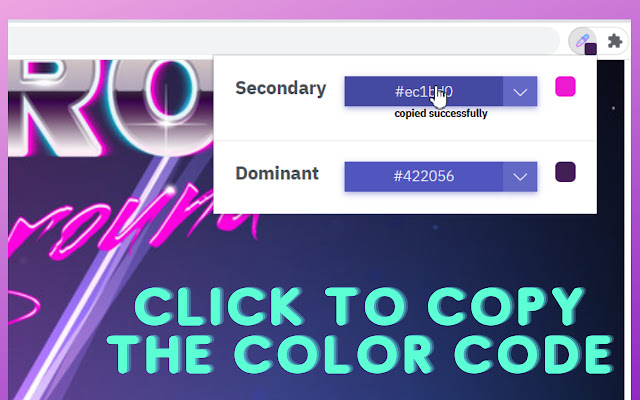

Scarica il file CRX dell'estensione Color Picker
Scarica i file di estensione Color Picker in formato crx, installa manualmente le estensioni di Chrome nel browser o condividi i file crx con gli amici per installare facilmente le estensioni di Chrome.
Istruzioni per l'Uso dell'Estensione
Meet new useful and cool Color Picker extension that brightens up your gray days behind the screen. Get the whole color palette from any web page just in one click with new and amazing Color picker. Absolutely free extension has never been so cool. It may come in handy for web designers and web developers. There is really no difficulties with this Eyedropper – simple, reliable, stable, with user-friendly interface so it`s pretty easy to work with. Get RGB colors from any webpage in simple manner. Extension deals with a bunch of different color formats. We provide you amazing and useful Eyedropper app for your browser. Install Color picker to improve your browser. Pick color just in one click and instantly get the color code. The color palette is absolutely free and most importantly, very versatile. Awesome ad simple extension allows you to select a pixel on the page and get color in popular formats. Extension is absolutely free and has no hidden scripts to mess with your personal data. It also doesn`t weigh a lot and it`s pretty easy to install and use. Extension flawlessly does what it`s supposed to do – instantly pick color from web pages. Download our product and you`ll be satisfied. After installation you`ll extracts the most used color from web pages just in one click while you're surfing the web. Informazioni di Base sull'Estensione
| Nome |  Color Picker Color Picker |
| ID | cbapocmbjilkikplhmkhhjjhmmlohffe |
| URL Ufficiale | https://chrome.google.com/webstore/detail/color-picker/cbapocmbjilkikplhmkhhjjhmmlohffe |
| Descrizione | Allows you to define the color of an element on the page |
| Dimensione del File | 22.86 KB |
| Conteggio Installazioni | 3,000 |
| Versione Corrente | 1.4 |
| Ultimo Aggiornamento | 2022-07-26 |
| Data di Pubblicazione | 2021-08-14 |
| Valutazione | 3.00/5 Totale 2 Valutazioni |
| Sviluppatore | makrkovdmitrij |
| [email protected] | |
| Tipo di Pagamento | free |
| Lingue Supportate | en |
| manifest.json | |
{
"update_url": "https:\/\/clients2.google.com\/service\/update2\/crx",
"icons": {
"128": "\/assets\/img\/logo.png"
},
"background": {
"scripts": [
"\/scripts\/common\/method.js",
"\/scripts\/background.js",
"\/vendor\/color-thief.umd.js"
],
"persistent": true
},
"content_scripts": [
{
"matches": [
" | |