Omegle Chat Helper
Use Omelge more easy and fast with the Omegle Chat Helper, no need to click next and type a welcome messagem we automate it.
Cos'è Omegle Chat Helper?
Omegle Chat Helper è un'estensione di Chrome sviluppata da http://li.cx, e la sua funzione principale è "Use Omelge more easy and fast with the Omegle Chat Helper, no need to click next and type a welcome messagem we automate it.".
Screenshot dell'Estensione
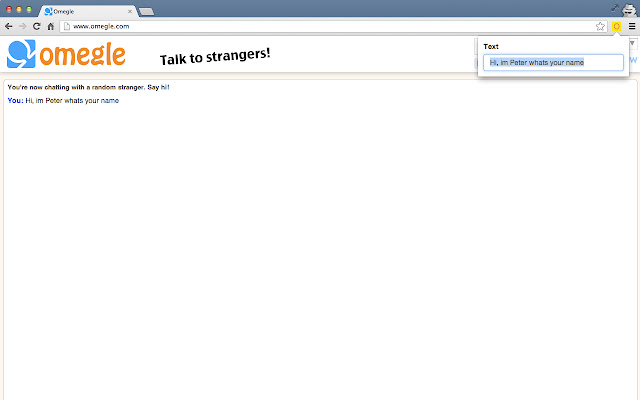
Scarica il file CRX dell'estensione Omegle Chat Helper
Scarica i file di estensione Omegle Chat Helper in formato crx, installa manualmente le estensioni di Chrome nel browser o condividi i file crx con gli amici per installare facilmente le estensioni di Chrome.
Istruzioni per l'Uso dell'Estensione
The App helps you to simplify your Omegle workflow. No more copy pasting welcome messages and pressing next if someone nexted you. Informazioni di Base sull'Estensione
| Nome |  Omegle Chat Helper Omegle Chat Helper |
| ID | ccpoppcajgnnmimhbkbmnbnmdjbagoep |
| URL Ufficiale | https://chrome.google.com/webstore/detail/omegle-chat-helper/ccpoppcajgnnmimhbkbmnbnmdjbagoep |
| Descrizione | Use Omelge more easy and fast with the Omegle Chat Helper, no need to click next and type a welcome messagem we automate it. |
| Dimensione del File | 109 KB |
| Conteggio Installazioni | 8,000 |
| Versione Corrente | 1.5 |
| Ultimo Aggiornamento | 2013-09-03 |
| Data di Pubblicazione | 2013-09-03 |
| Valutazione | 2.92/5 Totale 65 Valutazioni |
| Sviluppatore | http://li.cx |
| Tipo di Pagamento | free |
| Lingue Supportate | en |
| manifest.json | |
{
    "update_url": "https:\/\/clients2.google.com\/service\/update2\/crx",
    "manifest_version": 2,
    "name": "Omegle Chat Helper",
    "description": "Use Omelge more easy and fast with the Omegle Chat Helper, no need to click next and type a welcome messagem we automate it.",
    "version": "1.5",
    "background.persistent": {
        "persistent": false
    },
    "offline_enabled": false,
    "browser_action": {
        "default_icon": "icon.png",
        "default_popup": "popup.html"
    },
    "permissions": [
        "tabs",
        "*:\/\/*.omegle.com\/*",
        "storage",
        "*:\/\/*.omegle.com\/*"
    ],
    "content_security_policy": "script-src 'self' https:\/\/ssl.google-analytics.com; object-src 'self'",
    "content_scripts": [
        {
            "all_frames": true,
            "matches": [
                "*:\/\/*.omegle.com\/*"
            ],
            "css": [
                "bootstrap.min.css"
            ],
            "js": [
                "jquery.min.js",
                "popup.js"
            ]
        }
    ]
} | |