Word Count
Counts the words in the document selection and text entry.
Cos'è Word Count?
Word Count è un'estensione di Chrome sviluppata da shawn.hoover, e la sua funzione principale è "Counts the words in the document selection and text entry.".
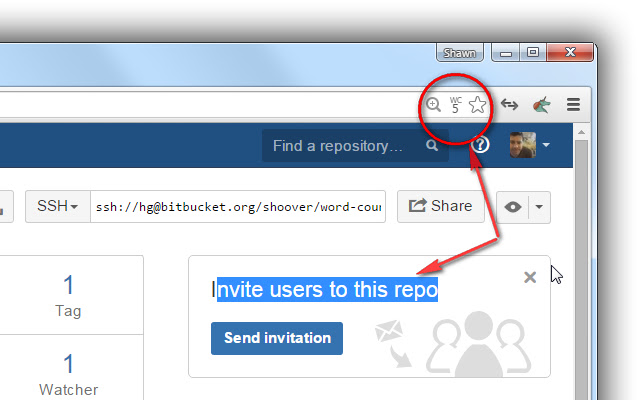
Screenshot dell'Estensione

Scarica il file CRX dell'estensione Word Count
Scarica i file di estensione Word Count in formato crx, installa manualmente le estensioni di Chrome nel browser o condividi i file crx con gli amici per installare facilmente le estensioni di Chrome.
Istruzioni per l'Uso dell'Estensione
Counts the words in the document selection and text entry. The count is displayed in an icon in the location bar. Use this to track word counts as you type or if you're curious how many words are in part of a web page. Informazioni di Base sull'Estensione
| Nome |  Word Count Word Count |
| ID | cipmjkgfjmkcmjfoidhpjfoihkgggmfk |
| URL Ufficiale | https://chrome.google.com/webstore/detail/word-count/cipmjkgfjmkcmjfoidhpjfoihkgggmfk |
| Descrizione | Counts the words in the document selection and text entry. |
| Dimensione del File | 9.76 KB |
| Conteggio Installazioni | 195 |
| Versione Corrente | 0.4 |
| Ultimo Aggiornamento | 2015-07-30 |
| Data di Pubblicazione | 2015-07-30 |
| Valutazione | 3.14/5 Totale 7 Valutazioni |
| Sviluppatore | shawn.hoover |
| Tipo di Pagamento | free |
| Sito Web dell'Estensione | https://bitbucket.org/shoover/word-count-ext |
| Lingue Supportate | en-US |
| manifest.json | |
{
"update_url": "https:\/\/clients2.google.com\/service\/update2\/crx",
"name": "Word Count",
"version": "0.4",
"author": "Shawn Hoover",
"manifest_version": 2,
"description": "Counts the words in the document selection and text entry.",
"icons": {
"64": "logo64.png",
"128": "logo128.png"
},
"permissions": [
"tabs"
],
"page_action": {
"default_title": "Word Count"
},
"content_scripts": [
{
"matches": [
" | |