CROPFROG
Preview crop / Capture / Simple ruler
Cos'è CROPFROG?
CROPFROG è un'estensione di Chrome sviluppata da PIKOPAPIKO, e la sua funzione principale è "Preview crop / Capture / Simple ruler".
Screenshot dell'Estensione

Scarica il file CRX dell'estensione CROPFROG
Scarica i file di estensione CROPFROG in formato crx, installa manualmente le estensioni di Chrome nel browser o condividi i file crx con gli amici per installare facilmente le estensioni di Chrome.
Istruzioni per l'Uso dell'Estensione
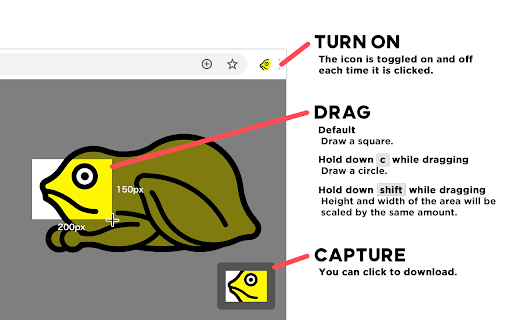
                        The icon is toggled on and off each time it is clicked.

[ Hold down 'SHIFT' while dragging ]
Height and width of the area will be scaled by the same amount.

[ Hold down 'c' while dragging ]
Draw a circle.

- - - - - - - -

わたしは提供します。

写真素材のマスク位置の確認のためや
ドラフトドキュメント作成の補助役としてこれを使うことを推奨します。
簡易定規を付録として装着します。

電源を入れ、画面をドラグで矩形を描画します。
キー・Cを継続して押下することで円を描画します。
キー・シフトを継続して押下することで縦横同じの比率を維持します。

ドラグが完了すると、画面右下にキャプチャ画像が出現されます。
それはクリックでダウンロードすることが可能です。
あなたが喜ぶために。
Informazioni di Base sull'Estensione
| Nome |  CROPFROG CROPFROG |
| ID | dccekhlkeelgmhmkihknmdlomdomibpk |
| URL Ufficiale | https://chromewebstore.google.com/detail/cropfrog/dccekhlkeelgmhmkihknmdlomdomibpk |
| Descrizione | Preview crop / Capture / Simple ruler |
| Dimensione del File | 85.08 KB |
| Conteggio Installazioni | 59 |
| Versione Corrente | 1.0.4 |
| Ultimo Aggiornamento | 2021-02-15 |
| Data di Pubblicazione | 2021-02-11 |
| Sviluppatore | PIKOPAPIKO |
| [email protected] | |
| Tipo di Pagamento | free |
| Sito Web dell'Estensione | https://morse.earth/ |
| URL della Pagina della Politica sulla Privacy | https://morse.earth/privacy-policy-for-chrome-extensions |
| Lingue Supportate | en |
| manifest.json | |
{
"update_url": "https:\/\/clients2.google.com\/service\/update2\/crx",
"name": "CROPFROG",
"version": "1.0.4",
"description": "Preview crop \/ Capture \/ Simple ruler",
"permissions": [
"activeTab"
],
"background": {
"scripts": [
"background.js"
]
},
"browser_action": {
"default_title": "CROPFROG",
"default_icon": "img\/icon.png"
},
"icons": {
"16": "img\/icon16.png",
"48": "img\/icon48.png",
"128": "img\/icon128.png"
},
"content_scripts": [
{
"matches": [
" | |