ShakeToPinTab
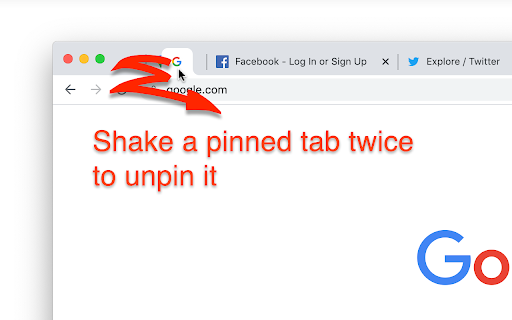
You can pin or unpin a tab by shaking a tab.
Cos'è ShakeToPinTab?
ShakeToPinTab è un'estensione di Chrome sviluppata da kent.ruffle.mgj626, e la sua funzione principale è "You can pin or unpin a tab by shaking a tab.".
Screenshot dell'Estensione

Scarica il file CRX dell'estensione ShakeToPinTab
Scarica i file di estensione ShakeToPinTab in formato crx, installa manualmente le estensioni di Chrome nel browser o condividi i file crx con gli amici per installare facilmente le estensioni di Chrome.
Istruzioni per l'Uso dell'Estensione
                        To pin a tab, shake an unpinned tab twice (move left, right, left, right, or the reverse).
To unpin a tab, shake a pinned tab twice (move left, right, left, right, or the reverse).

The tab can be pinned only when there are 2 or more unpinned tabs. Conversely, the tab can be unpinned only when there are 2 or more pinned tabs.
I'm sorry I can't be any help when the pinned or unpinned tab is isolated.

This extension will be active just by being installed. It doesn't have an option view, a popup view etc.
Informazioni di Base sull'Estensione
| Nome |  ShakeToPinTab ShakeToPinTab |
| ID | dfgfdilbghaelikilhppijemonkaoepf |
| URL Ufficiale | https://chromewebstore.google.com/detail/shaketopintab/dfgfdilbghaelikilhppijemonkaoepf |
| Descrizione | You can pin or unpin a tab by shaking a tab. |
| Dimensione del File | 23.95 KB |
| Conteggio Installazioni | 152 |
| Versione Corrente | 1.1 |
| Ultimo Aggiornamento | 2022-04-14 |
| Data di Pubblicazione | 2020-07-26 |
| Valutazione | 4.00/5 Totale 1 Valutazioni |
| Sviluppatore | kent.ruffle.mgj626 |
| [email protected] | |
| Tipo di Pagamento | free |
| Sito Web dell'Estensione | http://hp.vector.co.jp/authors/VA054317/index.html |
| Lingue Supportate | en,ja |
| manifest.json | |
{
    "update_url": "https:\/\/clients2.google.com\/service\/update2\/crx",
    "manifest_version": 3,
    "name": "__MSG_appName__",
    "version": "1.1",
    "default_locale": "en",
    "description": "__MSG_appDescription__",
    "background": {
        "service_worker": "background.js",
        "type": "module"
    },
    "icons": {
        "16": "stpt_16.png",
        "32": "stpt_32.png",
        "64": "stpt_64.png",
        "128": "stpt_128.png"
    },
    "action": {
        "default_icon": {
            "16": "stpt_16.png",
            "32": "stpt_32.png",
            "64": "stpt_64.png",
            "128": "stpt_128.png"
        }
    }
} | |