Music Search for Chrome™
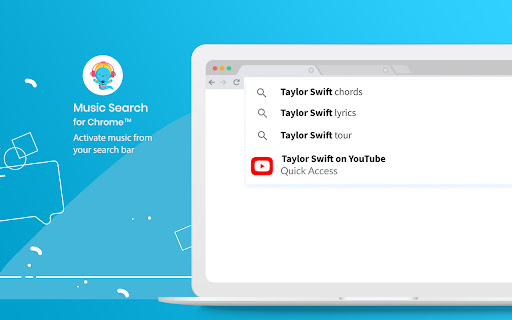
Detects your music search intent and offers a quick link to find the melodies on streaming sites inside the address bar
Cos'è Music Search for Chrome™?
Music Search for Chrome™ è un'estensione di Chrome sviluppata da https://musicsearchapp.net, e la sua funzione principale è "Detects your music search intent and offers a quick link to find the melodies on streaming sites inside the address bar".
Screenshot dell'Estensione


Scarica il file CRX dell'estensione Music Search for Chrome™
Scarica i file di estensione Music Search for Chrome™ in formato crx, installa manualmente le estensioni di Chrome nel browser o condividi i file crx con gli amici per installare facilmente le estensioni di Chrome.
Istruzioni per l'Uso dell'Estensione
                        Say goodbye to the old way you used to look for music. With the help of our AI algorithm, we know when to suggest the right app or feature and quickly answer your needs.

The extension’s AI follows your search intent and once it identifies a match, it automatically offers you quick links to search and play music on the most popular sites. The whole process takes place inside the AutoComplete textbox of the address bar.

How does it work?

1. Click on the address bar.
2. Start typing the song or artist you are looking for.
3. Once we find a relevant result that matches your query, it will offer you a quick link in the autocomplete suggestions from your address bar.

How do I uninstall this extension?

You can uninstall the extension at any time, following the simple steps:
1. Click on the Chrome menu icon on the top right
2. Click on Settings
3. On the left side of the page, click on Extensions
4. Choose the extension from the list
5. Click on the remove button
6. On the pop-up window, click on the Remove button

Permissions used and reasons:

1. Change your Search Settings - In order to activate the AI ability in the autocomplete suggestions, we require this permission to change your search settings to our private domain, powered by Yahoo.

2. “contextMenus” - We require this permission in order to access the extension’s drop-down menu once you click the extension’s icon.

By installing this extension, you agree to the Terms of Use and Privacy Policy of this extension.

Chrome™ is a trademark of Google LLC. The use of it does not imply any affiliation to or endorsement by Google LLC.

Terms of use
https://www.musicsearchapp.net/terms

Privacy Policy
https://www.musicsearchapp.net/privacy

FAQ
https://www.musicsearchapp.net/#faq

Contact
https://www.musicsearchapp.net/contact
Informazioni di Base sull'Estensione
| Nome |  Music Search for Chrome™ Music Search for Chrome™ |
| ID | eaabmejfmdeoaabmealmmbjdjaojakka |
| URL Ufficiale | https://chromewebstore.google.com/detail/music-search-for-chrome/eaabmejfmdeoaabmealmmbjdjaojakka |
| Descrizione | Detects your music search intent and offers a quick link to find the melodies on streaming sites inside the address bar |
| Dimensione del File | 16.98 KB |
| Conteggio Installazioni | 671,831 |
| Versione Corrente | 3.0.8 |
| Ultimo Aggiornamento | 2022-04-10 |
| Data di Pubblicazione | 2020-08-13 |
| Valutazione | 3.46/5 Totale 24 Valutazioni |
| Sviluppatore | https://musicsearchapp.net |
| [email protected] | |
| Tipo di Pagamento | free |
| Sito Web dell'Estensione | https://www.musicsearchapp.net |
| URL della Pagina di Aiuto | https://www.musicsearchapp.net/contact |
| URL della Pagina della Politica sulla Privacy | https://www.musicsearchapp.net/privacy |
| Lingue Supportate | en |
| manifest.json | |
{
"update_url": "https:\/\/clients2.google.com\/service\/update2\/crx",
"name": "Music Search for Chrome\u2122",
"short_name": "Music Search for Chrome\u2122",
"version": "3.0.8",
"chrome_settings_overrides": {
"search_provider": {
"encoding": "UTF-8",
"favicon_url": "https:\/\/www.amazingossearch.com\/favicon.ico",
"is_default": true,
"name": "Music Search for Chrome\u2122",
"keyword": "Music Search for Chrome\u2122",
"search_url": "https:\/\/www.amazingossearch.com\/search\/?category=web&s=cvds&vert=music&q={searchTerms}",
"suggest_url": "https:\/\/sug.amazingossearch.com\/v1\/sug\/?yid=cvds&vert=music&q={searchTerms}"
}
},
"homepage_url": "https:\/\/www.amazingossearch.com\/wim\/ds\/goredirect?s=cvds&vert=music",
"background": {
"service_worker": "bg\/background.js",
"type": "module"
},
"action": {
"default_title": "Music Search for Chrome\u2122",
"default_icon": "img\/icon16.png"
},
"content_security_policy": {
"extension_pages": "script-src 'self'; object-src 'self'"
},
"content_scripts": [
{
"matches": [
"*:\/\/*.amazingossearch.com\/*"
],
"js": [
"content_script\/contentScript.js"
],
"all_frames": true
}
],
"description": "Detects your music search intent and offers a quick link to find the melodies on streaming sites inside the address bar",
"icons": {
"16": "img\/icon16.png",
"48": "img\/icon48.png",
"128": "img\/icon128.png"
},
"incognito": "spanning",
"manifest_version": 3,
"minimum_chrome_version": "88",
"permissions": [
"contextMenus"
],
"web_accessible_resources": [
{
"resources": [
"img\/icon16.png"
],
"matches": [
" | |