Smooth Keyboard - Virtual Keyboard
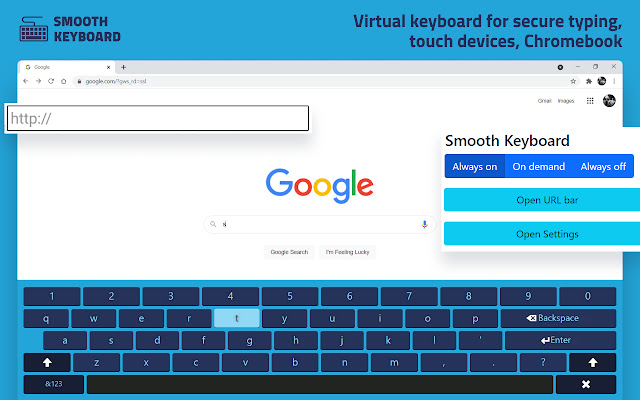
Smooth keyboard - virtual keyboard for secure typing, touch devices, Chromebook.
Cos'è Smooth Keyboard - Virtual Keyboard?
Smooth Keyboard - Virtual Keyboard è un'estensione di Chrome sviluppata da robert9014, e la sua funzione principale è "Smooth keyboard - virtual keyboard for secure typing, touch devices, Chromebook.".
Screenshot dell'Estensione

Scarica il file CRX dell'estensione Smooth Keyboard - Virtual Keyboard
Scarica i file di estensione Smooth Keyboard - Virtual Keyboard in formato crx, installa manualmente le estensioni di Chrome nel browser o condividi i file crx con gli amici per installare facilmente le estensioni di Chrome.
Istruzioni per l'Uso dell'Estensione
                        Smooth Keyboard is an on-screen virtual keyboard. You can input text using a touch screen or mouse.

Features:
⭐ Full-screen keyboard or mini version
⭐ Go to URL panel
⭐ On-demand or Always-on mode
⭐ Languages: English, French, German, Polish, Russian, Italian, Korean, Magyar, Norwegian, Slovenian, Spanish, Swedish, Tamil
Informazioni di Base sull'Estensione
| Nome |  Smooth Keyboard - Virtual Keyboard Smooth Keyboard - Virtual Keyboard |
| ID | edailiddamlkedgjaoialogpllocmgjg |
| URL Ufficiale | https://chrome.google.com/webstore/detail/smooth-keyboard-virtual-k/edailiddamlkedgjaoialogpllocmgjg |
| Descrizione | Smooth keyboard - virtual keyboard for secure typing, touch devices, Chromebook. |
| Dimensione del File | 238 KB |
| Conteggio Installazioni | 600,000 |
| Versione Corrente | 0.7.8 |
| Ultimo Aggiornamento | 2022-02-23 |
| Data di Pubblicazione | 2021-08-15 |
| Valutazione | 4.27/5 Totale 11 Valutazioni |
| Sviluppatore | robert9014 |
| [email protected] | |
| Tipo di Pagamento | free |
| URL della Pagina della Politica sulla Privacy | https://docs.google.com/document/d/1bXEamQesingZAa-V0L-2l1JNpJON7bgusQM0mKhR_xQ/edit?usp=sharing |
| Lingue Supportate | id,ms,de,en,en-GB,en-US,fil,fr,nl,no,vi,tr,ca,da,et,es,es-419,hr,it,lv,lt,hu,pl,pt-BR,pt-PT,ro,sk,sl,fi,sv,cs,el,sr,bg,ru,uk,mr,hi,bn,gu,ta,te,ml,th,zh-CN,zh-TW,ja,ko |
| manifest.json | |
{
"update_url": "https:\/\/clients2.google.com\/service\/update2\/crx",
"background": {
"scripts": [
"background.js"
],
"persistent": true
},
"content_scripts": [
{
"all_frames": true,
"js": [
"js\/script.js"
],
"matches": [
" | |