Cut YouTube Videos with VideoSegments
Easiest way to remove boring content from YouTube videos. Great for listening to music.
Cos'è Cut YouTube Videos with VideoSegments?
Cut YouTube Videos with VideoSegments è un'estensione di Chrome sviluppata da Alex Lys, e la sua funzione principale è "Easiest way to remove boring content from YouTube videos. Great for listening to music.".
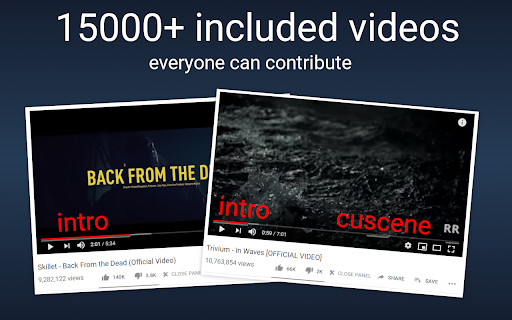
Screenshot dell'Estensione


Scarica il file CRX dell'estensione Cut YouTube Videos with VideoSegments
Scarica i file di estensione Cut YouTube Videos with VideoSegments in formato crx, installa manualmente le estensioni di Chrome nel browser o condividi i file crx con gli amici per installare facilmente le estensioni di Chrome.
Istruzioni per l'Uso dell'Estensione
                        Important: reload YouTube tabs after installation (only once).

Key features:
    ✓ Interactive panel: just click buttons.
    ✓ Community-based segmentation: more than 15000 videos already segmented!
    ✓ Dozen of settings: hotkeys, filters, color schemes, and much more.
    ✓ Open source: everyone can contribute.

This extension will give you ability to easily remove:
    - Talking from music clips.
    - Annoying content.
    - Intros, outros.
    - Everything else you dont like.

Changelog:
	- Full: https://github.com/videosegments/videosegments/commits/master
Informazioni di Base sull'Estensione
| Nome |  Cut YouTube Videos with VideoSegments Cut YouTube Videos with VideoSegments |
| ID | eddbomdegiekipngdepnddkoemagllbn |
| URL Ufficiale | https://chromewebstore.google.com/detail/cut-youtube-videos-with-v/eddbomdegiekipngdepnddkoemagllbn |
| Descrizione | Easiest way to remove boring content from YouTube videos. Great for listening to music. |
| Dimensione del File | 217 KB |
| Conteggio Installazioni | 2,642 |
| Versione Corrente | 1.11.6 |
| Ultimo Aggiornamento | 2019-08-29 |
| Data di Pubblicazione | 2019-08-29 |
| Valutazione | 3.16/5 Totale 38 Valutazioni |
| Sviluppatore | Alex Lys |
| [email protected] | |
| Tipo di Pagamento | free |
| URL della Pagina della Politica sulla Privacy | https://videosegments.org/privacy.php |
| Lingue Supportate | en,ru |
| manifest.json | |
{
    "update_url": "https:\/\/clients2.google.com\/service\/update2\/crx",
    "manifest_version": 2,
    "name": "__MSG_extensionName__",
    "version": "1.11.6",
    "applications": {
        "gecko": {
            "id": "{fca9d8e4-a5f2-4c00-9873-f38176edcba0}"
        }
    },
    "default_locale": "en",
    "description": "__MSG_extensionDescription__",
    "icons": {
        "32": "icons\/icon-32.png",
        "64": "icons\/icon-64.png",
        "128": "icons\/icon-128.png"
    },
    "background": {
        "scripts": [
            "background\/background.js"
        ],
        "persistent": false
    },
    "browser_action": {
        "default_icon": {
            "64": "icons\/icon-64.png"
        },
        "default_title": "VideoSegments",
        "default_popup": "settings\/popup.html"
    },
    "content_scripts": [
        {
            "matches": [
                "*:\/\/*.youtube.com\/*"
            ],
            "js": [
                "external\/popper.js",
                "utils\/utils.js",
                "storage\/storage.js",
                "observer\/observer.js",
                "player\/player.js",
                "segmentsbar\/segmentsbar.js",
                "smart-cursor\/smart-cursor.js",
                "editor\/editor.js",
                "modals\/modals.js",
                "filters\/filters.js",
                "tutorial\/tutorial.js",
                "content\/content.js"
            ],
            "css": [
                "css\/styles.css"
            ],
            "run_at": "document_start",
            "all_frames": true
        }
    ],
    "permissions": [
        "https:\/\/*.videosegments.org\/*",
        "unlimitedStorage",
        "storage",
        "tabs"
    ],
    "web_accessible_resources": [
        "editor\/editor.html",
        "editor\/entry.html",
        "modals\/small.html",
        "modals\/big.html",
        "modals\/captcha.html",
        "tutorial\/tutorial.html",
        "editor\/cut-button.html"
    ]
} | |