Taskllo - Tasks for Trello
To Do list for your Trello tasks across all of your team boards
Cos'è Taskllo - Tasks for Trello?
Taskllo - Tasks for Trello è un'estensione di Chrome sviluppata da trm313, e la sua funzione principale è "To Do list for your Trello tasks across all of your team boards".
Screenshot dell'Estensione


Scarica il file CRX dell'estensione Taskllo - Tasks for Trello
Scarica i file di estensione Taskllo - Tasks for Trello in formato crx, installa manualmente le estensioni di Chrome nel browser o condividi i file crx con gli amici per installare facilmente le estensioni di Chrome.
Istruzioni per l'Uso dell'Estensione
                        Generate a To Do list for your tasks across all of your team's boards

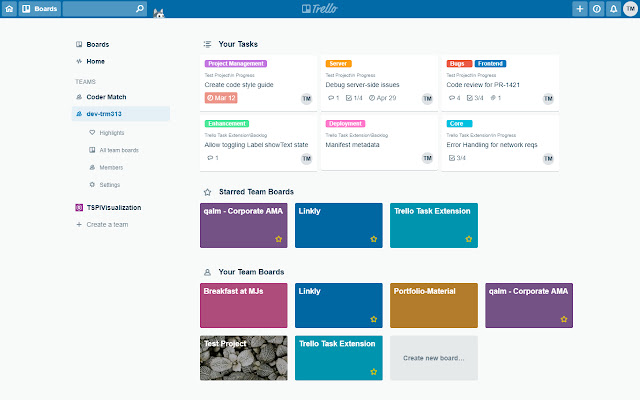
Trello is an amazing tool, but when you're working across multiple boards at once, it can be hard to see all of your tasks. Taskllo bubbles all of your active tasks up, accessible right on your team's overview page (the board selection page).

# FEATURES

- "My Tasks" widget embedded into your Trello team overview pages
- The list will contain all active tasks across all of your team's board
- Completed tasks will not be shown in your task list (see below for details)
- Your task list shows you the most useful information for each card:
  + Due dates
  + Labels
  + Checklist completion
  + Attachment indicator
  + Comment count
  + Assigned members

NOTE: Taskllo does not store any user data or information - all interactions are done client-side, and the only servers that Taskllo communicates to are Trello's

### How do I get started?

1) Install Taskllo via the Chrome Web Store
2) Open up trello.com and click on any Trello team you belong to
3) Use the "Authorize" button to allow the plugin to connect to Trello
4) That's it! You can now see your My Tasks widget on any team overview page (https://trello.com//home)

### Not seeing the cards you would expect to see in your task list?

For tasks to show up in your list, they must have you assigned as a member of the card AND not be in a list that would indicate a 'completed' state.

Currently, the plugin designates cards as 'completed' if their list name contains one of the following case insensitive strings:
- complete
- done
- finished
- archive
- #d

Please note that the list name does NOT need to match entirely, for instance "Completed", and "Card Archive" would still work to identify those cards as completed


# PLANNED ENHANCEMENTS

- "My Tasks" widget for your Trello personal home page
- Sort and filter functionality for your tasks


# REPORT BUGS / SUGGEST ENHANCEMENTS

Please use the github repo for this extension:
https://github.com/trm313/trello-tasks-extension


# RELEASE NOTES

v1.2.0
- Improved error handling

v1.1.0
- Resolved authentication bug
- New icon images

v1.0.0
- "My Tasks" widget embedded into team overview pages
- Trello authentication
- Task cards show following data:
  + Due dates
  + Labels
  + Checklist completion
  + Attachment indicator
  + Comment count
  + Assigned members
Informazioni di Base sull'Estensione
| Nome |  Taskllo - Tasks for Trello Taskllo - Tasks for Trello |
| ID | edfnjjddegeinbmnjofceifpnjmjimjp |
| URL Ufficiale | https://chrome.google.com/webstore/detail/taskllo-tasks-for-trello/edfnjjddegeinbmnjofceifpnjmjimjp |
| Descrizione | To Do list for your Trello tasks across all of your team boards |
| Dimensione del File | 695 KB |
| Conteggio Installazioni | 61 |
| Versione Corrente | 1.3.0 |
| Ultimo Aggiornamento | 2019-04-17 |
| Data di Pubblicazione | 2019-04-17 |
| Valutazione | 5.00/5 Totale 2 Valutazioni |
| Sviluppatore | trm313 |
| Tipo di Pagamento | free |
| Lingue Supportate | en-US |
| manifest.json | |
{
    "update_url": "https:\/\/clients2.google.com\/service\/update2\/crx",
    "name": "Taskllo - Tasks for Trello",
    "short_name": "Taskllo",
    "version": "1.3.0",
    "description": "To Do list for your Trello tasks across all of your team boards",
    "icons": {
        "16": "icon_16.png",
        "48": "icon_48.png",
        "128": "icon_128.png"
    },
    "background": {
        "persistent": false,
        "scripts": [
            "background.js"
        ]
    },
    "permissions": [
        "tabs",
        "https:\/\/trello.com\/*\/home"
    ],
    "manifest_version": 2
} | |








![[DEPRECATED] List Layouts for Trello](https://lh3.googleusercontent.com/dMEliMsS2lms4RZnApgfyShZkCag2o-BBMlgj5Y3W8ciG6XjIVm8DIAgykGQyAOZJq6vrZeOl_IQLlxLmSM5ggTP6w)