Cryptotab
CryptoTab is extension for getting all latest cryptocurrency rates and with bookmarks speed dial
Cos'è Cryptotab?
Cryptotab è un'estensione di Chrome sviluppata da Vladyslav Khrystych, e la sua funzione principale è "CryptoTab is extension for getting all latest cryptocurrency rates and with bookmarks speed dial".
Screenshot dell'Estensione
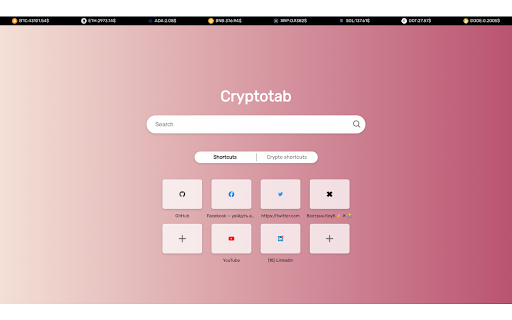


Scarica il file CRX dell'estensione Cryptotab
Scarica i file di estensione Cryptotab in formato crx, installa manualmente le estensioni di Chrome nel browser o condividi i file crx con gli amici per installare facilmente le estensioni di Chrome.
Istruzioni per l'Uso dell'Estensione
                        With CryptoTab extension you can access your most-used websites very fast and also see latest top-8 cryptocurrencies rates on top.

You can easily change saved website links and using search powered by Google.

On the "Crypto shortcuts" tab you'll find most popular resources related to the world of cryptocurrencies.
Informazioni di Base sull'Estensione
| Nome |  Cryptotab Cryptotab |
| ID | ediflhgcaolkgmfjnhjdkdncidfpobge |
| URL Ufficiale | https://chromewebstore.google.com/detail/cryptotab/ediflhgcaolkgmfjnhjdkdncidfpobge |
| Descrizione | CryptoTab is extension for getting all latest cryptocurrency rates and with bookmarks speed dial |
| Dimensione del File | 262 KB |
| Conteggio Installazioni | 52 |
| Versione Corrente | 0.0.0.1 |
| Ultimo Aggiornamento | 2021-10-07 |
| Data di Pubblicazione | 2021-10-06 |
| Sviluppatore | Vladyslav Khrystych |
| [email protected] | |
| Tipo di Pagamento | free |
| URL della Pagina della Politica sulla Privacy | https://vkhrystych.github.io/cryptotab-website/privacy-policy.html |
| Lingue Supportate | en |
| manifest.json | |
{
    "update_url": "https:\/\/clients2.google.com\/service\/update2\/crx",
    "name": "Cryptotab",
    "description": "CryptoTab is extension for getting all latest cryptocurrency rates and with bookmarks speed dial",
    "version": "0.0.0.1",
    "manifest_version": 2,
    "chrome_url_overrides": {
        "newtab": "index.html"
    },
    "icons": {
        "16": "logo192.png",
        "48": "logo192.png",
        "128": "logo192.png"
    },
    "permissions": [
        "topSites",
        "chrome:\/\/favicon\/*"
    ],
    "content_security_policy": "script-src 'self' 'unsafe-eval'; object-src 'self'"
} | |