Capitalize!t
This Chrome Extension lets you bookmark any web page in a Google Spreadsheet, along with any structured metadata you want to add.…
Cos'è Capitalize!t?
Capitalize!t è un'estensione di Chrome sviluppata da jfmonteil, e la sua funzione principale è "This Chrome Extension lets you bookmark any web page in a Google Spreadsheet, along with any structured metadata you want to add.…".
Screenshot dell'Estensione
Scarica il file CRX dell'estensione Capitalize!t
Scarica i file di estensione Capitalize!t in formato crx, installa manualmente le estensioni di Chrome nel browser o condividi i file crx con gli amici per installare facilmente le estensioni di Chrome.
Istruzioni per l'Uso dell'Estensione
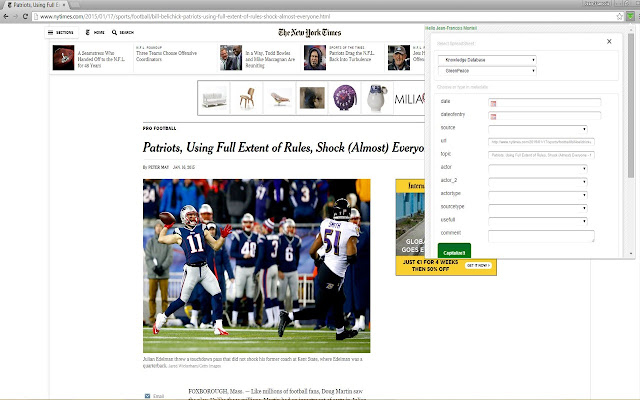
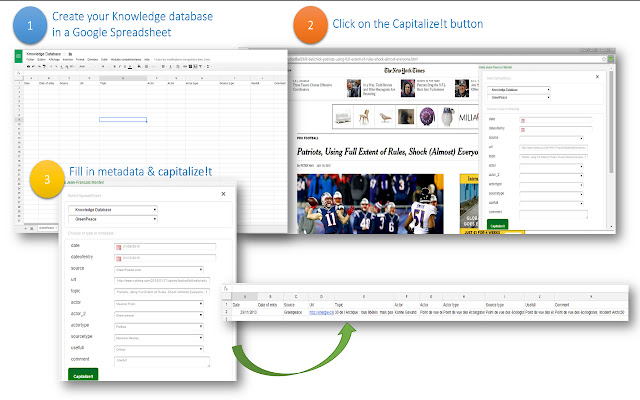
                        This Chrome Extension lets you bookmark any web page in a Google Spreadsheet, along with any structured metadata you want to add.

Initially intended for my students, in their Business Intelligence and Media Analysis program, this “software” (if I can call it so) can be used for anyone who wants to create / edit / annotate easily and share a bookmark database.

Why Capitalize!t when plenty of bookmarks management tool exist ?

> Capability to create your custom metadata
> All bookmarks and metadata saved in Google Spreadsheet enabling  Analysis with free tools on the web and Sharing with other students

New version 4 : lets you pick images from the page and highlighted text
Informazioni di Base sull'Estensione
| Nome |  Capitalize!t Capitalize!t |
| ID | elkppeldmfcophocjliimofkdlnmeghk |
| URL Ufficiale | https://chrome.google.com/webstore/detail/capitalizet/elkppeldmfcophocjliimofkdlnmeghk |
| Descrizione | This Chrome Extension lets you bookmark any web page in a Google Spreadsheet, along with any structured metadata you want to add.… |
| Dimensione del File | 403 KB |
| Conteggio Installazioni | 68 |
| Versione Corrente | 4.0 |
| Ultimo Aggiornamento | 2015-02-01 |
| Data di Pubblicazione | 2015-02-01 |
| Valutazione | 4.25/5 Totale 4 Valutazioni |
| Sviluppatore | jfmonteil |
| [email protected] | |
| Tipo di Pagamento | free |
| Sito Web dell'Estensione | https://docs.google.com/document/d/1wQRXbFqNmNw-f4yDcX_Gfm_CYGbPIksEmj6VoX4gA1M/pub |
| URL della Pagina di Aiuto | https://docs.google.com/document/d/1wQRXbFqNmNw-f4yDcX_Gfm_CYGbPIksEmj6VoX4gA1M/pub |
| Lingue Supportate | en |
| manifest.json | |
{
"update_url": "https:\/\/clients2.google.com\/service\/update2\/crx",
"name": "Capitalize!t",
"version": "4.0",
"manifest_version": 2,
"minimum_chrome_version": "29",
"browser_action": {
"default_icon": "icon-small.png",
"default_popup": "popup.html"
},
"content_scripts": [
{
"js": [
"selectionjfm.js",
"jquery-1.11.1.min.js",
"jquery-ui.min.js"
],
"css": [
"jquery-ui.css"
],
"matches": [
"http:\/\/*\/*",
"https:\/\/*\/*"
],
"all_frames": true
}
],
"icons": {
"16": "icon-small.png",
"48": "icon.png",
"128": "icon-small.png"
},
"permissions": [
"https:\/\/secure.flickr.com\/",
"identity",
"https:\/\/accounts.google.com\/*",
"https:\/\/www.googleapis.com\/*",
"https:\/\/spreadsheets.google.com\/*",
"tabs",
"storage",
" | |