Dank Neon DevTools Theme
A danker, more neon theme.
Cos'è Dank Neon DevTools Theme?
Dank Neon DevTools Theme è un'estensione di Chrome sviluppata da Conlin Durbin, e la sua funzione principale è "A danker, more neon theme.".
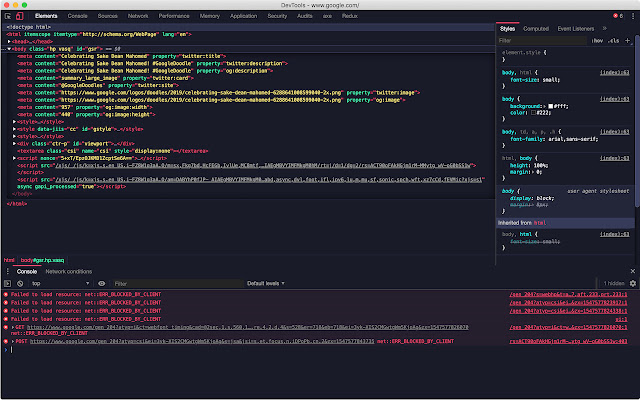
Screenshot dell'Estensione
Scarica il file CRX dell'estensione Dank Neon DevTools Theme
Scarica i file di estensione Dank Neon DevTools Theme in formato crx, installa manualmente le estensioni di Chrome nel browser o condividi i file crx con gli amici per installare facilmente le estensioni di Chrome.
Istruzioni per l'Uso dell'Estensione
                        Dank Neon for the Chrome DevTools is a nice looking dark theme for your DevTools.

How to install
---------------------------------------------------------
- First install this theme
- Goto chrome://flags/#enable-devtools-experiments and Enable Developer Tools experiments. Select "Relaunch Now" at the bottom of the page.
- Open developer tools settings, select Experiments tab, and check 'Allow custom UI themes'.
- Reload devtools.
Informazioni di Base sull'Estensione
| Nome |  Dank Neon DevTools Theme Dank Neon DevTools Theme |
| ID | eoijelgagfengjmfdjpoeooogcjgdobf |
| URL Ufficiale | https://chrome.google.com/webstore/detail/dank-neon-devtools-theme/eoijelgagfengjmfdjpoeooogcjgdobf |
| Descrizione | A danker, more neon theme. |
| Dimensione del File | 34.56 KB |
| Conteggio Installazioni | 164 |
| Versione Corrente | 2.1 |
| Ultimo Aggiornamento | 2019-01-15 |
| Data di Pubblicazione | 2019-01-15 |
| Valutazione | 5.00/5 Totale 2 Valutazioni |
| Sviluppatore | Conlin Durbin |
| Tipo di Pagamento | free |
| Sito Web dell'Estensione | https://github.com/DankNeon/chrome-devtools |
| URL della Pagina di Aiuto | https://github.com/DankNeon/chrome-devtools/issues |
| Lingue Supportate | en |
| manifest.json | |
{
    "update_url": "https:\/\/clients2.google.com\/service\/update2\/crx",
    "name": "Dank Neon DevTools Theme",
    "short_name": "A danker, more neon theme for Chrome Devtools",
    "version": "2.1",
    "description": "A danker, more neon theme.",
    "devtools_page": "devtools.html",
    "manifest_version": 2,
    "content_security_policy": "script-src 'self' https:\/\/www.google-analytics.com; object-src 'self'",
    "icons": {
        "16": "images\/icon16.png",
        "48": "images\/icon48.png",
        "128": "images\/icon128.png"
    }
} | |