Amazon AWS Quick Links
Quickly and conveniently open AWS Services from here
Cos'è Amazon AWS Quick Links?
Amazon AWS Quick Links è un'estensione di Chrome sviluppata da Tab Manager Plus, e la sua funzione principale è "Quickly and conveniently open AWS Services from here".
Screenshot dell'Estensione

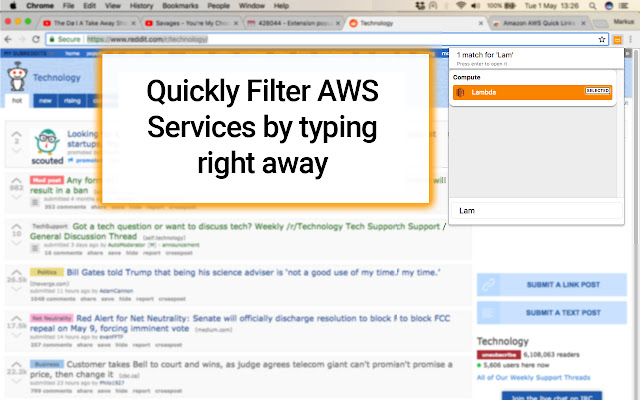
Scarica il file CRX dell'estensione Amazon AWS Quick Links
Scarica i file di estensione Amazon AWS Quick Links in formato crx, installa manualmente le estensioni di Chrome nel browser o condividi i file crx con gli amici per installare facilmente le estensioni di Chrome.
Istruzioni per l'Uso dell'Estensione
                        Quickly switch to Amazon AWS Webservices without having to go through the Amazon Console first. Once you visit an Amazon Webservice, the extension will remember your frequently used Services and highlight them first ( A permission for "https://*.aws.amazon.com/" is necessary due to this )

This app does not contact any 3rd party services and only works locally in your browser. This extension is not affiliated with Amazon.

Currently supports links to the following services :

Compute
 => EC2
 => Lightsail
 => Elastic Container Service
 => Lambda
 => Batch
 => Elastic Beanstalk

Analytics
 => Athena
 => EMR
 => CloudSearch
 => Elasticsearch Service
 => Kinesis
 => QuickSight
 => Data Pipeline
 => AWS Glue

Security, Identity & Compliance
 => IAM
 => Cognito
 => Secrets Manager
 => GuardDuty
 => Inspector
 => Amazon Macie
 => AWS Single Sign-On
 => Certificate Manager
 => CloudHSM
 => Directory Service
 => WAF & Shield
 => Artifact

Mobile Services
 => Mobile Hub
 => AWS AppSync
 => Device Farm
 => Mobile Analytics

AR & VR
 => Amazon Sumerian

Application Integration
 => Step Functions
 => Amazon MQ
 => Simple Notification Service
 => Simple Queue Service
 => SWF

Customer Engagement
 => Amazon Connect
 => Pinpoint
 => Simple Email Service

Business Productivity
 => Alexa for Business
 => Amazon Chime
 => WorkDocs
 => WorkMail

Desktop & App Streaming
 => WorkSpaces
 => AppStream 2.0

Internet of Things
 => IoT Core
 => IoT Device Management
 => IoT Analytics
 => Greengrass
 => Amazon FreeRTOS

Game Development
 => Amazon GameLift

Storage
 => S3
 => EFS
 => Glacier
 => Storage Gateway

Database
 => RDS
 => DynamoDB
 => ElastiCache
 => Amazon Redshift

Migration
 => AWS Migration Hub
 => Application Discovery Service
 => Database Migration Service
 => Server Migration Service
 => Snowball

Networking & Content Delivery
 => VPC
 => CloudFront
 => Route 53
 => API Gateway
 => Direct Connect

Developer Tools
 => CodeStar
 => CodeCommit
 => CodeBuild
 => CodeDeploy
 => CodePipeline
 => Cloud9
 => X-Ray

Management Tools
 => CloudWatch
 => AWS Auto Scaling
 => CloudFormation
 => CloudTrail
 => Config
 => OpsWorks
 => Service Catalog
 => Systems Manager
 => Trusted Advisor
 => Managed Services

Media Services
 => Elastic Transcoder
 => Kinesis Video Streams
 => MediaConvert
 => MediaLive
 => MediaPackage
 => MediaStore
 => MediaTailor

Machine Learning
 => Amazon SageMaker
 => Amazon Comprehend
 => AWS DeepLens
 => Amazon Lex
 => Machine Learning
 => Amazon Polly
 => Rekognition
 => Amazon Transcribe
 => Amazon Translate
Informazioni di Base sull'Estensione
| Nome |  Amazon AWS Quick Links Amazon AWS Quick Links |
| ID | fklkdeiiapbakigkagblkiaigibanmdm |
| URL Ufficiale | https://chrome.google.com/webstore/detail/amazon-aws-quick-links/fklkdeiiapbakigkagblkiaigibanmdm |
| Descrizione | Quickly and conveniently open AWS Services from here |
| Dimensione del File | 823 KB |
| Conteggio Installazioni | 2,000 |
| Versione Corrente | 1 |
| Ultimo Aggiornamento | 2018-05-03 |
| Data di Pubblicazione | 2018-05-03 |
| Valutazione | 4.78/5 Totale 9 Valutazioni |
| Sviluppatore | Tab Manager Plus |
| [email protected] | |
| Tipo di Pagamento | free |
| Sito Web dell'Estensione | https://github.com/stefanXO/Amazon-AWS-Quick-Links |
| URL della Pagina di Aiuto | https://github.com/stefanXO/Amazon-AWS-Quick-Links/issues |
| URL della Pagina della Politica sulla Privacy | https://github.com/stefanXO/Tab-Manager-Plus/blob/master/PRIVACY.md |
| Lingue Supportate | en |
| manifest.json | |
{
    "update_url": "https:\/\/clients2.google.com\/service\/update2\/crx",
    "name": "Amazon AWS Quick Links",
    "short_name": "AWS Quick Links",
    "version": "1",
    "manifest_version": 2,
    "description": "Quickly and conveniently open AWS Services from here",
    "author": "stefanXO",
    "icons": {
        "16": "icons\/General_AWScloud.png",
        "48": "icons\/General_AWScloud.png",
        "64": "icons\/General_AWScloud.png",
        "128": "icons\/General_AWScloud.png",
        "256": "icons\/General_AWScloud.png"
    },
    "permissions": [
        "activeTab",
        "https:\/\/*.aws.amazon.com\/",
        "tabs",
        "storage"
    ],
    "incognito": "spanning",
    "background": {
        "scripts": [
            "lib\/background.js"
        ]
    },
    "content_scripts": [
        {
            "matches": [
                "https:\/\/*.aws.amazon.com\/*"
            ],
            "js": [
                "lib\/worker.js"
            ]
        }
    ],
    "browser_action": {
        "default_icon": {
            "16": "icons\/General_AWScloud.png",
            "48": "icons\/General_AWScloud.png",
            "64": "icons\/General_AWScloud.png",
            "128": "icons\/General_AWScloud.png",
            "256": "icons\/General_AWScloud.png"
        },
        "default_popup": "popup.html"
    },
    "commands": {
        "_execute_browser_action": {
            "suggested_key": {
                "default": "Ctrl+Shift+A",
                "windows": "Ctrl+Shift+A",
                "mac": "Command+Shift+A"
            }
        }
    }
} | |