ProxyPony ToolBar
Mobile Carrier Proxies
Cos'è ProxyPony ToolBar?
ProxyPony ToolBar è un'estensione di Chrome sviluppata da Evina, e la sua funzione principale è "Mobile Carrier Proxies".
Screenshot dell'Estensione


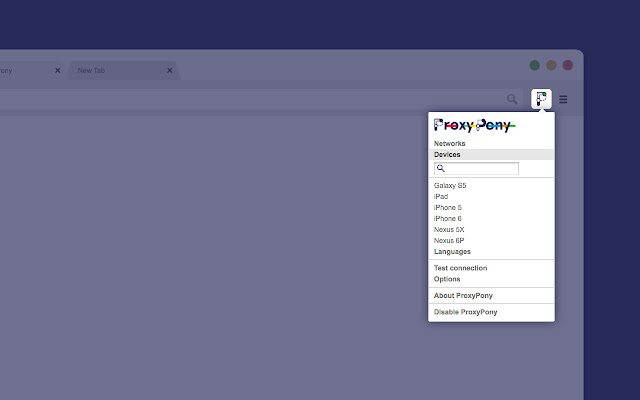
Scarica il file CRX dell'estensione ProxyPony ToolBar
Scarica i file di estensione ProxyPony ToolBar in formato crx, installa manualmente le estensioni di Chrome nel browser o condividi i file crx con gli amici per installare facilmente le estensioni di Chrome.
Istruzioni per l'Uso dell'Estensione
                        The all new ProxyPony plugin for Chrome allows you to access mobile carrier & region specific content (ads, landing pages, websites, etc) from your desktop as if you were in that region.

Functionalities include:
    o Selection of a proxy from a list of worldwide mobile carriers and use of it in Chrome.
    o Selection of a user-agent from a list of terminals and replacement of the user-agent of Chrome.
    o Auto-adaptation of the language to the region of the mobile carrier proxy you are using.

What you can accomplish with this plugin:
    o Competition analysis
    o Compliance tests
    o Functional tests for services using Direct Carrier Billing (DCB)
    o Threat analysis and security breach detection

This plugin is aimed for:
    o Performance Networks & Media Buyers
    o Mobile Advertisers
    o Ad Agencies
    o Services & Applications developers
    o Internet Security Companies

NB: In order to access & use this plugin, you need to have an account registered with ProxyPony. If you do not, please visit our website and ask for a quotation.

------------------------------------------

What changed in Version 1.0.13 :
   o Correction of a display bug of the main menu (for MacOS users)
   o Correction of a cache issue which didn’t allow users to change accounts

What changed in Version 1.0.14 :
   o The navigator's user-agent is also updated when selecting devices
   o Proxies status is refreshed when click on networks

What changed in version 1.0.17 :
   o Proxies downspeed is displayed in Mbit/s
   o Proxies status is displayed with red/green icons

What changed in version 1.0.18 :
   o Bug fixes when used on Linux/Unix

What changed in version 1.0.21 :
   o Fix AuthRequired chrome Event handling
   o Use evina's webpage for test connection tab
Informazioni di Base sull'Estensione
| Nome |  ProxyPony ToolBar ProxyPony ToolBar |
| ID | gakmhfkhimfndankmbbbkidoieogffcj |
| URL Ufficiale | https://chrome.google.com/webstore/detail/proxypony-toolbar/gakmhfkhimfndankmbbbkidoieogffcj |
| Descrizione | Mobile Carrier Proxies |
| Dimensione del File | 493 KB |
| Conteggio Installazioni | 169 |
| Versione Corrente | 1.0.21 |
| Ultimo Aggiornamento | 2020-11-27 |
| Data di Pubblicazione | 2020-04-02 |
| Valutazione | 5.00/5 Totale 2 Valutazioni |
| Sviluppatore | Evina |
| [email protected] | |
| Tipo di Pagamento | free |
| Sito Web dell'Estensione | http://www.proxypony.com/ |
| URL della Pagina di Aiuto | http://www.proxypony.com/ |
| Lingue Supportate | en |
| manifest.json | |
{
"background": {
"page": "ProxyPony\/Toolbar\/Pages\/Background.html",
"persistent": true
},
"browser_action": {
"default_icon": "ProxyPony\/Toolbar\/Images\/ProxyPony-48x48-Disconnected.png",
"default_popup": "ProxyPony\/Toolbar\/Pages\/Popup.html"
},
"content_security_policy": "script-src 'self' 'unsafe-eval'; object-src 'self'",
"description": "Mobile Carrier Proxies",
"icons": {
"128": "ProxyPony\/Toolbar\/Images\/ProxyPony-128x128-Colored.png",
"16": "ProxyPony\/Toolbar\/Images\/ProxyPony-16x16-Colored.png",
"48": "ProxyPony\/Toolbar\/Images\/ProxyPony-48x48-Colored.png"
},
"key": "MIIBIjANBgkqhkiG9w0BAQEFAAOCAQ8AMIIBCgKCAQEAr2NCWD88yRvpIoI4zDJYqmXZk+lLEPXFYDFWmBJRl1H6LzWhXx2dzJHiUO\/KqoBVIeBILRPA7LQs5EddC+k6yuyQp01gelxZsqnuRgkjc7GH7XdHDsI\/QKpr6v8D2hsNpWFny8yod0cRdgD3+I77gJ1H\/WRJ+JE4iM8D9g+3ylsGuNGS8sISxAYbrQstLPkNa+BFSaiU+qqs5BFQ1cm6TDuRJZACAb2gxKLGdFWi2s88NkEAblBfhZeB0CmqoXptoUBYTWNnsso8Fgwcu9feIYfMUzXpD1V0gofj4PrVV9SSTI8r2RsVXtMQuqd0GX6XTG0aPx8iA3g5C1hLtEF4CwIDAQAB",
"manifest_version": 2,
"name": "ProxyPony ToolBar",
"options_page": "ProxyPony\/Toolbar\/Pages\/Options.html",
"permissions": [
"tabs",
"notifications",
"cookies",
"idle",
"storage",
"webRequest",
"webRequestBlocking",
"http:\/\/*\/*",
"https:\/\/*\/*",
" | |