VISO for Chrome
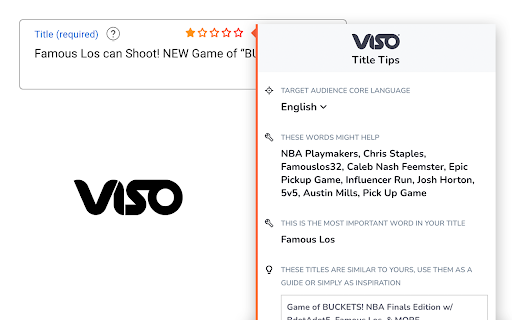
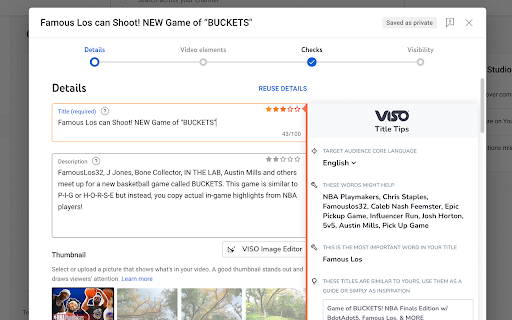
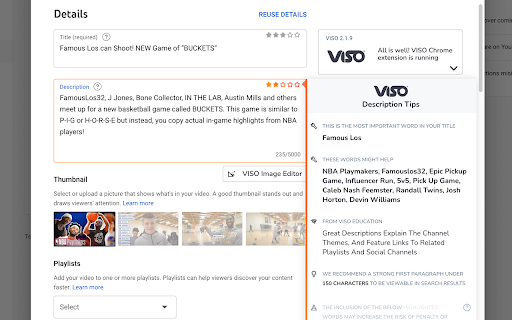
VISO for Chrome gives you automated and intelligent optimization tips while you edit & upload on YouTube
Cos'è VISO for Chrome?
VISO for Chrome è un'estensione di Chrome sviluppata da https://viso.tv, e la sua funzione principale è "VISO for Chrome gives you automated and intelligent optimization tips while you edit & upload on YouTube".
Screenshot dell'Estensione


Scarica il file CRX dell'estensione VISO for Chrome
Scarica i file di estensione VISO for Chrome in formato crx, installa manualmente le estensioni di Chrome nel browser o condividi i file crx con gli amici per installare facilmente le estensioni di Chrome.
Istruzioni per l'Uso dell'Estensione
                        Improve your YouTube video titles, descriptions, and tags on the fly with VISO as your co-pilot.

Accompanying this is a state of the art Image Editor; choose backgrounds, add text and position graphics to customize to your heart's content.

VISO gives you everything you need to grow your audience!

Note: You must be partnered with BBTV or an associated network to use this extension.
Informazioni di Base sull'Estensione
| Nome |  VISO for Chrome VISO for Chrome |
| ID | gigejlhmkgfmlahodjfejfnhegfllhoh |
| URL Ufficiale | https://chromewebstore.google.com/detail/viso-for-chrome/gigejlhmkgfmlahodjfejfnhegfllhoh |
| Descrizione | VISO for Chrome gives you automated and intelligent optimization tips while you edit & upload on YouTube |
| Dimensione del File | 40.9 MB |
| Conteggio Installazioni | 7,827 |
| Versione Corrente | 2.3.3 |
| Ultimo Aggiornamento | 2023-12-19 |
| Data di Pubblicazione | 2020-06-19 |
| Valutazione | 3.95/5 Totale 230 Valutazioni |
| Sviluppatore | https://viso.tv |
| [email protected] | |
| Tipo di Pagamento | free |
| Sito Web dell'Estensione | https://viso.tv |
| URL della Pagina di Aiuto | https://support.bbtv.com |
| URL della Pagina della Politica sulla Privacy | https://bbtv.com/privacy-policy |
| Lingue Supportate | de,en,fr,vi,es,pt-BR,ru,zh-CN,zh-TW,ja,ko |
| manifest.json | |
{
    "update_url": "https:\/\/clients2.google.com\/service\/update2\/crx",
    "description": "__MSG_appDescription__",
    "default_locale": "en",
    "version": "2.3.3",
    "manifest_version": 3,
    "options_page": "options.html",
    "background": {
        "service_worker": "service-worker.bundle.js"
    },
    "action": {
        "default_popup": "popup.html"
    },
    "content_scripts": [
        {
            "matches": [
                "https:\/\/studio.youtube.com\/*"
            ],
            "js": [
                "contentscript.youtube.bundle.js"
            ]
        }
    ],
    "icons": {
        "16": "icon16.png",
        "24": "icon24.png",
        "32": "icon32.png",
        "128": "icon128.png"
    },
    "permissions": [
        "tabs",
        "cookies",
        "storage",
        "alarms"
    ],
    "host_permissions": [
        "https:\/\/studio.youtube.com\/*",
        "*:\/\/app.viso.tv\/"
    ],
    "externally_connectable": {
        "matches": [
            "https:\/\/studio.youtube.com\/*",
            "https:\/\/app.viso.tv\/*"
        ]
    },
    "web_accessible_resources": [
        {
            "resources": [
                "assets\/*",
                "images\/*",
                "twoarms.png",
                "google-icon-color.svg",
                "pablo-v4c.png",
                "pablo-skydiver-small.png",
                "pablo-type-small.png",
                "pablo-avatar-sad.png",
                "pablo-missing.png",
                "powered-by.png",
                "monitor.png",
                "clouds.png",
                "image-editor-initial-image.jpg",
                "image-editor-bg.jpg",
                "image-editor-error-bg.png"
            ],
            "matches": [
                "https:\/\/studio.youtube.com\/*"
            ],
            "use_dynamic_url": true
        }
    ],
    "name": "__MSG_appName__"
} | |