Instant Syntax
This extension will highlight the code syntax of any highlighted text
Cos'è Instant Syntax?
Instant Syntax è un'estensione di Chrome sviluppata da Salvador Gutierrez, e la sua funzione principale è "This extension will highlight the code syntax of any highlighted text".
Screenshot dell'Estensione


Scarica il file CRX dell'estensione Instant Syntax
Scarica i file di estensione Instant Syntax in formato crx, installa manualmente le estensioni di Chrome nel browser o condividi i file crx con gli amici per installare facilmente le estensioni di Chrome.
Istruzioni per l'Uso dell'Estensione
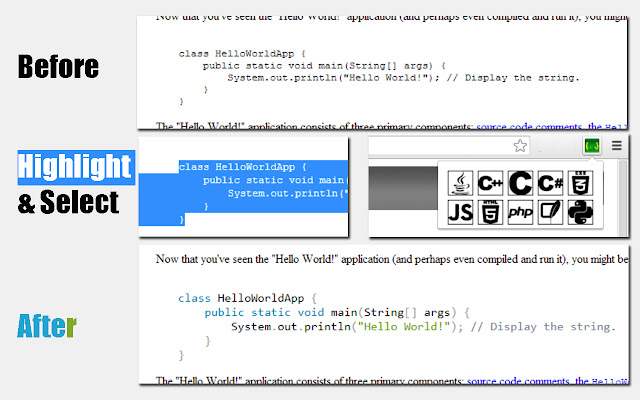
                        This extension allows you to perform code syntax highlighting anywhere in a webpage. Supports Java, Markup Languages , CSS, C-like languages, C#, C++,Python, SQL,PHP and JavaScript.

How to use:
1)Simply highlight the code whose syntax you wish to highlight.
2)Press action-button on toolbar and select language.
3)Watch the code magically become much more readable.
Informazioni di Base sull'Estensione
| Nome |  Instant Syntax Instant Syntax |
| ID | gjoffkgdelmaodajhoncmleiamifdcgi |
| URL Ufficiale | https://chrome.google.com/webstore/detail/instant-syntax/gjoffkgdelmaodajhoncmleiamifdcgi |
| Descrizione | This extension will highlight the code syntax of any highlighted text |
| Dimensione del File | 75.37 KB |
| Conteggio Installazioni | 162 |
| Versione Corrente | 1.1 |
| Ultimo Aggiornamento | 2014-03-02 |
| Data di Pubblicazione | 2014-03-02 |
| Valutazione | 4.50/5 Totale 12 Valutazioni |
| Sviluppatore | Salvador Gutierrez |
| Tipo di Pagamento | free |
| Lingue Supportate | en |
| manifest.json | |
{
    "update_url": "https:\/\/clients2.google.com\/service\/update2\/crx",
    "manifest_version": 2,
    "name": "Instant Syntax",
    "description": "This extension will highlight the code syntax of any highlighted text",
    "version": "1.1",
    "author": "Salvador Gutierrez",
    "background": {
        "css": [
            "popup_style.css"
        ],
        "scripts": [
            "simpleInsert.js"
        ],
        "persistent": false
    },
    "icons": {
        "38": "icon_38.png",
        "128": "icon_128.png"
    },
    "permissions": [
        "https:\/\/*\/*",
        "activeTab",
        "storage"
    ],
    "browser_action": {
        "default_popup": "popup.html",
        "default_icon": "icon_38.png"
    }
} | |